


markovesterinen
Participating Frequently
June 9, 2016

P: Can't read DNG files from Fuji X-E2 anymore

  • June 9, 2016
  • 75 replies
  • 2179 views

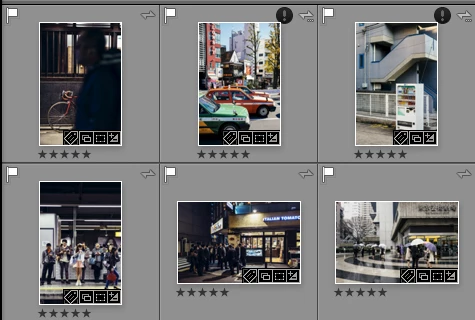
Just installed the new Lightroom CC 2015.6 / 6.6 update and i have a really strange issue. All my files are in DNG format. Everything works fine except the files from my Fuji X-E2. Lightroom and Photoshop can't read these anymore! The files get's a black exclamation mark next to them. See the screenshot. 
All files from the other Fuji X-series cameras works just fine. It's only X-E2 files that doesn't. 
The files work just fine with any other software and i tried them on a different computer which has the previous version of lightroom CC and there they work just fine!
Is there a way to make a roll-back to previous version?
This topic has been closed for replies.

75 replies

Legend
June 10, 2016
Inspiring
June 10, 2016
PLEASE, FIX IT ASAP!!! ALL X-E2 FILES ARE UNUSABLE WITH THIS LR VERSION. BAD BAD BAD
Rikk Flohr_Photography
Community Manager
Community Manager
June 10, 2016
This appears to only affect Fuji E X2 cameras where a raw file was converted to a DNG.  A fix is in the works. 
Rikk Flohr: Adobe Photography Org
Just Shoot Me
Legend
June 10, 2016
Same here with LR, Bridge>PS>ACR.

Rolled back LR to CC 2015.5.1. That was fairly easy.
Now the task is to roll back Bridge, PS and ACR.
I'm going to try ACR first as I think that is all that got updated in both Bridge and PS by the latest update.

I know one thing now. I won't be converting any more RAW file formats to DNG ever again.
Adobe Employee
June 10, 2016
We're looking into this issue.

As a workaround, you can download the Lightroom CC 2015/6.0 version from https://helpx.adobe.com/lightroom/kb/lightroom-downloads.html, install that and then download and update to the particular dot release (e.g. CC 2015.5.1/6.5.1) that you want. Detailed instructions here: https://helpx.adobe.com/lightroom/kb/roll-back-to-prior-update.html
Inspiring
June 9, 2016
I am having the same problem with my X-E2 files. How can I roll back to the previous version of LR?
markovesterinen
Participating Frequently
June 9, 2016
Thank you Rikk!  Hoping a for quick fix. Is there a way to make a roll-back to last version until this is fixed? I have a upcoming exhibition and need to work on some of the X-E2 files. 
Rikk Flohr_Photography
Community Manager
Community Manager
June 9, 2016
I have reported this issue, Marko.  Thanks for your help and your files!
Rikk Flohr: Adobe Photography Org
markovesterinen
Participating Frequently
June 9, 2016
I have the other computer at my office. I will try this tomorrow.
Rikk Flohr_Photography
Community Manager
Community Manager
June 9, 2016
I have the file you sent on my desktop so you can disable the link. 

You might try opening your older version of Lightroom and exporting this file as a DNG and then seeing if the newer version can open it. That would tell us something. 
Rikk Flohr: Adobe Photography Org