


markovesterinen
Participating Frequently
June 9, 2016

P: Can't read DNG files from Fuji X-E2 anymore

  • June 9, 2016
  • 75 replies
  • 2143 views

Just installed the new Lightroom CC 2015.6 / 6.6 update and i have a really strange issue. All my files are in DNG format. Everything works fine except the files from my Fuji X-E2. Lightroom and Photoshop can't read these anymore! The files get's a black exclamation mark next to them. See the screenshot. 
All files from the other Fuji X-series cameras works just fine. It's only X-E2 files that doesn't. 
The files work just fine with any other software and i tried them on a different computer which has the previous version of lightroom CC and there they work just fine!
Is there a way to make a roll-back to previous version?
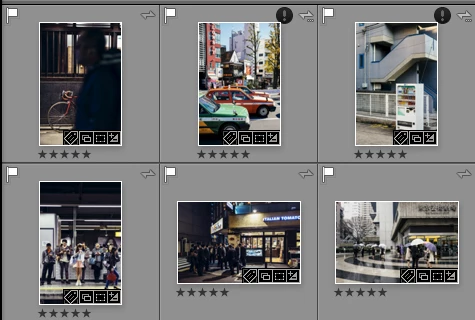
This topic has been closed for replies.

75 replies

Adobe Employee
July 15, 2016
@9691342 That's correct. After installing the original 6.0 release, then download and install the 6.5.1 patch.
July 15, 2016
Sorry about these silly questions but I am still not able to downgrade my LR/PS/ACR  CC version.
I always get "Update Failed" Updates could not be applied. This patch is not applicable for you .......
What is meant with  "the original release"  and where can I download this ?

Update:  Finally I got the downgrade of LR/PS/ACR done

The "Original Release" for my MAC was found here 
ssprengel
Inspiring
July 14, 2016
Adobe doesn't answer the "when" question, usually, but before the regularly-scheduled release for new cameras, just to fix bugs, I expect.
Inspiring
July 14, 2016
Hi, I rolled back to the previous version of LR. However, can you tell us when we can expect a fix? Thanks!
Known Participant
July 11, 2016
thank you all so much. This thing is so annoying....
Gabriele Lopez Photography
Just Shoot Me
Legend
July 7, 2016
You don't use the Creative Cloud desktop app. You have to manually download and install the original release then the 6.5.1 update.
ssprengel
Inspiring
July 7, 2016

To rollback you should uninstall LR CC 2015.6 then use the links to download LR CC/6 (.0) then download and install the patch LR CC 2015.5.1.

Victoria Bampton LR Queen
Community Expert
Community Expert
July 7, 2016
These links work for perpetual as well as CC: https://helpx.adobe.com/lightroom/kb/lightroom-downloads.html
Victoria - The Lightroom Queen
Known Participant
July 7, 2016
thanks but it looks like unavailable if you have cc...other stand-alone require a serial number I don't have....I will contact chat support again tomorrow...
Gabriele Lopez Photography
Light-Zone
Participating Frequently
July 7, 2016
Please read the previous posts in this thread to find direct links to roll back to prior versions of both Light Room and Photoshop.