


markovesterinen
Participating Frequently
June 9, 2016

P: Can't read DNG files from Fuji X-E2 anymore

  • June 9, 2016
  • 75 replies
  • 2143 views

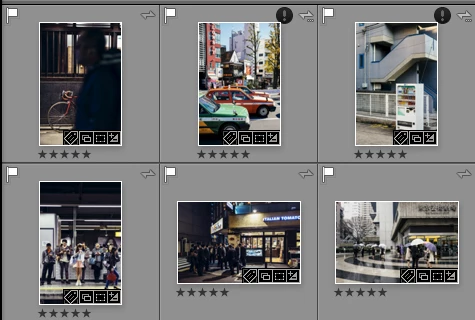
Just installed the new Lightroom CC 2015.6 / 6.6 update and i have a really strange issue. All my files are in DNG format. Everything works fine except the files from my Fuji X-E2. Lightroom and Photoshop can't read these anymore! The files get's a black exclamation mark next to them. See the screenshot. 
All files from the other Fuji X-series cameras works just fine. It's only X-E2 files that doesn't. 
The files work just fine with any other software and i tried them on a different computer which has the previous version of lightroom CC and there they work just fine!
Is there a way to make a roll-back to previous version?
This topic has been closed for replies.

75 replies

fujifilmshooter
New Participant
August 7, 2016


Have converted RAW files in Lightroom CC to DNG (from Nikon, Leica and Fujifilm cameras). Now, after the latest update, I can not edit my DNG files. Can't access 6-7 years of photos right now.
fujifilmshooter
New Participant
August 7, 2016
In the current version this issue is fixed. All DNG files from my Nikons, Leicas and Fujifilm cameras work again. Phew.
Brainiac
July 26, 2016
This issue should be corrected by today Lightroom CC 2015.6.1 update: http://blogs.adobe.com/lightroomjournal/2016/07/lightroom-cc-2015-6-1-now-available.html
Just Shoot Me
Brainiac
July 21, 2016
Right Gabriele they still can't be edited. A message appears at the top of the screen "Image is unsupported or Damaged".
July 21, 2016
After having rolled back CC still offers the LR update from June 2016 - that is the buggy version. For PS the currently offered ACR update will work because PS uses ACR as a plugin. LR has its own ACR-Component embedded - so pure LR / X-E2 users have to wait a little longer. I would recommend to wait until the official LR update is released. 
Known Participant
July 21, 2016
so, just to be sure..xe2 dng still do not open in Lightroom? just want to be sure before upgrading...cause i rolled back to the older working version...thanks!
Gabriele Lopez Photography
Community Manager
July 20, 2016
that's good news! thank you for sharing!
johnrellis
Brainiac
July 20, 2016
In another topic, Adobe employee Simon Chen just wrote, "you might have to wait a little bit longer for the Lr CC 2015.6.1/6.6.1 update for the fix, but not too long".
Community Manager
July 20, 2016
Just received an update to Bridge, and Camera Raw which fixes the above. That same fix is not available for Lightroom though 😞
ARS_Photography
New Participant
July 15, 2016
I agree, this bug is crippling my ability to work processing photographs.