

Participating Frequently
July 25, 2023

P: Canon 24-240 lens profile v3

  • July 25, 2023
  • 56 replies
  • 16039 views

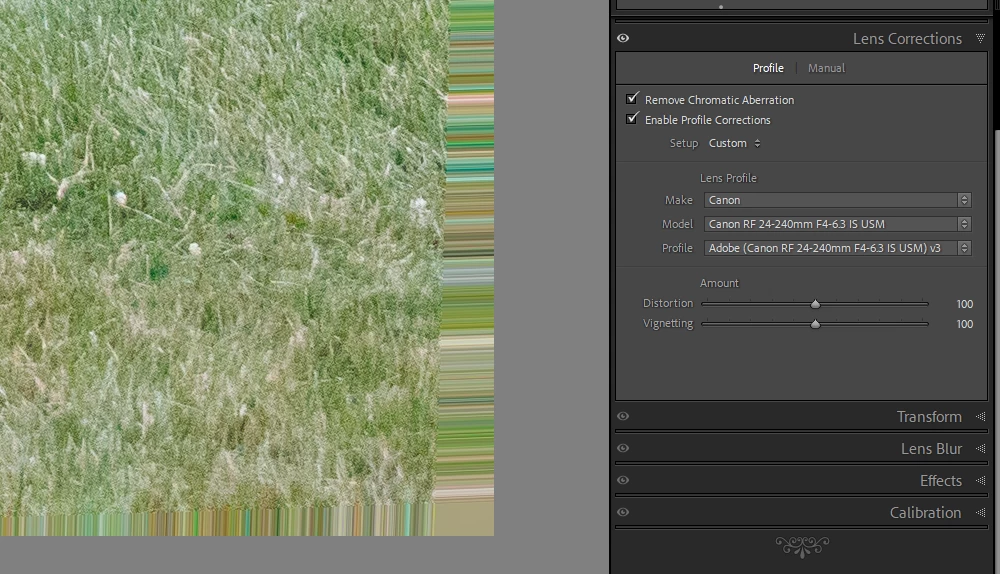
On the latest Lightroom Classic release version 13.5 there is a new lens profile (v3) for the Canon 24-240 lens. It has reintroduced the "bad borders" bug. Workaround is simply to select the older v2 profile.

This topic has been closed for replies.

56 replies

Participant
September 10, 2024

having issue with photos in lightroom. Camera R6 Mark II.


When importing Cr3 files -  some photos are like getting extended, lightroom adds strange frame. 


Screenshot you can see below. 1) Embedded preview and how it looks in Digital photo professional and other software. 2) develop screen - with this strange frame. after export to jpg frame also is there 


Please advice. 


Participant
September 5, 2024

Same thing on my side for Canon R5

Participant
September 5, 2024

Hi, 


This is what I got in Camera Raw from a photo taken with a canon R5.  


The same corner below but with Canon Digital Photo Professional 4:


Does anyone has an idea what is causing this?

Thanks. 

Participating Frequently
September 3, 2024

Just switch back to the v2 lens profile until Adobe fixes this.

Participant
September 3, 2024

Since some days I discover some artifacts in my images after I imported them.

When I inspect the RAW files from file system I cannot see this kind of artifacts. Also with competetive software this is not visible. This artifacts will also be exported. I tried with 13.5.1 and then downgraded to 13.5 but still this issues persists. This is extremely annoying because it makes my Lightroom unusable.


System information:

Lightroom Classic-Version: 13.5 [ 202408062022-6258095b ]
License: Creative Cloud
OS: Mac OS 14
Version: 14.6.1 [23G93]
Architecture: arm64

The images are all made with a Canon R6 Mk2 with CR3 RAW files.

Participating Frequently
September 2, 2024

I love my R8 and 24-240. I hear complaints about lenses being front-heavy all the time and don't understand. If you have your left hand on the zoom and control rings the combination balances quite well. If you don't have your left hand there, how do you zoom or do exposure compensation? (That's what my control ring is set for.)


I understand everybody is different, so I am not arguing with you. I am just curious how you hold your camera that feels front-heavy.

Inspiring
September 2, 2024

Not sure if we can call 24-240 "amazing"... It is way too heavy and huge for my taste. On a R8 makes the combination really front heavy. It is surely a very useful range of focal lenght, e.g. for street/city photography.

Participant
September 2, 2024

I was on holiday during august. It seems that Adobe updated Photoshop / Camera Raw in this time. And now I have a problem with the objective profile correction:

There are 3 versions I can choose from - the newest one (V3) creates edge artefacts around the whole photo. When I manually choose V2, everything is fine again. But every time I open a new photo, the setting is V3 again...that's awful to work with. I know the artefact problem existed already a while ago, because I already had some issues with it around 2021 / 2022. 

Participant
September 2, 2024

Thank you everyone.I was concerned that my RP's sensor was going bad.Lens profile V2 corrected the issue.

The lens is amazing and i know there are alot of calculations,corrections and cropping going on under the hood.Hopefully they will fix V3 shortly.

Canon RP 

Canon 24-240 f4-6.3 IS USM Lens.

Participant
September 2, 2024


This is athe bottom right corner. Applied LR Canon 24-240 v2 profile to the image. The red line shows what I see in my camera's viewfinder.