



P: Lightroom and Camera Raw Color Range Mask Edge Artifacts
The Local
Adjustment Color Range Mask appears to be calculated using the image data before Chromatic Aberration (CA) and Defringe are applied. This causes the Color Range Mask adjustments to be applied to image edges that have chromatic aberration. It creates a visible edge outline of size and color dependent on the type and severity of the lens chromatic aberrations. I tested this using a Canon EF 16-35mm F/4L IS lens that has very low CA and the Canon EF-S 18-35mmF/3.5-5.6 IS II, which has much higher CA. To confirm this analysis I created Export TIFF copies of the raw image file with Lens Corrections> Profile> ‘Remove Chromatic Aberration’ unchecked and checked. The TIFF with ‘Remove Chromatic Aberration’ unchecked appears identical to the raw file and exhibits the same edge artifacts. The TIFF with‘Remove Chromatic Aberration’ checked displays almost NO artifacts.
EDIT: The Adjustment Brush ‘Auto Mask’ control exhibits the same behavior as the ‘ColorRange Mask’ control when 'Remove Chromatic Aberrations' is unchecked.
SUGGESTEDSOLUTION
Calculate the ‘Color Range’ mask and ‘Auto Mask’ using the image data with both ‘Remove Chromatic Aberration’ and Defringe controls applied. Since this may impact performance of the Local Adjustment tools a workaround should be implemented.Allow applying the Adjustment Brush and Radial Filter Local controls just as they are now to minimize impact to performance. Add a ‘Refine Edge’ button to the ‘Range Mask’ and ‘Auto Mask controls that can be used after the local controls are applied if the image exhibits the edge artifacts. The mask can then be recalculated with Chromatic Aberration removal and Defringe applied to the image data. This “refinement” will take additional time, but won’t impact performance during initially application of the Adjustment Brush and Radial Filter local controls.
Canon EF 16-35mm F/4L IS lens
3:1 Zoom View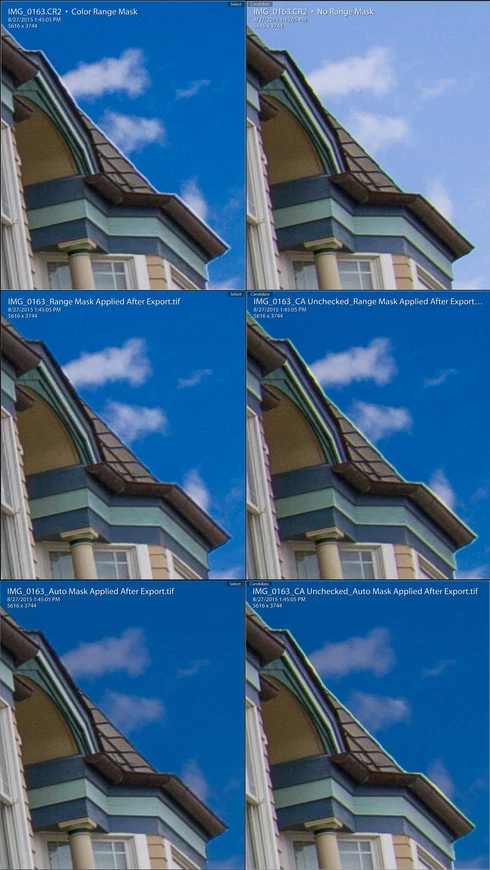
Canon EF-S 18-35mm F/3.5-5.6 IS II
3:1 Zoom View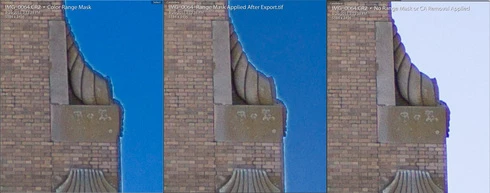
 AdChoices