Hi Mark and JJ,
Just saw this running dialog and let me input that everything that JJ has been showing and saying in regards to that dropdown menu on the ACR's filmstrip has been working for me ever since ACR was released.
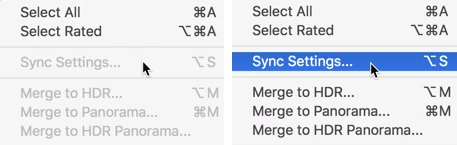
I'm currently on High Sierra with the latest Bridge and ACR and it just works. The key command for Sync Settings is Option-s so I can either select the option in the flyout menu (mentioned above) or press the key command (Option-s)
In my testing, there was no way I could bring up the Flyout menu and not display the Sync settings... menu option. It was either grayed out because I only had one image selected, or black because I did have more than one image selected.
If you still are not seeing either of these:
Perhaps you need to reset your copy of ACRs preferences, trying following the video here
how do you delete preferences for ACR
Alternatively, than there might be something wrong with your instillation. Perhaps if you tried to reinstall ACR
Camera Raw plug-in installer
Meanwhile, there are two basic ways to create global changes:
(1) open up "X" number of images and immediately press Command/Control-a to select them all at the same time. Now any change you make in the controls will be applied to all images. This is ANY change including things like Crop.
(2) have one image selected, make all of the changes you want, then select all of the images (either from the flyout menu or pressing Command/Control-a and then either selecting "Sync Settings" from the flyout menu or pressing Option-s. The big difference here is that you will then get the option to select which of the alterations you've done on the first image to apply to the others.
We know that #2 is not working, is #1 working at all? If not than perhaps you should try to do first the preferences deletion above or reinstalling ACR.
Please let us know what you find.
Hi Gary, thanks very much for taking the time to provide your detailed response. First, I followed all your suggestions including Resetting the ACR Preferences (by-the-way, the suggested technique in the YouTube video does not work; one must hold down the Option & Command keys on a Mac while Rebooting Bridge). I also re-installed Bridge. I did all these things several times with no improvement. Same problems persisted. Today I got notice of an update to Adobe Camera Raw v 11.2.0.135, which I immediately installed. Finally - that fixed the problems! Thanks again. Mark W.



 AdChoices