


EmmEmm
Known Participant
January 18, 2018
Answered

Adobe Camera RAW Update for Photoshop CS5 - Error message popping up?

  • January 18, 2018
  • 2 replies
  • 3213 views

Hey guys

My first ever post here and its for my younger brother, hence the old software, as he uses photoshop to merely play around and tinker.

He recently had some RAW fies cr2 but they wont open for him.

He has upgraded to MAC OS El captain 10.11.6.

He has Photoshop CS5 Version 12.0

Current Camera raw version: 6.0.0.205

After we done some reading together it said online to upgrade to Camera RAW 6.7.  We have downloaded it but every time we click the red adobe folder to do the installation process it says: "AdobePatchInstaller” is damaged and can’t be opened. You should eject the disk image. (see picture attached).
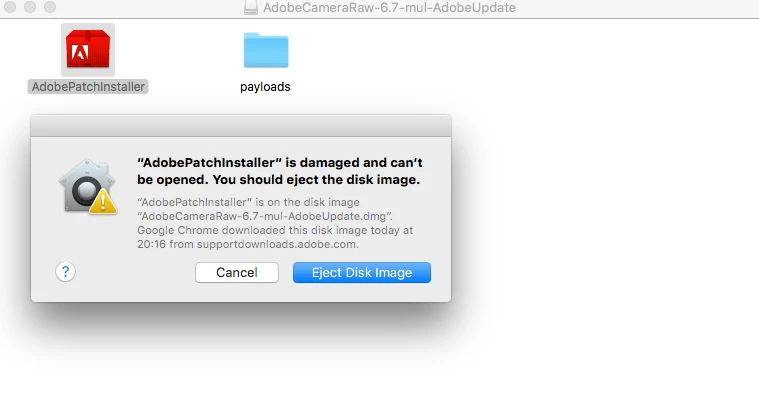
If anyone can shed some light on how we can get this camera raw up to date it would be greatly appreciated.  thank you
This topic has been closed for replies.
Correct answer Jeff Arola

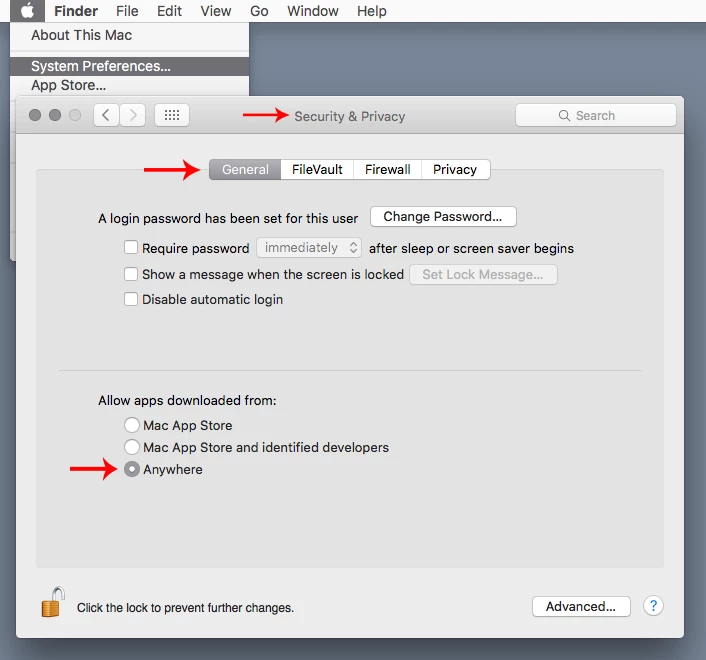
Yes, go to System Preferences>Security & Privacy>General>Allow apps downloaded from and enable Anywhere, then the 6.7 update should be able to be installed.

While your at it, install the newest Adobe Application Manager and then use Help>Updates from within photoshop cs5 to other important cs5 updates.

Adobe - Adobe Application Manager : For Macintosh : Adobe Application Manager

2 replies

EmmEmm
EmmEmmAuthor
Known Participant
January 22, 2018

Hello Jeff

Thanks for this your sugesstion worked and allowed raw to be updated.  Raw now opens up a few more files than before, not all of them though.  you would not happen to know what the latest camera raw update is for CS5 or is 6.7 the latest you can get on this software version?

Jeff Arola
Community Expert
Community Expert
January 22, 2018

6.7 is the newest camera raw for cs5.

For the other files, which are to new too be supported by camera raw 6.7, you can use the adobe dng converter to convert them to dng copies which then cs5 should open.

Adobe - Adobe Camera Raw and DNG Converter : For Macintosh : Adobe DNG Converter 10.1

how to use the dng converter

Camera Raw: How to use Adobe DNG Converter - YouTube

Jeff Arola
Community Expert
Jeff ArolaCommunity ExpertCorrect answer
Community Expert
January 19, 2018

Yes, go to System Preferences>Security & Privacy>General>Allow apps downloaded from and enable Anywhere, then the 6.7 update should be able to be installed.

While your at it, install the newest Adobe Application Manager and then use Help>Updates from within photoshop cs5 to other important cs5 updates.

Adobe - Adobe Application Manager : For Macintosh : Adobe Application Manager