


Participating Frequently
February 16, 2018
Answered

Camera Raw cannot open its own DNG file

  • February 16, 2018
  • 3 replies
  • 4079 views

Hello all,

I've updated on Windows to the latest and greatest Camera Raw version 10.2.1.895 (the one that fixes Photoshop version error).  The problem I describe here happened to me with the 10.2 version and also with this updated version.

When I open a .jpg file from Bridge on Camera Raw and I convert that file to a DNG file, Camera Raw, Bridge, nor Photoshop can open the generated DNG file. I get no image preview on Bridge, and camera raw gives me an error like this:
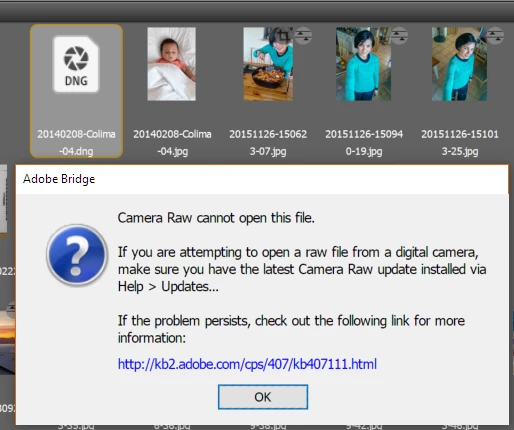
In this case, the DNG file is an export of the JPG immediately to its right.

I've tried this with several JPG files, both old and new, and the behavior is 100% consistent.

EDIT: These are the options I'm using to save the file as DNG from Camera Raw (should be pretty harmless...):
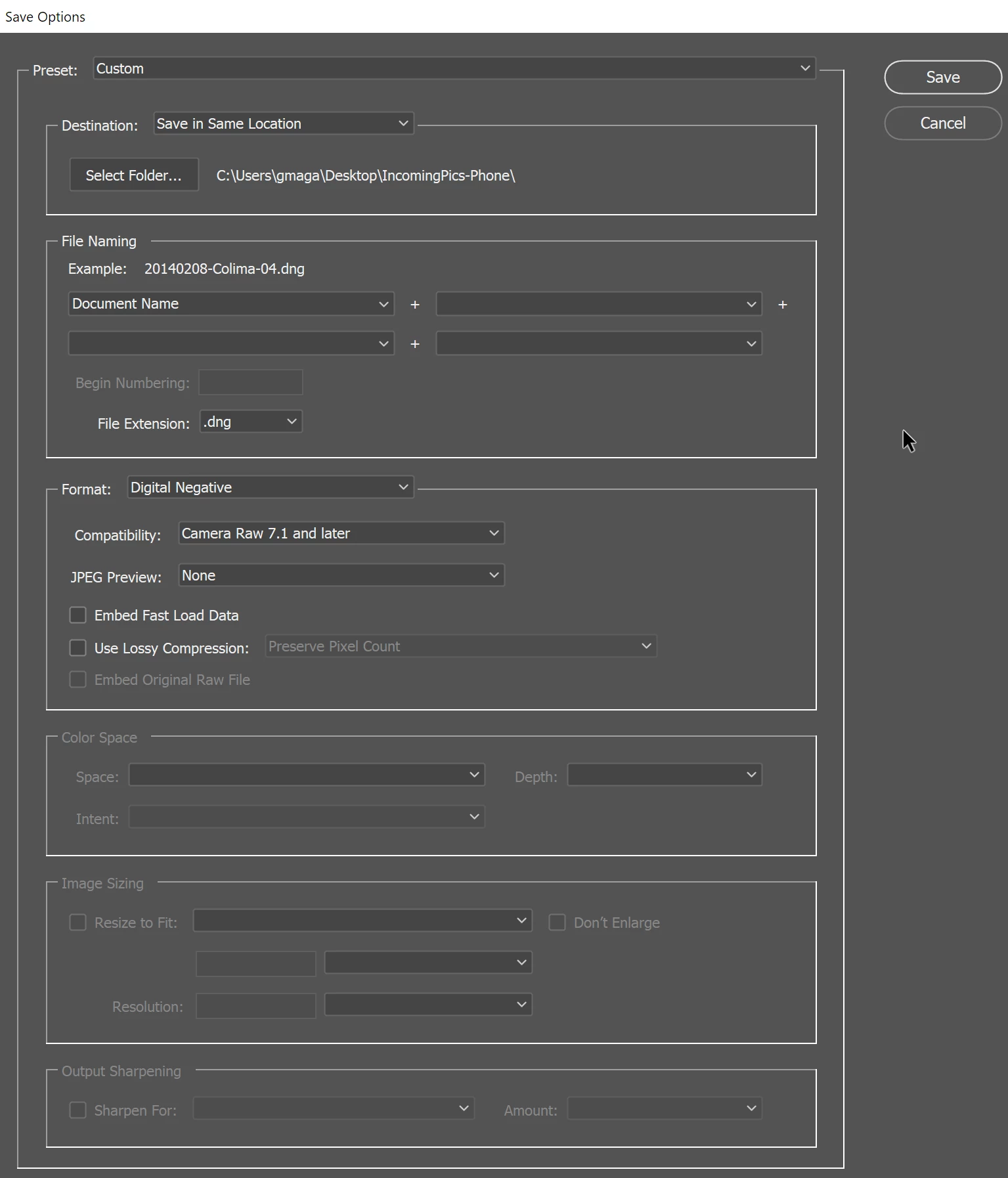
Any ideas?

    This topic has been closed for replies.
    Correct answer ccastleb

    Hello,

    This looks like an issue we also discovered internally and will have a fix for in a future release. One thing you can try for JPEGs is to set the DNG output to Linear under Compatibility> Custom... to work around it until it is officially fixed for all JPEG->DNG options in the Camera Raw plugin.

    You are correct that the DNG converter application does not support converting non-raw images, and likely will not anytime soon.

    Hope that helps and thanks for your patience.

    - Chris

    3 replies

    ccastleb
    Adobe Employee
    ccastlebCorrect answer
    Adobe Employee
    February 16, 2018

    Hello,

    This looks like an issue we also discovered internally and will have a fix for in a future release. One thing you can try for JPEGs is to set the DNG output to Linear under Compatibility> Custom... to work around it until it is officially fixed for all JPEG->DNG options in the Camera Raw plugin.

    You are correct that the DNG converter application does not support converting non-raw images, and likely will not anytime soon.

    Hope that helps and thanks for your patience.

    - Chris

    Brainiac
    March 21, 2018

    FWIW, I just encountered the same effect when processing a TIFF (Camera Raw plug-in version 10.2.0.894).

    Changing the output option to Linear, as described, did fix the issue.

    Please try to get it fixed as quick as possible; thanks a lot.

    MadManChan2000
    Adobe Employee
    Adobe Employee
    April 3, 2018

    Hi Adriana,

    This is still broken as of now (31-Mar-2018). Any idea when the JPEG to DNG conversion fix will go out in an update?


    Hi Gabriel,

    This should be fixed in the new DNG Converter 10.3, released today.  Please try it and let us know.

    Windows and Mac links below:

    Adobe - Adobe Camera Raw and DNG Converter : For Windows : Adobe DNG Converter 10.3

    Adobe - Adobe Camera Raw and DNG Converter : For Macintosh : Adobe DNG Converter 10.3

    Just Shoot Me
    Brainiac
    February 16, 2018

    Doing an Export from LR to DNG makes a images that shows both in LR and in Bridge.

    So it must have something to do with the new CD version to fix the other bug. LR is still using 10.2 and not the 10.2.1 CR version.

    Just Shoot Me
    Brainiac
    February 16, 2018

    So I must ask why are you converting a JPG image to DNG. You aren't gaining anything by doing that.

    I know this doesn't answer your question or solve the problem.

    Participating Frequently
    February 16, 2018

    I started doing that so that I'd have consistent file formats. I have "real" cameras that I convert from Nikon's NEF to DNG and having that single format frees my mind from worrying about where the picture was taken originally. This bothers me entirely too much, I know.  It's my OCD in action.

    I've not yet had time to see if converting NEF files also produces invalid DNGs.

    Just Shoot Me
    Brainiac
    February 16, 2018

    You could use the stand alone DNG converter for all of this. You can download older versions of the DNG converter so your not using the same version as used in PS/Bridge.