


SuzanneNotSue
New Participant
January 22, 2017
Answered

Camera Raw changes the resolution/image size when I open a TIFF from Bridge

  • January 22, 2017
  • 1 reply
  • 9084 views

I scan old photos at high resolutions and save them as TIFFs to restore in photoshop.  When I open these photos from Adobe Bridge CS5.1, they first open in Camera Raw, which I use to make some adjustments, and then open into Photoshop.  Most times, but not all-say if the photo is a square-the resolution changes, thus changing the image size as well. Sometimes it makes the image large, and other times it decreases it.  I have to go into image size and put the resolution back to what it was scanned at to regain the actual size of the old photos. This is tedious.

How do I get Camera Raw to just keep the same resolution/image size that the image was scanned at?

Thank you for any suggestions!
This topic has been closed for replies.
Correct answer Just Shoot Me

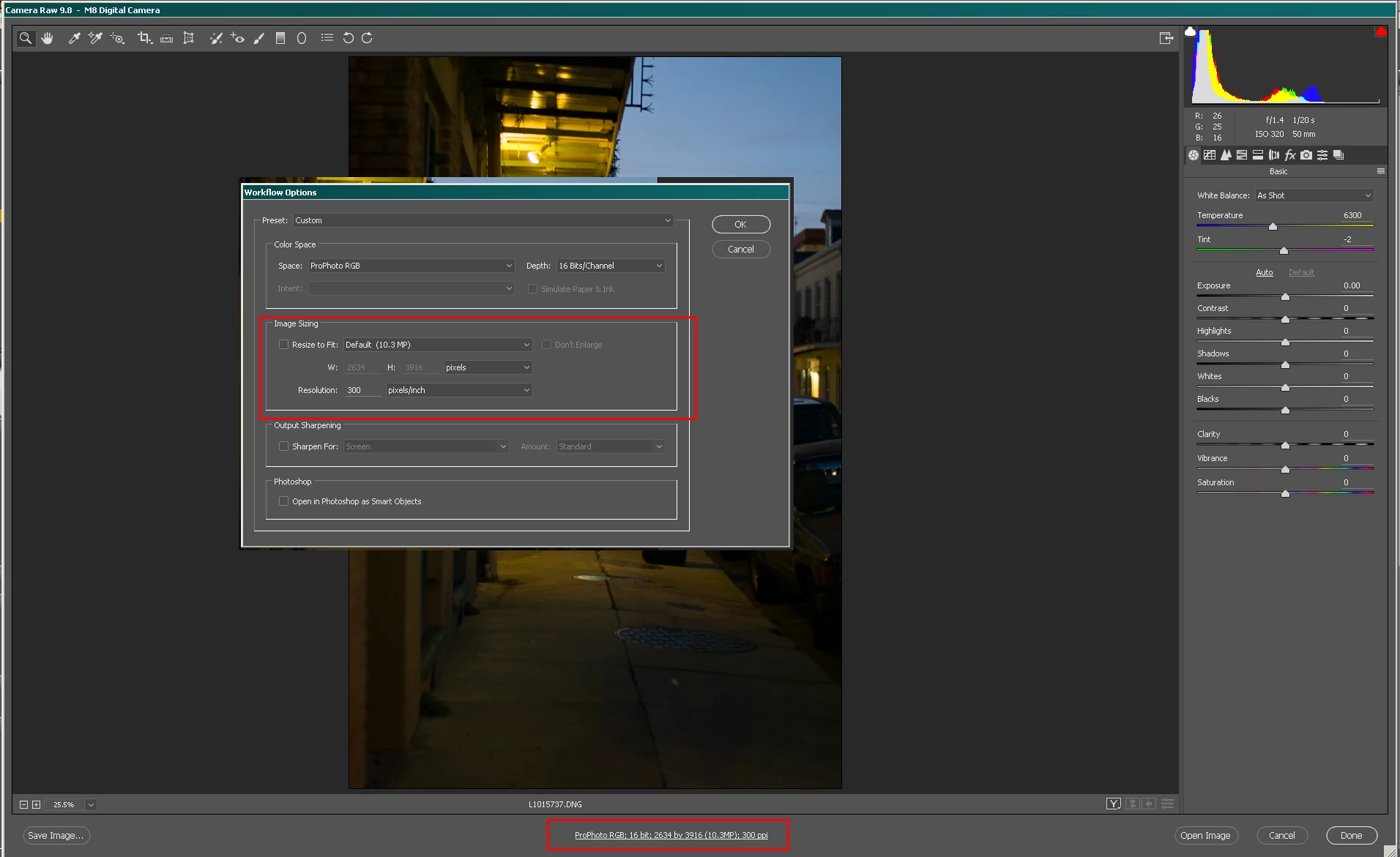
At the bottom of the ACR screen is the Options link. Click that and make sure Resize to Fit: isn't selected. There are other options in there that you should go over.

I'm using a newer version of ACR but the same options should be in your version.

1 reply

Just Shoot Me
Just Shoot MeCorrect answer
Brainiac
January 22, 2017

At the bottom of the ACR screen is the Options link. Click that and make sure Resize to Fit: isn't selected. There are other options in there that you should go over.

I'm using a newer version of ACR but the same options should be in your version.

SuzanneNotSue
New Participant
January 23, 2017

Thanks for the reply Just Shoot Me. 

Mine is definitely older!  This is what my workflow options look like and my Preferences.  I don't see anything that I can change that will open each of them as is.  All I have figured out to do is change the resolution back for each photo I open in the workflow options. This photo should be 1200ppi, but it opens it up at 700.

See anything I am missing? 

Just Shoot Me
Brainiac
January 23, 2017

What options is there in the Crop Size section? You should set it to something higher like Original  xxMB.