


New Participant
August 17, 2012
Answered

Camera Raw editing is not enabled

  • August 17, 2012
  • 30 replies
  • 312092 views

The Camera Raw option in Bridge 6 is dimmed and not available when I wont to edit a picture file in Camera Raw.

I got this message:
Camera Raw editing is not enabled

Camera Raw editing requires that a qualifying product has been launched at least once to enable this feature"

Any help will be highly appreciated

Best regards

Frank
This topic has been closed for replies.
Correct answer Rob_Cullen

Or, is the question from @Terry Carroll about opening TIFF and JPGs Through ACR?

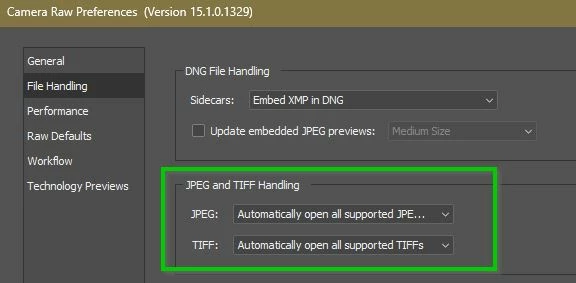
This would be a Camera Raw Preference setting in Photoshop for TIF & JPG to appear in ACR..

30 replies

New Participant
October 18, 2013

Bridge now wants to know which program to default to when opening a RAW file.  Highlight your file (or files) you wish to edit or open in Camera RAW.  Go to the top bar,the one that says Adobe Bridge CS Click on the word File, drill down to "open with"  find photoshop from the arrow box, and click Photoshop.  If you do this enough with different raw files the default becomes photoshop, and you can then just klick the raw icon and things will work correctly once again.  It only took me three times to get it to default. 

Mad at Adobe for not supporting CS 5.1  

Thanks and good luck!

Inspiring
October 7, 2013

I have the same problem in Bridge CS6. I discovered a workaround that I don't believe has been mentioned yet (if it has, I missed it and ask your pardon): In Photoshop, select File>Open and navigate to the folder with the photo or photos you want to open; select one or more images; set Enable to All Readable Documents and Format to Camera Raw. If you wamt to open a jpeg or tiff file make sure you set Format after you've selected the image(s) or it will automatically select the original file format. I found this strategy works in Photoshop CS6 as well as in CS4.

This is, of course, a workabound rather than a solution. Like others, I've found that if I double-click a raw file in Bridge CS6 rather than trying to use the contextual menu, images open just fine in Adobe Camera Raw. However, this will not open Camera Raw without first launching Photoshop - if it's not already open. It won't enable Camera Raw in Bridge itself. So this is still a workaround rather than a solution for the root problem - which is not being able to use Adobe Camera Raw in Bridge as we should be able to do. Apparently not even Adobe has a solution, even for ligitimate license holders.

New Participant
October 8, 2013

I have this problem in bridge as well all tho, I opened up Photoshop CS6, click on "file" "browse in mini bridge" then select the mutiple images you want in mini bridge, right click and select "open with" "defult application", this sends me to Camera Raw with all the images on the left. i hope this helps your workflow.

Inspiring
October 8, 2013

Thanks, Philip. I think this may be the best workaround I've seen yet - once you get the hang of using Mini Bridge.

New Participant
September 10, 2013

Quick Fix to open jpg in camera editing.

This does not provide any real fix to the bridge issue itself. However it does allow you to open in camera raw.

1. open photoshop cs6

2. click window > Extensions > mini bridge ( only if mini bridge is not already checkmarked.)

3. Through mini bridge located at the bottom of the photoshop screen, (click launch bridge if asked) find the image folder that has the jpgs you want to open in camera raw.

4. Right click jpg image and hover over open with, then click camera raw.

5. Voila!

Worked for me, still wont open from bridge cs6 to camera raw, but through photoshops mini bridge it will. Hope that helps you's out for the time being until a perminant fix comes along. The atmlib option didn\t really work for me.

atiela_thehun
New Participant
February 11, 2015

Using mini bridge was a solution to this for me...sort of. It only lets me open one file at a time, while I'm glad I found a work around, this is still terribly inconvenient and time consuming. Any tips in that regard?

New Participant
July 3, 2013

I was having the same problems and couldn't get any of the above solutions to work.  However, upon further searching I found this video tutorial that shows how to copy the atmlib file from the program files of Photoshop and place it into the program files of Bridge and it worked just as the video shows.

http://www.youtube.com/watch?v=HvK5w_hvcGI

New Participant
March 2, 2015

You save the day, it workd! Thanks!

New Participant
April 30, 2013

Make sure you update all of your photoshop software (bridge --> help --> updates).  That was what my problem was apparently, because it's working now.

Dexter Golden
Inspiring
May 6, 2013

Folks

The problem is still out there. I am running a Mac with legal copys of my Adobe products.

The Cntrl R command in Bridge is Grayed out and unaccessable.

I noticed this problem today when I went to do some work and I noticed the feature in Bridge was dead.

.........And as I go to get a screen shot of what it looks like.... Its all working again.......

All I did was to stop all programs running, reboot my machine (curse a little) and restart everything from stratch...

I then came over here to leave a note since nothing has change and poof.... it is working now.... Go figure....

If it happens again I will doc what I did and post screen shots.

-David

New Participant
August 17, 2015

Hey could you post what you did to fix this problem!? Mine still is not working

PECourtejoie
Community Expert
March 1, 2013

I found a workaround online that might help the engineers trying to fix the issue: http://www.youtube.com/watch?v=nzpGJRP-daA

Mike_D_1961
New Participant
February 6, 2013

I think I found a solution... it worked for me anyway.  I opened Photoshop, then from the File menu I selected Browse in Bridge.  I then closed Photoshop and was able to open raw files in Bridge.

Hope this helps...

New Participant
February 20, 2013

I am having the same issue with not being able to open Camera RAW from bridge. I can see the button and select it , it will act like it is opening it and then come up with  a message saying " Camera Raw editing is not enabled.    Camera Raw editing requires that a qualifing product has been launched atleast once to enable this feature."    I am working on a PC with Photoshop CS6. It is a ligit copy. I have tried updates, uninstalling and reinstalling and nothing works. I am able to get to camera raw thru photoshop , just not thru bridge which is what I need so I can edit multiple pics at once! HELP!!    I tried mike _d_1961 suggestion of opening photoshop, then from the file menu selecting browse in bridge, Closing photoshop and trying to open raw and it is still NOT working!    I see several people are having this issue you would think there would be a fix somewhere!! 

January 18, 2013

I have this same issue, only I am not getting an error message, I just cannot select "open in camera RAW" because it is greyed out. I didnt have this problem last week, but all of a sudden, I cannot open anything from Bridge in Camera RAW. There have been no solutions posted for this issue and it is costing me serious time and money here. ADOBE!!!!!  SOMEONE PLEASE RESPOND WITH AN ACTUAL FIX!!!

New Participant
September 11, 2013

you could solve??

I have the same problem.

In my "macbook pro" I managed to solve the following instruction from the video above. (installed CS5, ran the Bridge CS5, then went back to the Bridge CS6 and camera raw work, using "Command + R)

Now I bought a Imac and the same process does not work. Already tried everything.
I need to use the "Camera Raw" in Bridge.

It's not the same thing as using the mini bridge.

Someone definitely knows how to solve?

thank you very much

New Participant
November 17, 2012

Bridge CS6 for Mac users ... I was able to right click on photo in Bridge. Select Develop Settings and Select Camera Raw Defaults.

ssprengel
Inspiring
August 17, 2012

Mac or PC?

Can you open the photo in question using Photoshop?

The error suggests you have Bridge installed but not Photoshop installed. If you do have Photoshop CS6 installed then it seems like Bridge CS6 is not detecting that Photoshop is installed.

fjustesenAuthor
New Participant
August 18, 2012

I have booth Bridge 6 and Photoshop 6 installed - If I double click an raw file there is no problem - but if I try to open a Raw file from Bridge I face the problem.

I have seen in support forum other users have excatly the same problem. But I have not seen a solution !!

station_two
Inspiring
August 18, 2012

Please answer the question posed in post #1.

Macintosh or Windows?