



Cannot force ACR 11.2 and above to use OpenGL on Windows 10
I stumbled upon a post, where someone said you can force Adobe Camera Raw to use either DirectX or OpenGL by editing the crs:gpu_preferred_system="" line in the following file: C:\Users\[username]\AppData\Roaming\Adobe\CameraRaw\GPU\Camera Raw GPU Config.txt:
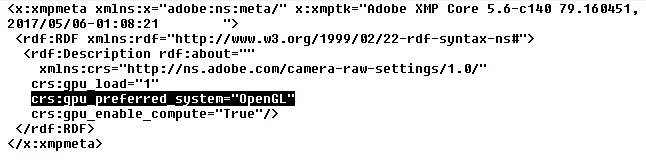 However, there's a problem with forcing ACR to use OpenGL on my laptop, if I use any version above ACR 11.1. I change the line to crs:gpu_preferred_system="OpenGL", but ACR ignores it and stays on DirectX anyway. I tried reinstalling PS and ACR, manually deleting the file, but it didn't help. I want to use the OpenGL, because it feels way smoother on my system.
But here's the catch - I don't have this problem on my desktop computer, only on laptop. Here are the specifications:
Desktop computer: AMD FX-4130, 8GB DDR3, Radeon HD 7750 1GB (DirectX 11), Windows 7 Ultimate 64-bit, Adobe Photoshop CC 2017 64-bit.
Laptop: Intel i3-7010U, 8GB DDR4, hybrid Intel HD 620 + Radeon 520 2GB (DirectX 12), Windows 10 v1809 64-bit, Adobe Photoshop CC 2017 64-bit.
Is the possibility to force OpenGL or DirectX not available anymore? Does ACR 11.2 and above store the GPU settings somewhere else? The graphics card in my laptop can't be the case, since I can force ACR 11.1 and below to use OpenGL just fine. Therefore, the problem probably lies with ACR 11.2's Enhance Details feature, which requires both Windows 10 and DirectX 12, thus forcing ACR to use DirectX all the time.
 AdChoices