Ivan Zajats
Inspiring
November 24, 2022
Answered

Color grading. Balance vs Blending

  • November 24, 2022
  • 1 reply
  • 1487 views

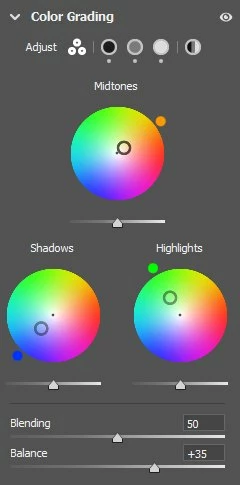
What's the difference between Balance and Blending sliders? 

This topic has been closed for replies.
Correct answer Ivan Zajats

This should be added to the pop-up prompt, because it's not obvious at all.
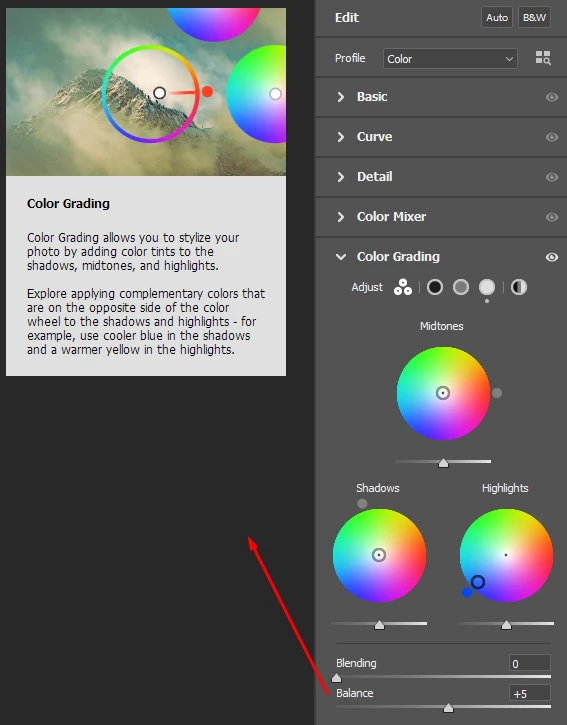
As I understood, the Balance is like the Blend if which limits the grading to the areas of a certain lightness range.

It's quite interesting how we can color the whole image (from darks to hightlights) just with this slider and a color wheel, doesn't matter which one!


Let's say, we choose the red shadows and move the Balance to -100, the image turns red.

If we choose just the red highlights and move the Balance to +100, the whole image turns red again.

With the midtones we just keep the 0 value and the result is more or less similar (though less saturated).


Blending is like the mask (of the highlights or shadows) feather. Or like the handles in the Blend if.

If it's 0, the transition/edge is harsh.

Frankly, for PS users it would be clearer if it's called Feathering. IMHO 🙂

And the values above 50 just spread the color all over the image, that's why these 2 sliders are so confusing when you're just testing them and get similar results with both.


1 reply

PECourtejoie
Community Expert
November 24, 2022

Hi, here is a good explanation: from Adobe's Julieanne Kost, found in this excellent resource: 

https://jkost.com/blog/2022/10/225-shortcuts-tips-and-tricks-for-adobe-camera-raw.html

  • Use the Balance slider to shift the range of values that define the shadows/midtones/highlights. For example, if you apply a blue tint to the shadows and want that tint to extend farther into the midtones/highlights, move the Balance slider to the left. If you apply a yellow tint to the highlights and want that tint to extend farther into the midtones/shadows, move the Balance slider to the right.
  • Use the Blending slider to determine the amount of color blending (crossover/overlap) between the tints assigned to the shadows/midtones/highlights. With blending set to 0, there is a small amount over overlap to avoid abrupt transitions but each color should remain “pure”. With the slider set to 100%, the color tints will overlap (crossover) and create additional colors between shadow/midtones, and highlights. Note: Without the blending slider, it would be difficult to control how color is added in the midtones (a lower blending value enables the midtone color to stand on its own).
    • Option -drag (Mac) | Alt -drag (Win) the Blending slider to temporarily boost the saturation to 100, allowing you to quickly see how the tints are mixing as you adjust the Blending.

If you prefer a video: https://youtu.be/zgzIA0Tx1Rs?t=222

Ivan Zajats
Ivan ZajatsAuthorCorrect answer
Inspiring
November 24, 2022

This should be added to the pop-up prompt, because it's not obvious at all.

As I understood, the Balance is like the Blend if which limits the grading to the areas of a certain lightness range.

It's quite interesting how we can color the whole image (from darks to hightlights) just with this slider and a color wheel, doesn't matter which one!


Let's say, we choose the red shadows and move the Balance to -100, the image turns red.

If we choose just the red highlights and move the Balance to +100, the whole image turns red again.

With the midtones we just keep the 0 value and the result is more or less similar (though less saturated).


Blending is like the mask (of the highlights or shadows) feather. Or like the handles in the Blend if.

If it's 0, the transition/edge is harsh.

Frankly, for PS users it would be clearer if it's called Feathering. IMHO 🙂

And the values above 50 just spread the color all over the image, that's why these 2 sliders are so confusing when you're just testing them and get similar results with both.


Ivan Zajats
Inspiring
November 25, 2022

Just created a topic in the ideas section with these suggestions.

https://community.adobe.com/t5/camera-raw-ideas/color-grading-balance-amp-blending/idi-p/13371484