


DNG Converter Loads Unwanted Custom Profile in Converted DNG File
This title is a little clearer and hopefully will attract people who work on DNG Converter.
DNG Converter (I am using 9.8 but it did this earlier as well) appears to always load into the converted .DNG file one of the custom .dcp profiles available for the camera in the ...\CameraRaw\CameraProfiles directory. The only way I have found to make it load the default profile (which I assume is Adobe Standard) into the .DNG file is to delete all custom profiles for the camera from that directory. That's a pain because I then need to put them back in there whenever I do want to use them with ACR.
For reference, here is a screenshot of the never-opened, just converted .DNG file as read by exifTool showing my custom .dcp profile in place of Adobe's default (note illuminant, matrix and name):
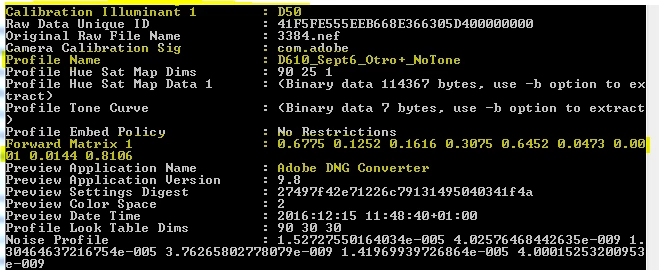
I need these DNG files to be standalone in order to be processed by programs other than LR/ACR. How can one tell DNG Converter to load default profile information in the converted DNG? Or at least to choose what profile to load?
 AdChoices