



How do I reset a RAW file to it's original settings?
Hello
[I use PS CS3 (Although I have access to CS4) and an intel imac]
I want to keep my RAW files unadulterated, in the state that they were shot, so that I can return to them at a later date to 'play' again, with a fresh point of view. However, when I open Bridge, i see they have the icon on them indicating that changes have been applied to them. I don't need the RAW files with the changes, I already have the jpgs and tiffs that i created from them.
Yes, i searched the forms here and found how to prevent the settings from being applied to RAW files that I open from now on: tested the method and it's good.
I also followed the remove xmp file advice and that worked, too.
However, I still have a couple of RAW files that didn't have xmp files associated with them, and I can't get rid of the little icon, hence i assume the changes are still there.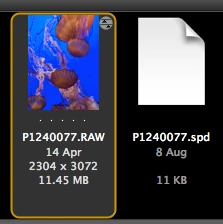
How can I recover the original unchanged RAW files for these?
What I've tried: in Camera Raw i 'reset camera raw defaults', because I thought that would return all the sliders to the unchanged state, but as you can see, it still indicates changes. The camera is panasonic, and came with Silky Pix to work with the RAW files: last night I tried SP on the same photo (created the spd file). Would the spd file have anything to do with my problem?
By the way, SP opened the raw file while it still had the CR changes applied and I think SP might have been working from the already-adjusted raw file. (Which is another reason why i want to keep the RAW files clean and original)
Hope someone can help me (And that this isn't too confusing)
Elizabeth
 AdChoices