Giulio fa cose
Inspiring
July 27, 2024
Answered

How do you use the Colour Mixer function with Masks in Camera Raw?

  • July 27, 2024
  • 2 replies
  • 1567 views

Hi everyone, could do with a bit of help here.


In Camera Raw, I heavily rely on the "Color Mixer" function to fix incorrect color casts. Sometimes though, I'd like to apply these corrections only to masks created using Camera Raw's "Mask" feature. But it seems like I can't do that. There's no tool like "Color Mixer" within "Masks". Am I missing something? Could you please help me out?


Thanks a bunch.

This topic has been closed for replies.
Correct answer Conrad_C

Color Mixer is easy to use, but has always been a sort of blunt instrument because it lacked enough control in several ways. I don’t work for Adobe so I don’t know technically why Color Mixer is not part of masking, but the other thing I do know is that the new Point Color feature is much better and more controllable, so I now prefer Point Color and I rarely need Color Mixer.


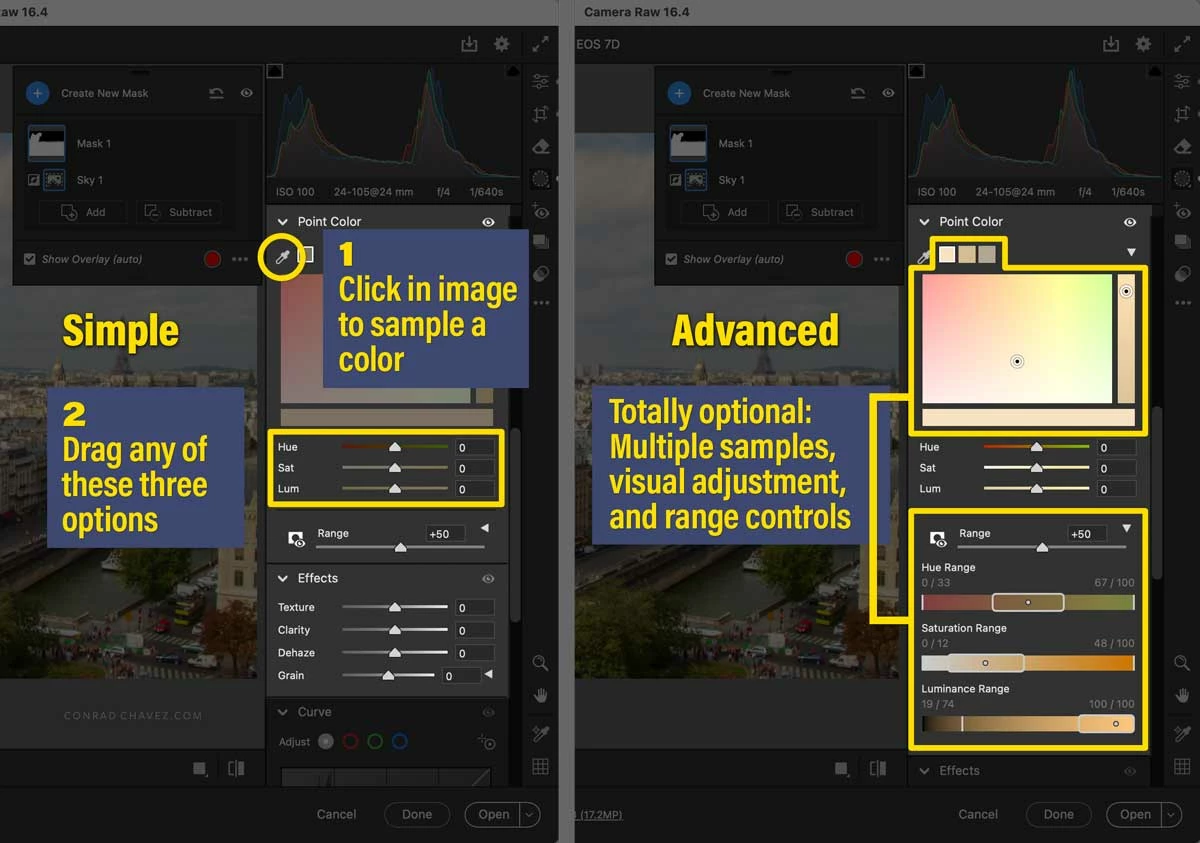
It looks complicated, but if you want something simpler like Color Mixer and want to work fast, you can focus on the Hue, Sat, and Lum options and ignore the rest…just two steps, click to sample and drag a slider. But if you need to solve a color cast that Color Mixer was incapable of solving, then you can add more Point Color samplers, and expand Range and fine-tune all the range selections, as needed.


Point Color was very warmly welcomed by the pros, and I think it is one of the most important upgrades ever added to Camera Raw. If you want a good tutorial, try the one below by Blake Rudis, who is one of the more knowledgeable Camera Raw color experts out there because his background includes a solid grounding in color theory. (The Point Color section starts at 3:22, in case the link below does not already jump to that time.)


This tutorial by Colin Smith is very good too:

 

2 replies

Participant
July 29, 2024

Czesc,

od pewnego czasu w Camera Raw jest funkcja "Kolor punktu", która pokazuje się zamiast Color Mixer ale tylko po wybraniu jakiegoś maskowania. Daje podobne mozliwości jak Color Mixer, ale działa tylko na obszarze objętym maską. Mówię o wersji Camera Raw 16.4.0..1906 aktualnej na dzis (29-07-2024).

Pozdrawiam


Erik Bloodaxe
Legend
July 27, 2024

Open the Masking Panel, select any existing mask or create a new one by any suitable means.

The color tools are then available and any adjustments you make will be applied to just the selected mask.

Giulio fa cose
Inspiring
July 27, 2024

Okay, I've seen this. But the Mixer is missing. I find it much easier to use. For example, if I see a blue cast, I just select the point, move the mouse to the left to reduce the cast, and it's done. However, if you can suggest how to achieve the same thing with this panel, I'd appreciate it. I've always found it much more complicated and less intuitive.

Conrad_C
Community Expert
Conrad_CCommunity ExpertCorrect answer
Community Expert
July 27, 2024

Color Mixer is easy to use, but has always been a sort of blunt instrument because it lacked enough control in several ways. I don’t work for Adobe so I don’t know technically why Color Mixer is not part of masking, but the other thing I do know is that the new Point Color feature is much better and more controllable, so I now prefer Point Color and I rarely need Color Mixer.


It looks complicated, but if you want something simpler like Color Mixer and want to work fast, you can focus on the Hue, Sat, and Lum options and ignore the rest…just two steps, click to sample and drag a slider. But if you need to solve a color cast that Color Mixer was incapable of solving, then you can add more Point Color samplers, and expand Range and fine-tune all the range selections, as needed.


Point Color was very warmly welcomed by the pros, and I think it is one of the most important upgrades ever added to Camera Raw. If you want a good tutorial, try the one below by Blake Rudis, who is one of the more knowledgeable Camera Raw color experts out there because his background includes a solid grounding in color theory. (The Point Color section starts at 3:22, in case the link below does not already jump to that time.)


This tutorial by Colin Smith is very good too: