


Exit
  • Global community
    • Language:
      • Deutsch
      • English
      • Español
      • Français
      • Português
  • 日本語コミュニティ
  • 한국 커뮤니티
0

"New Profile" dialog box / Import Color Lookup Table

New Here ,
Aug 31, 2020 Aug 31, 2020

Hello,

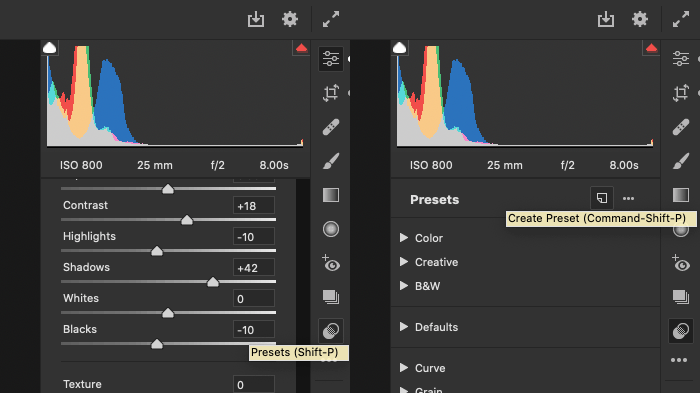
I want to "import" a *.CUBE LUT into Camera Raw and found a tutorial to head to the preset tab and alt-click the New Preset Icon. However this tutorial was written for Camera Raw 10.3.

In the current version I cannot find this option dialog to create a New Profile. I attached two images for better understanding.


Regards,

Tobias
1.8K
Translate
Report
Community guidelines
Be kind and respectful, give credit to the original source of content, and search for duplicates before posting. Learn more
community guidelines

correct answers 1 Correct answer

Community Expert , Aug 31, 2020 Aug 31, 2020

Adobe-Camera-Raw-12.4-Presets-New.gif

Translate
Community Expert ,
Aug 31, 2020 Aug 31, 2020

Adobe-Camera-Raw-12.4-Presets-New.gif

Translate
Report
Community guidelines
Be kind and respectful, give credit to the original source of content, and search for duplicates before posting. Learn more
community guidelines
New Here ,
Aug 31, 2020 Aug 31, 2020

Thank you!

Translate
Report
Community guidelines
Be kind and respectful, give credit to the original source of content, and search for duplicates before posting. Learn more
community guidelines
New Here ,
Apr 18, 2021 Apr 18, 2021

While this answers the create new profile question, the ability to use a .CUBE in the new profile seems to be gone. Is there a different step to get a LUT transformation into a preset? 

Translate
Report
Community guidelines
Be kind and respectful, give credit to the original source of content, and search for duplicates before posting. Learn more
community guidelines
New Here ,
Apr 18, 2021 Apr 18, 2021
LATEST

Actually I found it, I have to press ALT when creating the profile, not too easy to discover or recall after a while. 

Translate
Report
Community guidelines
Be kind and respectful, give credit to the original source of content, and search for duplicates before posting. Learn more
community guidelines