


Question
Custom ICC profiles not accessible in Camera Raw 11.2.0.135
On MacOS 10.11.5 (El Capitan), I updated Adobe Photoshop CC to version 19.1.5.
On this occasion, the Camera Raw application was automatically updated to version 11.2.0.135.
Following this update, my ICC profiles other than the default ones (Adobe RGB, ProPhoto RGB, ...) are no longer visible in Camera Raw (see screenshot below).
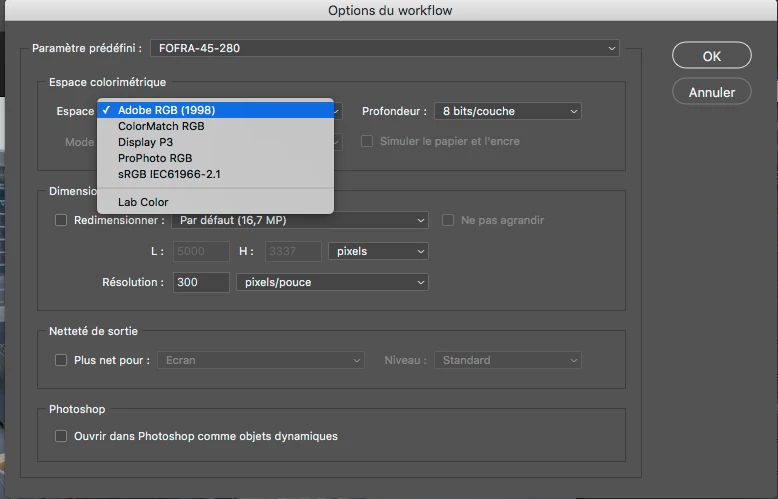
I tried to copy the ICC profiles into all possible directories related to Camera Raw but nothing solves the problem.
- /User Library>Application Support>Adobe>CameraRaw>CameraProfiles
- /Library/ColorSync/Profiles
- /Users/[User name]/Library/ColorSync/Profiles
- ...
Obviously, before this update, the custom profiles were clearly visible in Camera Raw !
I specify that my custom profiles are CMYK profiles and not RGB
Thank you for your help
 AdChoices