


Known Participant
November 22, 2021
해결됨

associating unique quiz failure messages with multiple choice selections in a quiz

  • November 22, 2021
  • 1 답변
  • 687 조회

Hi. I am running Captivate 2019 and have a multiple choice quiz with 4 selections: (a), (b), (c), and (d). There is only one correct repsonse for the quiz, so there are 4 answers, 3 attempts, and 3 failure messages. I would like to have each incorrect selection display a unique failure message. I assumed that the error message for each response is associated with only that response, but what I am finding is that the failure messages display in a set pattern. For example, if a I set (a) as the correct answer and run the quiz, I get the same sequence of failure message---b, d, and c---regardless of which order of answers I select. (I tried all 6 combinations of incorrect selections of b, d, and c and get the same pattern of display of error messages.)


How do I associate a unique failure message for each wrong selection?  
    이 주제는 답변이 닫혔습니다.
    최고의 답변: Lilybiri

    Some important info is missing: are you talking about a MCQ with ONE or with MULTIPLE correct answers?


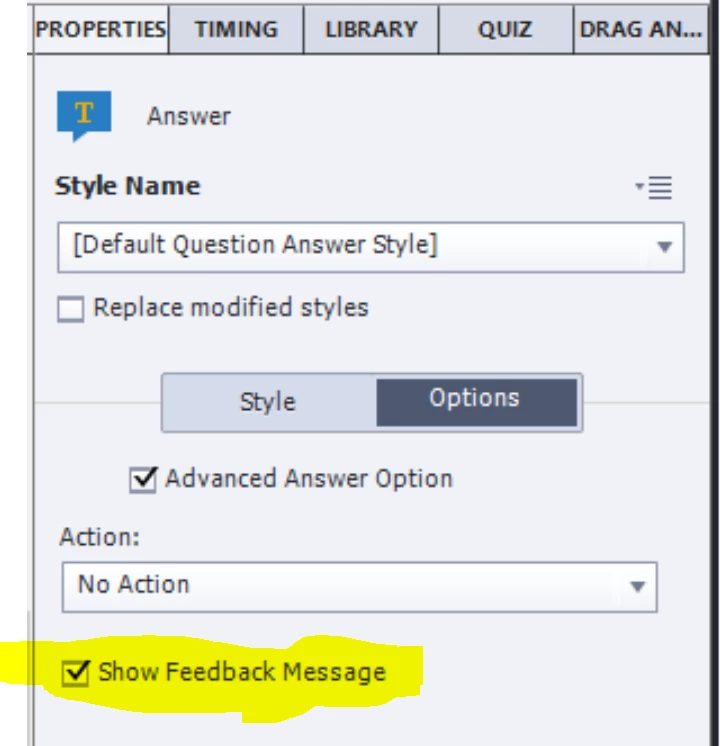
    In the first situation (one correct answer) you can use the Advanced Answer feature, which allows to show a dedicated message for each answer. You will need to use the individual Properties panel for each answer, tab Options.

    1 답변

    Lilybiri
    Lilybiri답변
    Legend
    November 22, 2021

    Some important info is missing: are you talking about a MCQ with ONE or with MULTIPLE correct answers?


    In the first situation (one correct answer) you can use the Advanced Answer feature, which allows to show a dedicated message for each answer. You will need to use the individual Properties panel for each answer, tab Options.

    M. Krebs작성자
    Known Participant
    December 17, 2021

    Thanks for your response. Sorry for the long delay in getting back to you. In the Properties panel for my quiz, I do not see the option "Show Feedback Message." Is that available in an update to Captivate? I am currently running Captivate 2019 (11.5.499). 

    Lilybiri
    Legend
    December 17, 2021

    Here below is what I am seeing in the Properties tab when I select an incorrect answer. 

     I do not see the "Show Feed Back" checkbox option. 


    That is the only type of question where you can use Advanced Answers.

    Your screenshot shows the Properties of a message, not of an answer. You need to select each answer separately and find the Options tab in its Properties panel.