
maseinyerfaceintheplace
Known Participant
May 20, 2019
Question

Captivate has stopped publishing my Typekit fonts

  • May 20, 2019
  • 3 replies
  • 1916 views

I've been working on a Captivate project for some time with no issue.

However, today I publish the project and Captivate is rolling back to non typekit fonts. Strange, as I had made no font style changes and before it was working fine.

So, I check the web projects on adobe font and can see that Captivate has not included any fonts in the latest publish.

See attached screenshot:
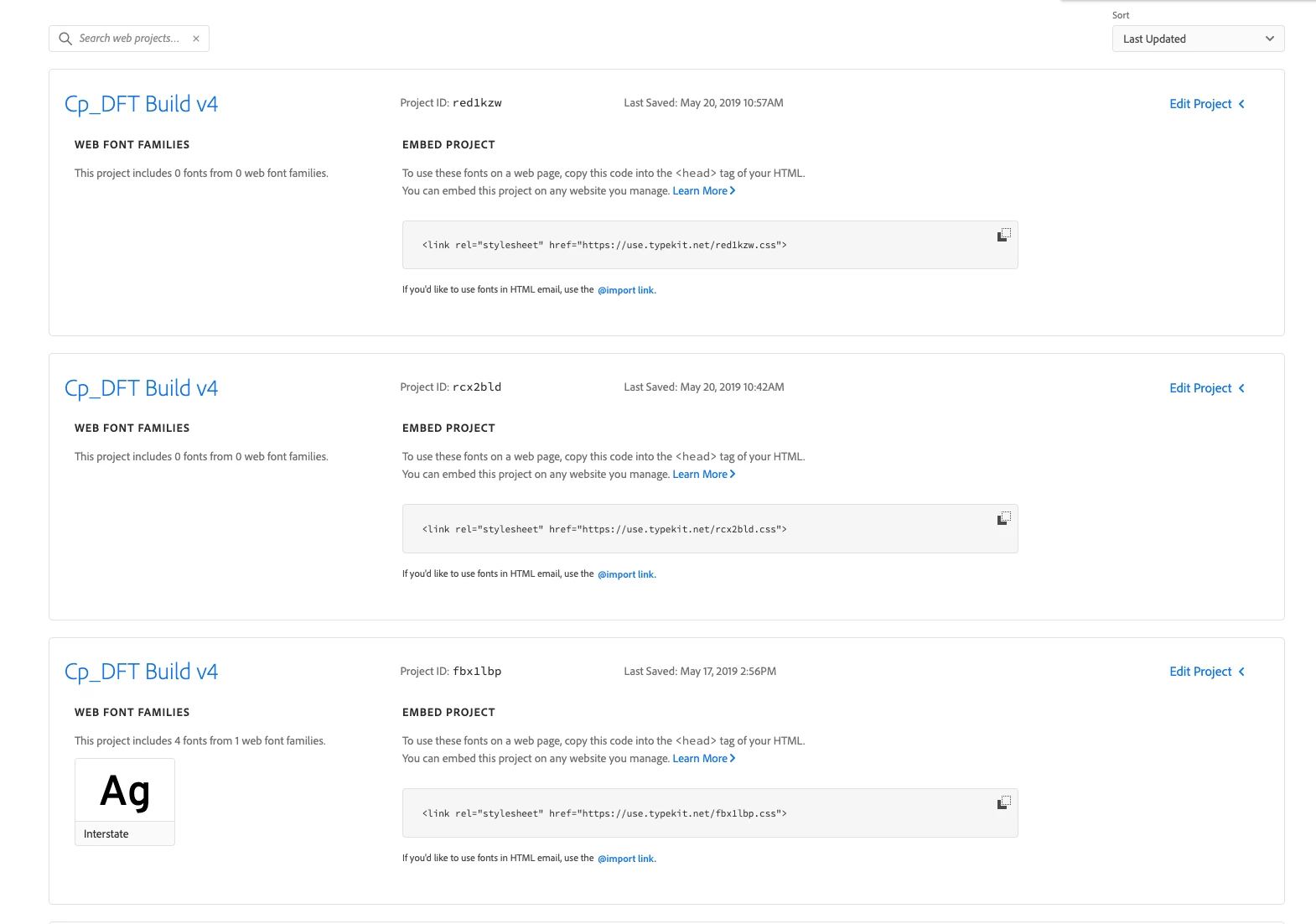
You can see on the 17th of may Interstate was included. Today (20th may) not fonts.

Why has Captivate stopped including myFonts? I am logged in to CC, everything else is synching fine.

Any ideas?!

any fonts in the latest publish.

See attached screenshot.

You can see the 3rd version down did include the fonts and this worked OK. I have made no changes to font styling and Captivate should just publish and include fonts - but it does not.

    This topic has been closed for replies.

    3 replies

    Inspiring
    May 23, 2019

    I'm having problems getting my fonts to render as well. Only mine is a first-time thing; this is the first project I've created.

    I followed the instructions on this thread:

    https://helpx.adobe.com/captivate/using/integrate-adobe-fonts.html

    I added the domains when prompted but it still doesn't work. Now I'm confused because the instructions don't mention anything about 'web projects' settings like @

    Inspiring
    May 24, 2019

    Nevermind, it works now. I don't know what happened but all of a sudden the fonts are there.

    I would still like to know why I get sent to the plan page when I click on the TypeKit icon. Because the instructions state that I should be taken to my account page that shows if TypeKit sync is available to me.

    Thanx

    Lilybiri
    Legend
    May 24, 2019

    Were you logged in the CC app?

    maseinyerfaceintheplace
    Known Participant
    May 20, 2019

    Also, just to add to this. Why is Captivating creating a new web project in adobe fonts EVERYTIME I publish it?

    Lilybiri
    Legend
    May 20, 2019

    Do you still see the licensed Tk fonts in Captivate?

    Did you add the domain to which you publish in the Putlisin dialog box?

    You didn't add more fonts than allowed for your plan?

    maseinyerfaceintheplace
    Known Participant
    May 20, 2019

    Thanks Lilybiri

    - Typekit fonts are still in captivate ( infact this font is displaying fine elsewhere, for some reason it's only effecting the text with variables

    - Domains are in, this is also happening locally.

    - I wondered about limits on my plan, but when typekit became Adobe fonts they removed all limits

    maseinyerfaceintheplace
    Known Participant
    May 20, 2019

    Thanks again @Lilybiri

    I've signed out, restarted the app etc.

    I've even done a clean install of Captivate on a separate machine.

    I've also copied all the slides and pasted into a new project.

    No change in any case. It just wont compile the font into the web project.

    I've also tried adding the font into the created web project via the adobe fonts page. (So the web project in adobe fonts shows it contains the fonts) ...but the published captivate project still doesn't want to show the font.

    I've also tried changing the URL ref in the html to a previous font web project that was working.

    Still no luck.

    I've got a full Captivate license and pay for all Creative Cloud apps.

    A fly has also just landed in my coffee. Not a good day

    Really not sure what to do.


    I've done a little test with other Typekit fonts.

    Despite all these fonts showing as available within Captivate and having 'add to web project' in adobe fonts, not all of them work.

    ( See screen shots below)

    I guess this shows that:

    - My Typekit / Adobe Cloud is working.

    - I've never used fonts Bungee, Teeshirt, Cubano or Trevor in a captivate project yet I have mixed results so I don't think this is a font limitation / usage issue.

    My conclusion is that some Typekit fonts just don't work! (but they did last week!!!! argh! What changed?)

    The only viable option for me right now seems to be to change the font in the project. Having already produced designs and proof of concept in Captivate this is going to seem totally irrational to the client.

    Is there another way to Contact Captivate / Adobe people about this sort of thing? The results here just seem quite random and are potentially a system bug?

    ( My Adobe Font web projects. Captivate generates these every time I publish my project. You can see that only some of the Tyepkit fonts we're add to the different tests)