


- Home
- Captivate
- Discussions
- Re: Captivate tries to update fonts but freezes
- Re: Captivate tries to update fonts but freezes
Captivate tries to update fonts but freezes

Copy link to clipboard
Copied
Hi
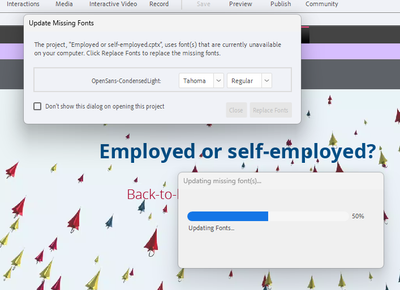
I am trying to open some Captivate files, which I created last year, before I upgraded my verions of Captivate. They take ages to load, but once they are loaded, Captivate tries to "Update Missing Fonts" and then freezes at 50%. The fonts are not missing from Adobe Creative cloud, so I have no idea what to do.
Any suggestions?
Regards


 13
Replies
13
13
Replies
13


Copy link to clipboard
Copied
I suspect you have been using Adobe fonts? If yes, can you check in Adobe fonts if they are still activated? I am asking this because Adobe Fonts deactivates fonts since a while when they are not used regularly. It is very annoying in this case, because I often open older Captivate files using Adobe fonts. If you are on 11.5 or later, normally you should also see a possibility to replace those missing fonts. Was that not the case or are you on an older version?
Copy link to clipboard
Copied
I checked that. They are activated. However, I am beginning to suspect that my current version of Captivate cannot open files created on my previous version of Captivate. Have you come across this?
Copy link to clipboard
Copied
That is not the case, Captivate can open files from previous versions, not the reverse. Which version are you now using? You can also try to close the Creative Cloud app (log out), close Captivate. Then log in back to the CC app and reopen Captivate. That may restore the link between Adobe fonts and Captivate. This problem started when Adobe fonts started to deactivate fonts without warning. I have also accounts for CC and Captivate.
Copy link to clipboard
Copied
I'll have a go. My current version is 2019 Release, 11.8.1.219.
Copy link to clipboard
Copied
It'll open some files, but not others. Same problem.
Copy link to clipboard
Copied
Copy link to clipboard
Copied
Did you use the option Replace fonts? If yes, check if you have Tahoma on your system, or try a completely different font as replace font.
Copy link to clipboard
Copied
No luck. It also begs the question why the program is trying to replace a font that isn't used in the file.


Copy link to clipboard
Copied
The Update Missing Fonts dialog indicates the font it cannot find is OpenSans-CondensedLight. It's suggesting that you might want to replace it with Tahoma Regular.
Did you create this project from scratch or did you use a CPTL template file as a starter? Captivate can sometimes maintain a copy of the template embedded within the CPTX and it could be that this template used the missing font.
Copy link to clipboard
Copied
I inherited from a colleague. That is, I used previous course as a format for a new one.
Copy link to clipboard
Copied
However, I am still using this method now, with the newer files I can open.
Copy link to clipboard
Copied
Use as 'format', what do you mean exactly?
The three fonts displayed in the dialog box are the first 3 fonts used in the Theme of the project. However, based on many consultancy and debugging jobs, most developers ignore what a Theme means for a project. Can you check the used theme, and make sure it is upgraded to the present version. There were significant changes in themes with version 11.5 and it is possible that the theme you are using is from older versions.
https://blog.lilybiri.com/themes-are-time-savers-what-is-new-in-11-dot-5
Copy link to clipboard
Copied
Thanks - I'll have a look tomorrow.


Find more inspiration, events, and resources on the new Adobe Community
Explore Now
 AdChoices