


Copy link to clipboard
Copied
Hello!
So, I got 5 projects, 1 main project that is just to choose between 4 courses.
I've tried using the "Open another project" on a button, but it does not work, I'm probably doing something wrong.
But I can only link it to a captivate file, but when I press the button it tries to open a index.html page. I've tried to choose the folder the project is built to, but it wont let me choose it.
Is there an easy way for me to link to these four projects that enables moving of the entire project?
4 buttons to each of their own course.
Thanks!


 1 Correct answer


You need to publish the project which you want to link to a main project
Then link the source file of that particular project to the main project using the button.
After publishing the main project manually copy the published folder of linked project in the callees folder of main published project.
Regards
Himanshu

 22
Replies
22
22
Replies
22

Copy link to clipboard
Copied
Hello,
Welcome to Adobe Forums ,
I will explain you by taking an example of 4 projects ( A, B, C, D).
As Per your requirement you want to link the project with each other as well as with the home Page.
You need to first publish your last project which is D. Now Insert a button on the last slide of Project C.
Now apply action on that button to Open Url or File and link the output( .htm file ) of Project D.
Now publish it to the same folder where you have published project D .
Now do the same with Project B and then A.
But make sure that you publish all of them in the same folder as D.
Now create a new project with a blank slide having 4 buttons ( A, B, C, D) on it .
Then on Button A apply the action as open url or File and locate to the output file (.htm) File of Project A.
Now you can do the same thing with rest of the three projects as well . After doing this make sure you publish this new project to the same folder where you have placed the previous projetcs output.
Note : This workflow will be only useful if you are publish the output in .SWF Format, This is not applicable for HTML5 Output
Hope This Helps
Regards
Himanshu

Copy link to clipboard
Copied
Hello,
Welcome to Adobe forums.
In order to link multiple projects I would suggest you to use Aggregator Project. If you publish your Captivate projects as SWFs, you can combine multiple SWF files into one lesson using the Aggregator. Once added to an Aggregator project, you can publish the combined files as a SWF, EXE file, PDF or HTML. The published Aggregator file will include a TOC using the names of the separate SWF files. you may use the following links to get the more details.
https://helpx.adobe.com/captivate/using/combining-multiple-swf-files-aggregator.html
Please let me know in case you need any further information.
Regards,
Rajeev.
Copy link to clipboard
Copied
I'm sorry, I forgot to say that the project must be published as HTML5.
Is there any way of doing it with HTML5?
Copy link to clipboard
Copied
Yes,
Well in that case you will have to insert a button on the slide and apply action as open project and link the source file (.cptx file) to that .
After publishing make sure that the published output of the source file which you have linked must be pasted in the callees folder of the main project .
Regards
Himanshu
Copy link to clipboard
Copied
I understood the first line, but not the second one, but I'll try.
You want the project file (.cptx) to be placed in the same folder it were published to?
Because that is not an option. The files are several gb large.
Copy link to clipboard
Copied
You need to publish the project which you want to link to a main project
Then link the source file of that particular project to the main project using the button.
After publishing the main project manually copy the published folder of linked project in the callees folder of main published project.
Regards
Himanshu
Copy link to clipboard
Copied
What if i want to link project B back to project A and so on?

Copy link to clipboard
Copied
I have this same issue and like sveinevn I need to the to link in BOTH direction (ie: from home to unit 1, and from unit 1 to home) so putting the units into the callees folder only works in one direction. I am going to insert an image here of the simple navigation map I am hoping to archive. AT the bottom I have noted all the methods I have tried to use, but here are my notes in case the type on the image is too small:
open another project?
works if I export units 1-5 into the callees folder of home...however then I cannot link back to the home from the units. I would esentially have to paste everything into every callee folder in some Inception-like scenario. And this happens....
open URL or file?
doesn’t seem to work at all if I input a path like /BuildingStrengths_Unit1/index.html for some reason that just returns me to the homepage
Aggregator Project?
only with swf, and even if I do this, how do I code the links? I am aiming for HTML 5 here.
hard link everything?
this would be super disapointing but at this point I feel I may have to go this way...
combine all units into one file manually
you know....all 90 something slides....
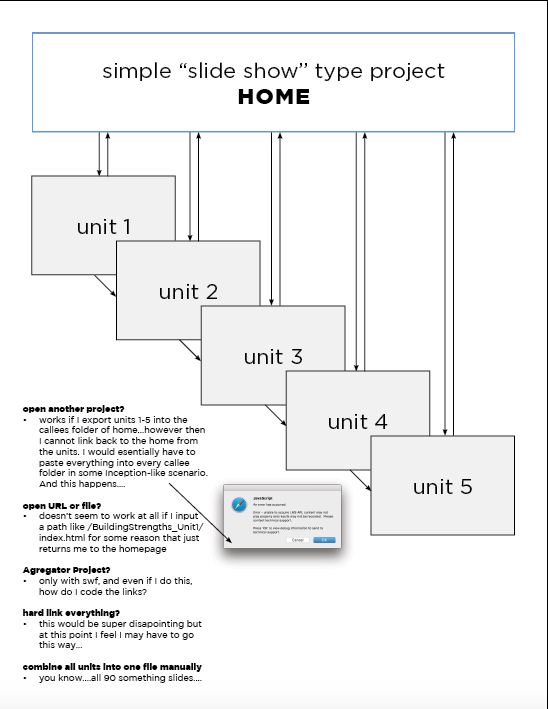
I think right now I just need someone to tell me that this is NOT doable in captivate so I can give up trying to find a solution and just let client know it can't be done.
Thanks!
Camilla


Copy link to clipboard
Copied
Camilla,
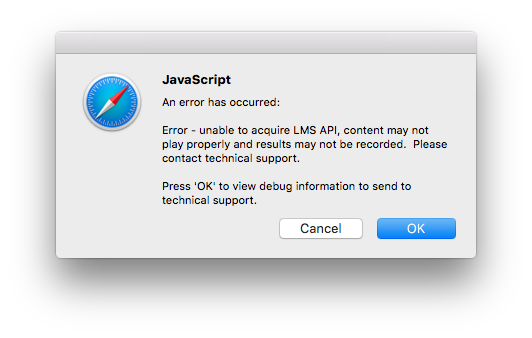
Since it appears you are publishing SCORM objects for delivery from an LMS, you need to allow the LMS to control how each SCO module is launched. The SCORM standard prohibits a SCORM object calling another SCORM object.
Trying to have each SCO module call the next one as you appear to be trying to do would break the SCORM standard because that's not the way it's designed to work. The communication with the LMS (the API mentioned in the error message you see above) is only designed to work properly if the action to launch each SCO module is taken either by the user clicking on a link in the LMS or by the LMS itself launching the next module once the previous one has been successfully completed.
Copy link to clipboard
Copied
Hi Rod,
We are aiming for the two simple quizzes in this project to be non-mandatory and non-reporting. The quizzes are not really important; we don't want to capture results AT ALL.
- Should I farm out the quizzes to a third party site?
- Should I move the quizzes into their on files and leave the static slides separately.
I did have this same issue before I added the quizes, which I did dead last. So assuming I have NO quizzes, is there a way to link my units?
Thanks!
Cam
edit for crappy writing, I've been working on this all week with not-much sleep.
Copy link to clipboard
Copied
Farming out the quizzes to another site or adding the quizzes into their own module is entirely up to you.
The SCORM standard only allows each SCO to have a maximum of one quiz.
If your non-quiz 'modules' will not make a single SCORM design overly large and slow to download, you could have them all as part of one SCO and just control the navigation to each separate group of slides inside that project file via a menu slide. It's still just one SCORM as far as the LMS is concerned.
Copy link to clipboard
Copied
Hmmm ok, I have tried read about "SCO" and multi "SCO" projects but it really seem like super overkill for the very very simple thing I am trying to do. I can only think that I haven't explained it properly. I am simply trying to make this work:
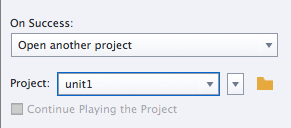
I think I will have to resort to use absolute paths the links in my project becasue I know where it will be hosted (when I upload the files on Tuesday) and treat them like opening a web page in the current window. there will only be an issue/more work when the project gets moved.
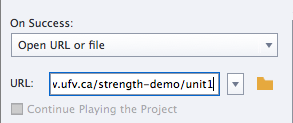
It really is a shame the the "open project" functionality in captivate doesn't really allow for relative paths.
Copy link to clipboard
Copied
Forget about trying to use the Open Another Project action. You have to point it at the Captivate CPTX file location but it is actually going to look for an HTM file at that same location by the same name. In effect, it's expecting the CPTX published output to be in the same folder as the project file itself. This is useless for what you are trying to do.
I mentioned about SCORM because your earlier post seemed to indicate you are trying to work with an LMS. If you are using an LMS then you DO need to be talking about some kind of interoperability standard and it will either be SCORM, AICC or xAPI.
So is that the case or not?
Copy link to clipboard
Copied
Hi Rod,
Thanks for the reply.
Not the case — No LMS, no reporting, and self hosting on our university's server.
A simple set of informational slides with one or two little activity interactions (ie drag n' drop, matching) and lots of videos. I split it into units due to differing visual design requirements and the fact that there were different topics. IAnd it kept the number of slides in each managable.
I have "Published" each project so I have all the HTML output.
So if I put my 6 html files (index.html, unit1.html, unit 2.html etc.) into the same root directory, combine all the images folders into one big images folder, all the vr folders into one big vr folder etc....that would be the "best practice" for this?
I've already created a version with hard coded links which just seems like the safest bet right now as long as we just don't move the module around.
Copy link to clipboard
Copied
OK. Then to have seen that error message you must have inadvertently turned on LMS Reporting in your Quiz Settings. That's the only reason it would be complaining about not finding an LMS API when you run the content. Look in your Quiz Settings and deselect the Quiz Reporting option to get rid of that message.
As for your other question: NO. Do not combine all of your content folders for separately published CPTX files into single folders. That will likely create conflicts. You have to keep the content separated.
Since it seems you are loading content to a web server, you need to use the Open URL or File action to link from one module to the index.html file of the next module in order to launch it. You can either use an absolute link (one that starts with http:// and has the entire path to the index.html file on your web server) or you can try using a relative link (one that just points from the current file to the next one by indicating its relative position in the folder hierarchy). If you are unfamiliar with these terms, do some Googling. There's plenty of information available on the web.
Copy link to clipboard
Copied
Thanks Rod!
That is exactly what happened in the one unit (accidentally checked the reporting). Unchecked now 
I uploaded the module this morning for beta testing (Building Strengths: learning that supports all students) and the absolute paths are working well! I'm just going through and catching any links that were left "project" style and am very thankful for my background in web dev. which I think I would be lost without at the publishing stage of Captivate!
What did happen of course (and probably happens to all first-timers is that all my videos broke. I notice that Captivate auto renames the video assets when it puts them in the "vr" folder so of course the file names I liked to in the file are gone...and let me guess...I need to use the absolute links to the published video files?
I did a bit of quick searching and found this thread: Help, Videos no longer play after Publishing however it doesn't seem to address *quite* the same issue I am having.
I am asking this question here just becasue it's sort of almost on topic being that we are still dealing with the whole link thing, but If you like I can start a new thread. Any tips are super appreciated....I need to send you a starbucks card or something!
Cam

Copy link to clipboard
Copied
Will AICC or Xapi standards allow for linking projects from a callees folder back up to the root project? If so, is it possible in Captivate?

Copy link to clipboard
Copied
"Well in that case you will have to insert a button on the slide and apply action as open project and link the source file (.cptx file) to that. After publishing make sure that the published output of the source file which you have linked must be pasted in the callees folder of the main project ."
Does someone know --- Does the does the Captivate source file (.cptx) have to have the same name as the published file to make this work?
Copy link to clipboard
Copied
DO NOT use the Open Project action. What you may not realise is that if you use that action you are NOT actually linking to the CPTX project file but to the published output from that project file and ONLY if that output is published into the same folder as the source CPTX. However, in practice it is very risky to publish to your project folder's location.
The better action to use is Open URL or File and point that at the HTM or HTML file of the published output. If you are publishing to dual output SWF/HTML5 then you should point it at the multi-screen.html file you get with that output.
No the output does NOT have to have the same name as the project file. You specify the output name in the Publish dialog.
Copy link to clipboard
Copied
Rod, Thank you. I will try linking to a file location on the server using relative addresses.... Crossing my fingers.
Ugh... this is a speedbump we did not plan for. 😞
We have educational programs that can contain 10-30 sub-modules. They are fully narrated so the published files are large. We originally published a single SWF file (Captivate 7) . But we discovered the loading time for a single program (2.5 hours) were terrible so we broke them into modules that were smaller than 10MB and linked the files together using the open another project action.
Alas, now we are publshing HTML5 only. Loading time is per page (not per module) so it really doesn't matter if the project is large - now the goal is to keep individual slides short so the user does not experience delays slide to slide (again, slides are fully narrated and so they are large). But now we learn the links between projects have to all be programmed as relative file locations. ARGGGHHH... Now it would be easier if we had never broken the large modules into sub-modules.
Copy link to clipboard
Copied
Is this project being delivered from an LMS or just from a web server?
Copy link to clipboard
Copied
We're posting on a webserver.
I followed your advise and created relative addresses for each submodule. I published, zipped, uploaded to our website and testsed. It works. Thank you.
It was time consuming. This particular program has 9 submodules. Each submodule has 9 navigational buttons that allow the user to freely navigate between the submodules. In addition, the final slide has an action to proceed to the next submodule.


Get ready! An upgraded Adobe Community experience is coming in January.
Learn more
 AdChoices