



chemelnalic
Participating Frequently
December 2, 2019
질문

How to get rid of text overflow pop out icon

  • December 2, 2019
  • 3 답변들
  • 1898 조회

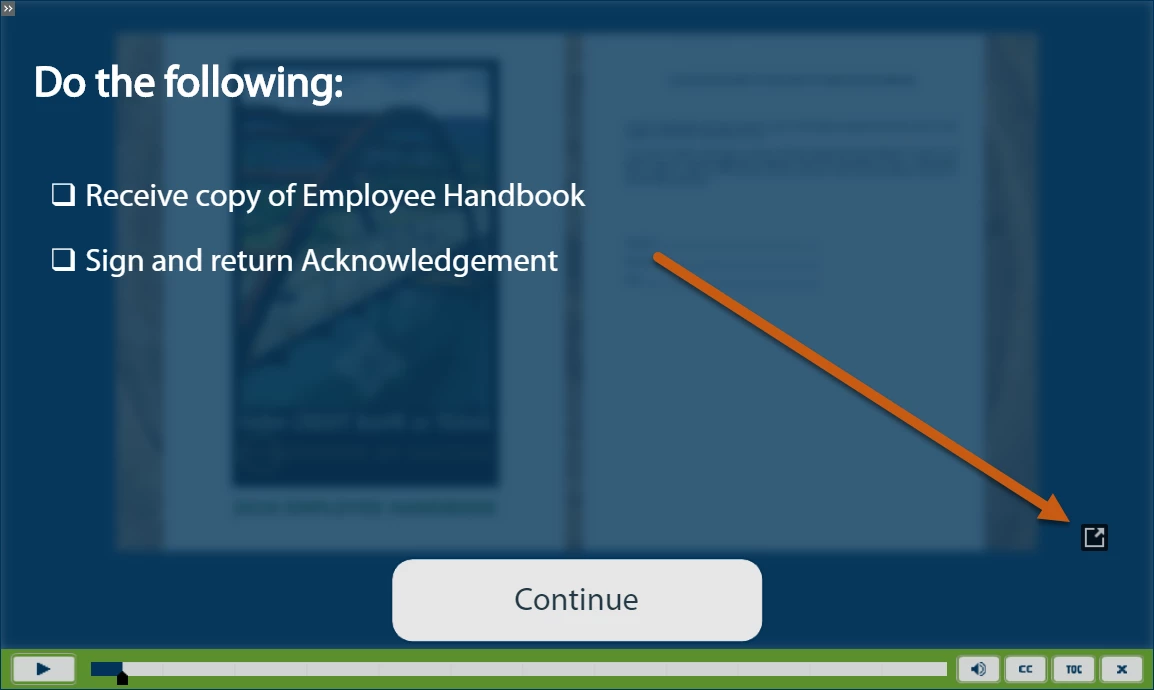
I have a responsive project with 4 overlay slides throughout. The overlay slides are formatted from an Overlay Slide Master I created. Every time I preview from Captivate and/or publish to our LMS, it is showing a pop-out icon as seen in the picture. I am assuming it is a text overflow because when I click it, it does the transparent black overlay with white text. I have removed all formatting from the text, checked the margins for the text boxes as well as the fluid boxes and made sure there were no extra spaces below the text. I've reduced the font size, made sure "Enable Uniform Text Scaling" was checked, etc. What else can I check or how do I get this pop-out icon to go away? Thanks!
 

이 주제는 답변이 닫혔습니다.

3 답변

Participating Frequently
January 23, 2021

I found that even tho my text box wasnt falling off the right hand side of my page, captivate deemed it too close to the edge! I dragged that in a little, making the right hand edge of the text box further away from the edge of the page, and hey presto, it got rid of this. Very annoying when there is clearly available real estate, and all the text is clearly viewable. Maybe the page has some invisible margins I'm not aware of....

chemelnalic
chemelnalic작성자
Participating Frequently
January 8, 2020

I had pretty much just settled on the fact that it would stay this way until I updated the text in the text box. When I removed the inbuilt bullet points, the pop-out arrow went away. I added them back in and it reappeared. So I am assuming that it has to do with the bullet boxes. Took them out, no more issues!

Lilybiri
Legend
December 2, 2019

Interactive video in a responsive project? I only know overlay slides in such a video project... Maybe it is terminology issue, can you explain exactly?

chemelnalic
chemelnalic작성자
Participating Frequently
December 2, 2019

Hi Lilybiri, 


Yes, it is 6 different MP4 videos that I imported as Slide Videos into the project. In two of the videos, I pause the video with an overlay slide and then when they hit Continue on the overlay slide, it resumes from a bookmark that I placed immediately after the overlay slide on the timeline. In total, there are 6 slides with slide videos and 4 overlay slides. Does that help clarify? I'm not sure if I'm using all of the correct terminology, but I am happy to provide pictures or whatever you need to help me troubleshoot!

Lilybiri
Legend
December 2, 2019

My worries are about the fact that it is IMPOSSIBLE to have a slide video in a fluid box at all. You can have fluid boxes on the master slides for the questions, but how that is combined with a video which is not being managed in a fluid box? No idea, would never try to use a Fluid Boxes project if so many interactive video slides are involved.