



Jeff Almasol
Adobe Employee
Adobe Employee
August 10, 2022
Question

Feature Focus: Motion Library

  • August 10, 2022
  • 8 replies
  • 9423 views

Introducing the Motion Library, a new Character Animator behavior. The Character Animator Motion Library (powered by Mixamo) is a library of 350+ full-body character animations, captured from professional motion actors. Dance moves ranging from ballet to hip hop can be applied with one quick selection. Sports moves from basketball to bowling are super simple. And a range of walking, running, and jumping are also available. Moves that were difficult to animate are now within everyone’s reach.


Tutorial

Check out this tutorial from Okay Samurai:


Puppets to use with the Motion Library

Use these example puppets.


Requirements

  • Puppets must have Body, Motion Library, and Limb IK behaviors applied to the same layer.
  • Full body puppets with typical human dimensions work the best.
  • Body behavior must be picking up relevant body handles properly. Body behavior requires puppets with at least one arm (Head/Neck/Shoulder and Elbow/Wrist) to estimate the body scale.


Current rules

  • Head and Waist: If tracked by Motion Library, Motion Library always wins.
  • Other body handles: averages if tracked by both Motion Library and Body.
    • In this case, you may want to uncheck Head, Head Rotation, and Neck from Motion Library to make it look a bit better.
    • You may also want to Calibrate before testing the quality.


Set up

Add the Motion Library behavior. 


Controls


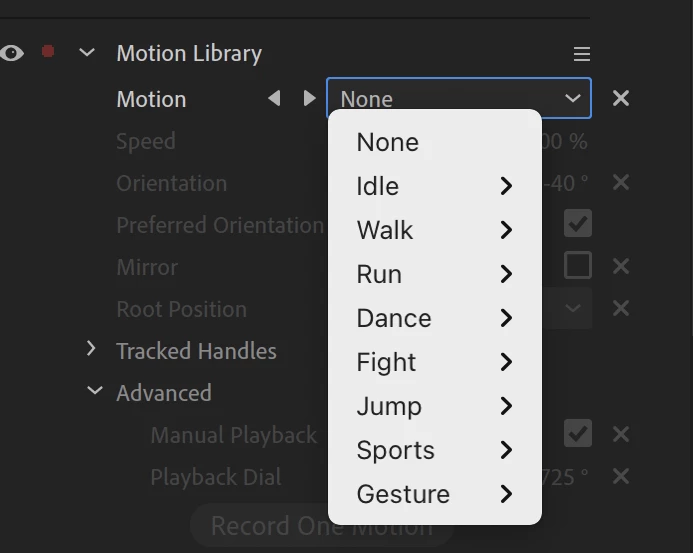
Motion

Animate your puppet with any of over 350 motions. There are eight motion categories. Pick a category and then click the < > buttons to audition motions one after another.
 

Speed

Change the motion’s playback speed across the whole motion. The speed value is recorded into any take generated by Record One Motion. The default value is 100% (no speed change). The minimum value is 10% (10 times slower). The maximum value is 1,000% (10 times faster).


Note: Speed is not animatable. To change the speed of a motion, use the Manual Playback controls in the Advanced section.


Orientation

Change the angle of view for the 3D motion capture data as it’s applied to your 2D artwork. For example, a front-facing puppet might want a 90º offset compared to the default left-to-right walk. If the applied motion doesn’t look right (e.g., a head or wrist has too much rotation), tweaking this parameter might help improve your results.


Preferred Orientation

Use the “best” 3D orientation of the motion captures as a starting point. Otherwise, the motion capture’s default angle is used.


Mirror

Flip the motion data horizontally.


Root Motion

Specify how your puppet’s overall position behaves during the animation cycle:

  • Reset at loop resets your puppet to its initial position.
  • Continuous loops the local motion with your puppet’s global position continuing where it left off. This is useful for continuous animation cycles such as walking (or dancing!) off the screen.
  • Treadmill leaves the puppet in place and performs the animation cycle as if walking on a treadmill.


Tracked Handles

Specify the handles that the captured motion is applied to. If the same handles are also tracked by Body Tracker (specified by Tracked Handles in the Body behavior), the handle transforms get averaged, except for Head and Waist which are controlled solely by Motion Library.


Advanced

Select Manual Playback to control the playback of all the motions in your timeline manually. The Playback Dial value cycles through the entire animation for each 360. For example, you can keyframe the Manual Playback dial to have a cycle ease in and out of an animation.


Record One Motion / Reset Position

Record One Motion captures all the current motion parameters and creates a new take in the timeline for one cycle of that motion. The new take will have the name of the recorded motion; view the tooltip to see any additional parameters that were captured at the time of the recording. Extend or trim the motion in the timeline to change the duration; create multiple overlapping takes with new motions and blend them.


Reset Position resets the puppet’s location to its original starting point. This is helpful if the puppet has danced out of the scene. 🙂


Known issues and limitations

No known issues. Please let us know if you encounter any problems.


What we want to know 

We want to hear about your experience with Motion Library:  

  • What are your overall impressions?  
  • What do you think about the Record One Motion workflow?
  • Do the parameter names make sense to you?

Also, we’d love to see what you create with Motion Library. Share your animations on social media with the #CharacterAnimator hashtag. 

Thank you! We’re looking forward to your feedback. 


Use this Beta forum thread to discuss Motion Library and share your feedback with the Character Animator team and other Beta users. If you encounter a bug, let us know by posting a reply here or choosing “Report a bug” from the “Provide feedback” icon in the top-right corner of the app.


This topic has been closed for replies.

8 replies

Participant
October 8, 2022

Hi, I've noticed that changes I'm making in Limb IK to make a character look better don't seem to be translating when I then click on 'Record One Motion'. So any changes I made with, let's say, reversing an elbow bend, are gone when I play back the scence and hit it. 


I notice that the recorded motion librarty clips note the speed, ortientation, mirror and root position, but nothing else. Is Limb IK info not being saved? If it isn't, how would you recommend saving those choices and transfering them to the clip recorded from 'record one motion'? 


Thanks in advance. 🙂

Adobe Employee
October 10, 2022

Hi,

Thank you for trying out Motion Library!

The only parameters baked into the Motion Library recording are what you see when you hover over the recording in the timeline like this:

All other parameters you want must be enabled for recording explicitly. The workflow will be similar to my attached video describing how to record Tracked Handles with Motion Library. In your case, you do the same for the Limb IK parameters you are interested in. If you do use the "Record One Motion" button, you will probably need to separately record the Limb IK parameters. In your case, it may be less confusing to record Motion Library and Limb IK parameters altogether by hitting the usual Record button (red circle above the timeline).

This parameter recording workflow is a general design of CH, not specific to Motion Library.

Participant
October 10, 2022

Thank you for getting back to me. I'll have to try both of those ideas out next time I make a recording. I really appreciate the support you provide for character animator... it's an exciting program!

Participant
October 2, 2022

Happy Sunday folks! 

Let me first just say holy WOW!! Absolutly love all 350 of the motion presets. 

So far I just have one question, is it possible to assign keyboard shortcuts to activate these motions quickly?

I apologize if this has already been asked I did search but didn't find anything. 

Thank you very much! I really appreciate all your efforts!

Jason

Rares Molnar
Known Participant
October 2, 2022

Hi! The only way you can assign keyboard shortcuts to motions is by creating Previews. Once you found a suitable motion for your puppet, hit Record one motion. Then simply create a preview using that motion. Please let me know if it helps! Cheers!

Adobe Employee
October 3, 2022

Thanks Jason for trying out Motion Library, and Rares for helping other users!


Just to supplement the answer by Rares, I made a quick tutorial on making a trigger from a Motion Library motion and assigning a key to it. I hope this clarifies the workflow.

Rares Molnar
Known Participant
September 16, 2022

Hi!


I've been playing around with Motion Library lately and I've noticed some problems/issues which should be addressed before roll out:

1. It is essential to add in the Advanced Menu of the Motion library the option to adjust the movement amplitude individually for each body part: head, torso, left leg, right leg, left arm, right arm. I understand that you can not make it possible for us to edit those animations, but a "slide bar" (0 to 400% slide bar) adjustment is indispensable. Some animations work super well, but some need adjustment based on your puppet because are heavily exaggerated or need an amplification: ex: increase or decrease the amplitude of the left arm.

2. Multiple walking animations have problems with the foot (heel and toe) position. The animation is not working smooth and at some point the foot just jumps to another position instantly (on X axis).

3. The dynamic link between Adobe Character Animator and After Effects does not work at all. The scene is imported successfully, but the puppet is standing still even though the performance is there.

2. Many animations are not in a perfect loop (especially those which involve steps and X axis movement) which can cause serious problems when trying to create the animation. Even though I've adjusted the animations by Easing In and Out, there is still a noticeable X axis movement I can not get rid off. This is annoying because I can not integrate the animation in my creations and it becomes "useless". To replicate the scenario, use a standing still puppet and then blending in a waling animation. When the walking animation stops and the puppet is standing still again, it will jump some px on X axis. Most of the animations should have a perfect loop.

2. Catwalk animation (from idle category) is not working at all.


Please let me know what do you think about these points.

Thank you in advance!

Adobe Employee
September 16, 2022

Hi,

Thanks for another feedback 🙂


1. This is very unlikely to happen anytime soon, given the design of the system. Please add animations with Dragger etc. if needed.

2. Perfect motion retargeting to stylized characters with free-style initial poses is an extremely challenging open problem. While there is no fundamental solution to this, I may be able to suggest rigging tips to minimize this if you can share your puppet and a screen capture of what you see as a problem.

3. Because you are working on CH beta, the other app must also be a beta app. Please try dynamic-linking with After Effects beta. I will request the team to make this clear to users with an error message.

4. Motions are as they are from Mixamo. Many Mixamo animations are looping animations, but not all of them. Many motions make sense as looping motions, some do not. You need to select the ones that suit your needs. We surely will not eliminate non-looping motions but we may consider clarifying which ones loop, and which ones do not.

5. Catwalk in idle: sorry, this is totally my bad. It should have been named "Catwalk Idle." If you want a "Catwalk" that actually walks, please go "Catwalk" in "Walk" category. We will fix this soon.

Inspiring
September 10, 2022

Motion Library looks awesome; maybe Walk will be consolidated there. But judging by the preview video, your team is creating another complication of the type CH is already full of. Simply put, if I want to control the strength of a selected Motion Library dance, why do I have to go to a separate behavior's panel (Body) to do it? I'd rather look at one big, consolidated Body panel with Motion Library and Limb IK inside. 


We already have to remember or write down "if this, then this" flow charts to achieve positive outcomes.

Another example is having to click off "Initial Foot Pinning" in Limb IK--even if Limb IK is unarmed--to allow the Dragging of an ankle. Or if I've added an extra head level and tag for better head tilting, it ruins Body Tracking, so I have to remember to temporarily turn off that "head."


I wish your team would work more on consolidating the app's existing functions and panels for less clicking around and eliminate conflicting behaviors (or behaviors that get confused by some rigging when others need it).


But I still don't get why I can easily scroll around a PS image with two fingers on my trackpad but have to hold down Option in CH or Spacebar in AE to do the same thing.

Adobe Employee
September 11, 2022

Hi,

Thanks for your interest in Motion Library!


Let us go to specifics first.

  1. Strength parameter in Body behavior - This is a great candidate to consolidate in Motion Library. Thank you for your suggestion. This was mostly my hindsight. I did not think the strength parameter is going to be so useful. It turns out it is very handy for quickly customizing the preset animations. We will most likely do this in our next update!
  2. "Initial Foot Pinning" - In the beta app, we recently updated its default to be off. We also updated the beta app so the foot pinning takes effect only when there are no animations on heels. We hope to push this change to the official release app soon so this option will not interfere with the animations.


Now, let us discuss the general technical design.

We are consciously taking the modular component approach for our recent behaviors. Walk behavior, as you say, is an all-in-one behavior. It has its own preset motions, it does animation retargeting, and it does IK. This seems to be convenient, but it turns out behaviors with this design become hard to reuse and they do not cooperate well with other behaviors. Breaking down this big monolithic block into smaller rigging pieces allows developers and riggers to reuse them. Limb IK can constrain any animations from Dragger, Transform, Body Tracker, Motion Library, and any way to animate which may come up in the future. Body behavior can now consume the input from Motion Library as well as Body Tracker. Motion Library focuses on its own recording model to leverage the looping animations from Mixamo for high-level animation editing, which would not be possible if Motion Library was a part of a single Body behavior doing everything.


While we have to take this modular design, this choice is more of an engineering and rigging convenience, not an animation convenience. One possibility to improve the general UX is to redesign the behavior panel so it looks different in the rig mode and the animation mode. We can certainly take small realistic steps by consolidating/eliminating specific parameters, like strength and foot pinning as you pointed out.


Thank you for your valuable feedback!

Participant
September 3, 2022

Do you have key frames to change manual movements? This would be a huge huge break through to custom key frame the movements. I only see transform simple moements. What if you wanna to key frame the movement animation. Modify it more custom so it can be even more unique.  Or manually make the movements on your own without motion capture using key frames based on pin point of the rigs. It would make things soo much easier for an animator.

Adobe Employee
September 3, 2022

Thank you for your request!


Because this is a thread on Motion Library, I will first answer in the context of Motion Library.

Motion Library is meant for the high-level editing of animation. For example, you can bring in punch, kick, and idle motions and then reorder and stretch them as you like.

Your request for keyframing is a low-level editing feature. Usually, going from high-level editing to low-level editing requires baking the animation to keys and losing the high-level information. While this is in theory doable, this is not currently the focus of Motion Library. The closest low-level adjustment available to Motion Library is layering Dragger animation as discussed in the post started by Rares Molnar above.


Outside of Motion Library, Character Animator in general does not provide low-level editing after recordings but this is a frequent user request. I also personally wish there was a better infrastructure to edit Dragger and Body Tracker recordings with keyframing. I will note your request to the team.

Rares Molnar
Known Participant
August 29, 2022

Hi! I want to say that those 350 animations are just
WOW, but I have some points which would
dramatically improve this feature in a practical manner:
1. The possibility to change, adapt or personalize the pre-made animation (ex: to change only the left arm position during the dance animation or to change the position of both legs during the idle animation).

2. Saving you own animation (creating a pre-made animation by your own) so you can use it across multiple projects and puppets.
3. Will the developers add more and more animations (during time, of course)? A household activities category would be also super useful.

4. The posibility of importing animations made by community members would add so much diversity and complexity to this system. It would be super useful if someone can use my eating animation and for me to import and use a sleeping animation made by another member.
6. I saw that the animations are a little bit laggy. It it because of the beta version of Character Animatior?

Adobe Employee
August 30, 2022

Hi,

Thank you for trying out Motion Library! We just pushed a new beta build with many Motion Library improvements, most notably retargeting improvement and blending with Dragger, which very much relates to your first suggestion. If your time allows, please update the beta app and try it out again.


To customize the pre-made animation, there are three ways:

  1.  NEW from the beta build v23.0.0.42 (2022-08-29): You can now layer Dragger animations on top of Motion Library. This averages the position from Dragger and Motion Library.
  2.  To fully take over a body part (e.g. left arm) with your own Dragger animation without averaging, uncheck Left Wrist and Left Elbow under "Motion Library > Tracked Handles" (make sure to uncheck the ones of Motion Library, not Body)
  3.  Adjust high-level parameters such as Speed, Orientation, and Body > Strength


I saw that the animations are a little bit laggy

Can you be more specific here about what you mean by "laggy?" Screen capture of what exactly is happening always helps us to understand. If this is about the performance, we appreciate it if you can also share your hardware information and which puppet you are using to test. If this is about the speed of the animation, they are exactly the same as in Mixamo. If you need to speed up some animations, please use the Speed parameter.


As for importing user-created animations, this is one of our top requests. We will consider this for our future release. Meanwhile, if you have specific motions from Mixamo that you want to be added to the presets, please let us know. We will note your request on the household activities. If you can be specific about what household activities you are interested in, please let us know.


Thank you again, your feedback is invaluable to us.

Inspiring
August 30, 2022

Thanks for adding the option to layer dragger animation. But for when we want to fully take over a part - like unchecking the wrists and elbows when doing a walk motion so we can do our own thing with it - would it be possible to have that specific to every motion recording? For instance, I wanted my character to hold something while walking, so I unchecked the wrists and elbows, but then I wanted to use one of the wave gestures from the motion library, and I couldn't have the two recordings working in the same scene.

Inspiring
August 16, 2022

Another issue - but this may be something I'm rigging wrong and I'd like to hear if anyone else is encountering something similar. My puppet has a skirt set as an independent layer, attached to her torso. I've rigged quite a few puppets with skirts/dresses and usually after some tweaking, it moves along with the body naturally - this one was working before I tried playing around with Motion Library. However, now it seems to fall off the body with certain movements, like jumps. Anybody else working with a puppet that has clothing that have movement (skirts, wide pants, etc.) and having the same issue? Or NOT having any issues and knows how to get around this?

Adobe Employee
August 17, 2022

Thank you again for trying out Motion Library. It sounds like your puppet uses an advanced rigging strategy for simulating garments. We would love to take a look at your puppet so we can fully replicate the case and make the best suggestion.

Inspiring
August 17, 2022

Thanks. I have three versions of the same puppet, one for full movement (the most complex one), one with fewer views for walk cycles, and one that I simplified to try out the motion library"

https://www.dropbox.com/s/9jc9a47x598mnfa/ELLA.puppet?dl=0

https://www.dropbox.com/s/jlvjfvx0kcho9to/ELLA_walk.puppet?dl=0

https://www.dropbox.com/s/k9rv1hfxr7cbpty/ELLA_motion-library.puppet?dl=0


Inspiring
August 16, 2022

A small bug that I'm encountering is that I have a puppet with big ribbons on her shoes that I had set a dangle handle to. It seems that dangle and motion library don't play nicely together. Not a huge issue, but disappointing and something to know about beforehand.

Adobe Employee
August 17, 2022

Thank you for trying out Motion Library and taking time to report the problem here. We appreciate it if you can share your puppet so we can replicate and resolve your issue.