


Participant
July 10, 2023

libgit2 error everytime I try to start a new file in version 23.1

  • July 10, 2023
  • 4 replies
  • 375 views

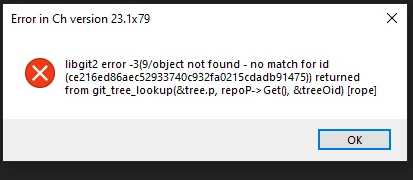
I am getting an error every time I open this app on my pc. I was surprised to see that I have the pro version as well, so anytime I click to move back to starter, I will see the following error. I have tried deleting all my projects, restarting my pc , and ensured this was installed locally on my C drive. anything else?

This is my file structure btw 

 

4 replies

Community Manager
July 12, 2023

Yay! Thanks for the report!

Participant
July 12, 2023

This worked! Thanks so much

Community Manager
July 11, 2023

Actually, looking at the code for starter mode it is opening up an blank project in a somewhat hidden location which I think explains why your (sensible) attempts to delete the projects it might be opening didn't work.


On Windows, finding this location goes something like this:

1. Enter %APPDATA% into the address bar of an Explorer window

2. Navigate up one level and then back down into the Local folder

3. Navigate into Adobe and then into Character Animator

4. Navigate into the subdirectory matching your app version

5. Make sure Character Animator isn't running.
6. Delete any folders with "EmptyShell" in the name (there's probably only one).

7. Start Character Animator up again.

On Mac (for others that might find this thread) the steps are similar:
1. Hold Option and open the Finder Go menu.

2. Pick "Library" (this is hidden if you don't hold option)
3. Navigate into Application Support.

4. Continue from step 3 in the Windows instructions (paths from there follow the same convention).

Community Manager
July 11, 2023

It seems like it's trying to open up the last project and that project was somehow left in a damaged state.

Can you try quitting and then opening Character Animator while holding the alt key on your keyboard? That should cause Character Animator to create a brand new empty project which hopefully will break it out of this failure loop. If that doesn't work, it seems like there's an issue with successfully creating a new project and that'll require some additional experimentation to figure out.


Dan Tull

Adobe Character Animator Team