

aforetaste
Known Participant
May 9, 2019
Answered

A Case of the Missing Claw

  • May 9, 2019
  • 2 replies
  • 434 views

I seem to be unable to wrap my brain around triggers and swap sets (especially with cycle layers active).

So, I want the claw to open and close with one layer in-between.
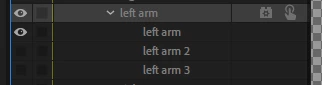
The layers have the cycle layer behavior added and set up (correctly??)
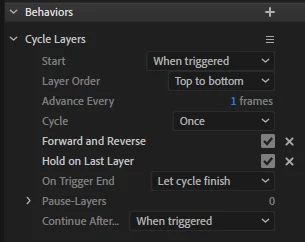
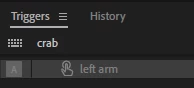
But when I go to "record" the crab I don't see the initial arm until I press "A," my trigger key.

I've tried swap sets... and their deep mysterious difference from triggers--still no luck.

What am I doing wrong?

Thanks in advance!

    This topic has been closed for replies.
    Correct answer alank99101739

    Putting a trigger on a layer (without a swap set) hides the layer, showing it only when you press the key (that is, when you “trigger” the layer). The trigger makes the layer appear.

    A swap set can have a default layer selected. If any trigger in the swap set is on, the default is hidden. If no triggers are active, the default (if selected) is shown.

    On top of that you have latch mode where the keyboard toggles it on/off instead of having to hold the key down (you tap to change it). I don’t use latch very often - I just hold down and release keys usually.

    Then you add in cycle layers. When triggered, they play the sequence. But it can be confusing what happens when the cycle ends - there is hold last layer, but without it nothing is shown (which Is not useful very often). Cycle layers can reverse when released (e.g. Cycle layer to close claw when triggered, then reverses to open claw when released).

    2 replies

    alank99101739
    Legend
    May 10, 2019

    So I forgot to add - so if you want a trigger to hide a layer (instead of reveal a layer), you MUST use a swap set. You create a trigger on an empty layer, and put the layer you want to hide in the same swap set as the default. That way the default shows the layer, and when you trigger the empty layer the normal layer disappears.

    So as soon as a trigger is meant to hide something, you must have a swap set. Triggers alone cannot do it.

    aforetaste
    Known Participant
    May 10, 2019

    Thank you, alank99101739!​​

    So basically (if I understand this correctly) triggers are used for things to be not seen then seen (ie. fireball).

    And Swap sets are used for things to be seen then changed (ie. hand, then hand pointing fingers).

    Understanding that fixed it! Thank you.

    I add my cycle layers into their own group (and added the behavior):

    So in the swap set, it was really only looking at swapping between two things (so to speak): the default layer (left arm) and the cycle layer set (closing claw):

    Hope this is helpful to someone else, too!

    alank99101739
    alank99101739Correct answer
    Legend
    May 10, 2019

    Putting a trigger on a layer (without a swap set) hides the layer, showing it only when you press the key (that is, when you “trigger” the layer). The trigger makes the layer appear.

    A swap set can have a default layer selected. If any trigger in the swap set is on, the default is hidden. If no triggers are active, the default (if selected) is shown.

    On top of that you have latch mode where the keyboard toggles it on/off instead of having to hold the key down (you tap to change it). I don’t use latch very often - I just hold down and release keys usually.

    Then you add in cycle layers. When triggered, they play the sequence. But it can be confusing what happens when the cycle ends - there is hold last layer, but without it nothing is shown (which Is not useful very often). Cycle layers can reverse when released (e.g. Cycle layer to close claw when triggered, then reverses to open claw when released).