Participating Frequently
October 4, 2018
Answered

About pinning feet on the floor- This subject again... Sorry.
  • October 4, 2018
  • 1 reply
  • 1907 views

Hello there,

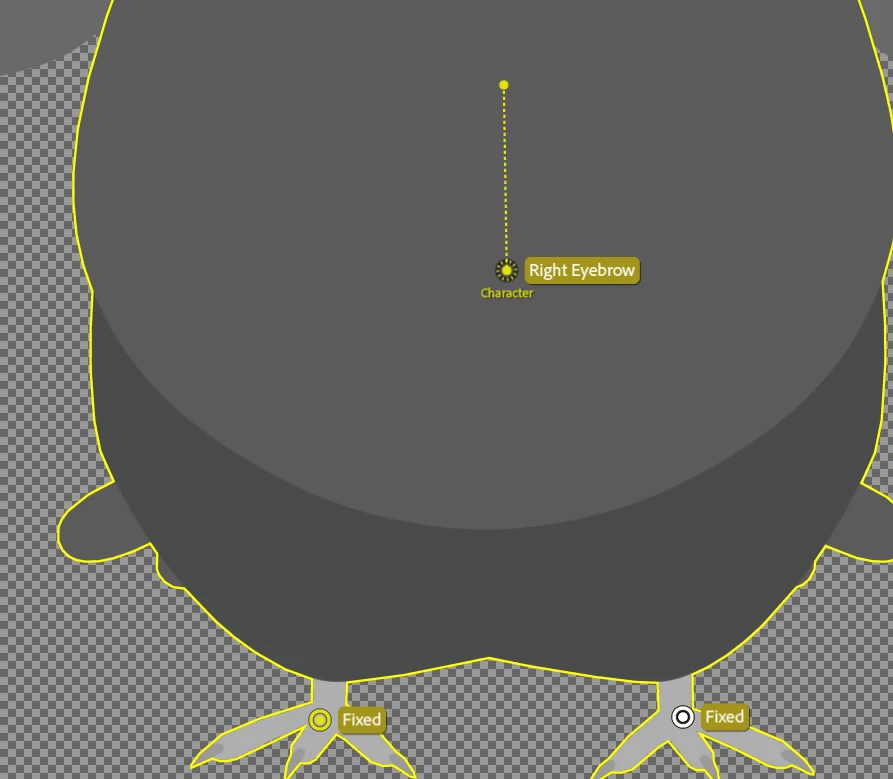
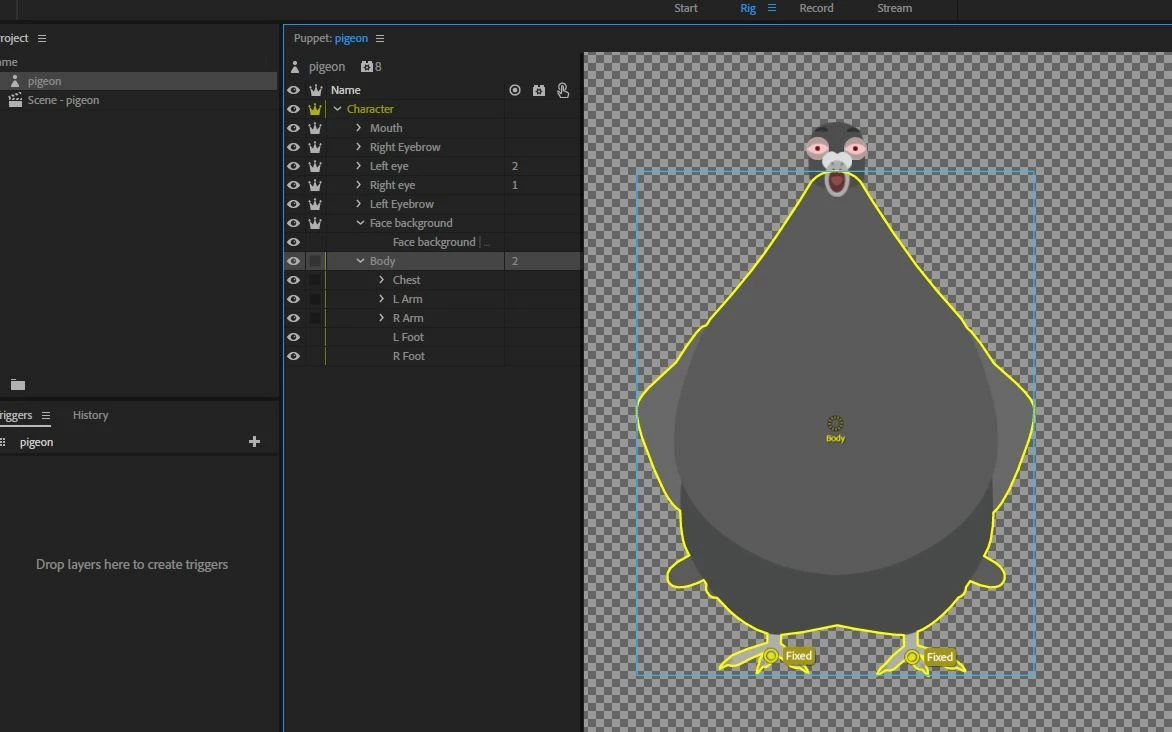
I am really sorry to bring this same thing up again, but I just cannot figure out how to make this thing work. I have been trying to pin this character's feet on the ground but I just cannot do it. First of all, when I choose a layer I get a yellow line around the character instead of only that blue frame I see in tutorials. I don't know why this happens? I wonder if this is related to the problem? So how to choose the "body" without the yellow line appearing?

I've also been reading tutorials and watching tutorials, but I am not sure what they mean or if I am missing something. I found this answer from the forum:

"Pinning (i.e. Fixed handles) pins the handle relative to the origin handle of its group (the one with the dashed circle around it). If that origin handle itself is being moved (e.g. with a Draggable or Head handle, or a containing group's origin), it will bring the Fixed handles along with it. The fix is usually to untag the origin, and instead tag a regular handle. Or, place the fixed handles in a parent group instead (but still on the same mesh)." 

... but unfortunately I am too newbie with this kind of a thing to understand the answer well enough to actually DO anything. I also found talk about the " handle fixer " but I didn't find anything else but options to "remove, rename and hide " there. So this option that was mentioned somewhere didn't help either. Unless I missed something?

This puppet is indeed made from the beginning by myself so according to a reply I found I should have to " re-apply it to the root of your puppet if you have any Fixed handles" which is something I don't understand either..

So basically... could somebody please be so kind and patient and walk me through this pinning problem with some incredibly clear way?

I have also another problem with the character's eyes. They seem " soft " but I would like them to be more solid instead.  How could I control the "hardness" of the eyes?

Thank you SO much for your time!

Johanna
    This topic has been closed for replies.
    Correct answer alank99101739

    You are SO kind! Thank you. I exported, so I should just send this file in the middle to you? Do you have an emailing address I could use for sending it? And thank you SO much.

    Johanna


    Hi. This is what I did to your puppet:

    • I clicked on the root "Character" layer and added "Fixed" pins to the feet. It still moved around a lot.
    • I removed the "Right Eyebrow" tag from the root character origin. I think that was causing problems. Eye movements would move the body causing issues. (Use the "Tags" panel to remove it. I like clicking on the "A" button (top right) to show text names for tags - makes them easier to click for me).

    • I then removed the independence crown from "Face background". The helped join the head to the body.
    • In the "Face" behavior section on the side, I changed the puppet's "Head Position Strength" from 100% to 400% - the head is so small compared to the body it would not move much

    Things started working a lot better then. I think it was the stray "Right Eyebrow" on the character origin causing you most of the problem.

    1 reply

    alank99101739
    Legend
    October 5, 2018

    First thing to try - click the refresh button on the scene (there two arrorws in a circle in bottom left corner). That flushes some caches. It has solved a few wacky problems.

    I think you need to click on the root object in the independence group. That is, in your case, don’t put the pins on “body” (it is not independent - the crown is not clicked). Select the “Character” layer at the root and put the pins there. I think that will fix it. That pins it to the root (the scene) rather than the parent layer of Body (which is Character).

    I would suggest putting all the facial stuff under a “Head” layer (sibling of “Body”). Do you want the head to move Independent to body? It is fine to NOT turn on the crown for the Head layer, but all the eyes etc can then attach themselves to the head properly.

    In newer versions of CH there are now two buttons in puppet view - one shows the mesh (lots of yellow triangles), the other shows the outline only (yellow outline) but you always now get the blue “bounding box” - a rectangle around everything in the layer.

    Participating Frequently
    October 5, 2018

    Hello there!

    You are very kind to help me! Unfortunately I had not success pinning the feet on the floor this way either.  I tried to make those changes..  The refresh-button didn't do anything either.

    Could you see if there is still something wrong here?

    Thank you SO much!

    Johanna

    alank99101739
    Legend
    October 5, 2018

    If you like, you can do an “export puppet” (from file menu) and upload to google drive etc. I don’t mind fiddling to see if something easy.