
Participant
February 17, 2023
Answered

Arms Still Stuck and Motionless
  • February 17, 2023
  • 1 reply
  • 915 views

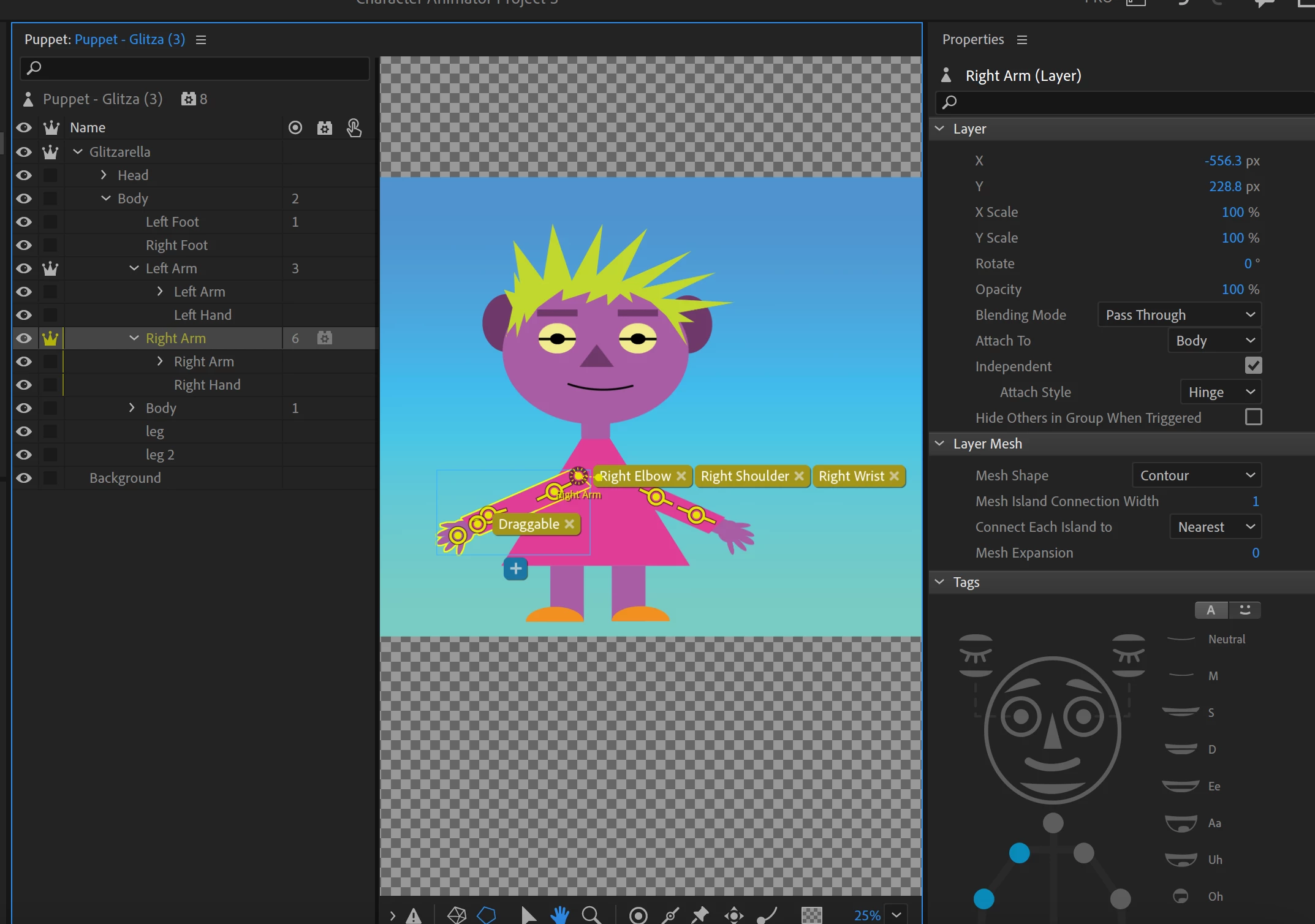
The arms of my character do not move with my arms when move my hands to gesture.


The following are the strategies I have already tried.


1. I added draggable tags to the hands.

2. I made the attachment style hinge.

3. I tried enabling the body tracking behavior.

4. I tried moving the origin position for both the arms and the body.


Any advice?

This topic has been closed for replies.
Correct answer TheOriginalGC

So sorry for all the stupid questions, but I tried doing all of this from scratch myself, and I couldn't move the nodes because it seemed like there was only one node and all of the tags were attached to it.  In other words, they moved as a group of three when I dragged them around using the arrow tool. Is there a way to make additional nodes so that each tag has its own node?


In your case, you should just click on the x to remove the tags, move or create nodes (handles), and then add the appropriate tags using the puppet map to the right - highlight the node and click on the corresponding point on the map to add the tag.

1 reply

TheOriginalGC
Community Expert
Community Expert
February 17, 2023

Add the IK (inverse kinematics) behavior to the puppet. Also, the elbow and shoulder should not be sharing the same node. Move those nodes out along the arm (in their natural locations) and apply the tags appropriately. Move the body behavior over to the root of the puppet as well.

Participant
February 17, 2023

Thank you so much for your help. Unfortunately, I don't know how to move the nodes or even want the nodes are. I will try though!


TheOriginalGC
Community Expert
Community Expert
February 17, 2023

This video should provide some assistance. https://youtu.be/7GKCw4f1UrI?t=878


Also, if you want us to troubleshoot your puppet, export it and put it into a file sharing service like Google Drive or Drop Box and post the link here.