
JackMyth
Participant
July 30, 2017
Question

Camera doesn't Work

  • July 30, 2017
  • 1 reply
  • 969 views

I want to use this software,but the camera doesn't work.

here is the screenshot:
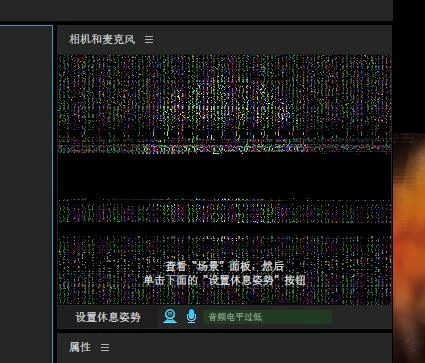
I'm using Notebook computer.This camera is the built-in camera.

I reinstall the software and graphics driver​. but this issue still happen.

what should I do?

This topic has been closed for replies.

1 reply

oksamurai
Legend
July 31, 2017

Hmm that's a new one to me - my best guess is there's something with the camera that isn't supported. What type of notebook is it? Do you have any specs on what type of camera it is as well?

JackMyth
JackMythAuthor
Participant
August 1, 2017

My notebook is Acer Predator G9-791 .In my memory my camera can work with a previous version.

About the camera....I don't know anything about it.

All software can work with the camera except Character Animator.Character Animator can detect the camera but can not get any image.

JackMyth
JackMythAuthor
Participant
August 10, 2017

Is this a built-in webcam or one connected via USB?

If you use the Switch to Next Camera or Switch to Default Camera commands in the Camera & Microphone panel's menu (the three lines next to the panel's title), does it show any notification about switching cameras?


It is a built-in webcam.

I use Switch to Next Camera command,It says Only Detected one camera.Use Switch to default camera command and it says switch to camera 1,but still can not get any image.