
Participant
January 8, 2019
Answered

Can't split audio lip sync into visemes

  • January 8, 2019
  • 1 reply
  • 962 views

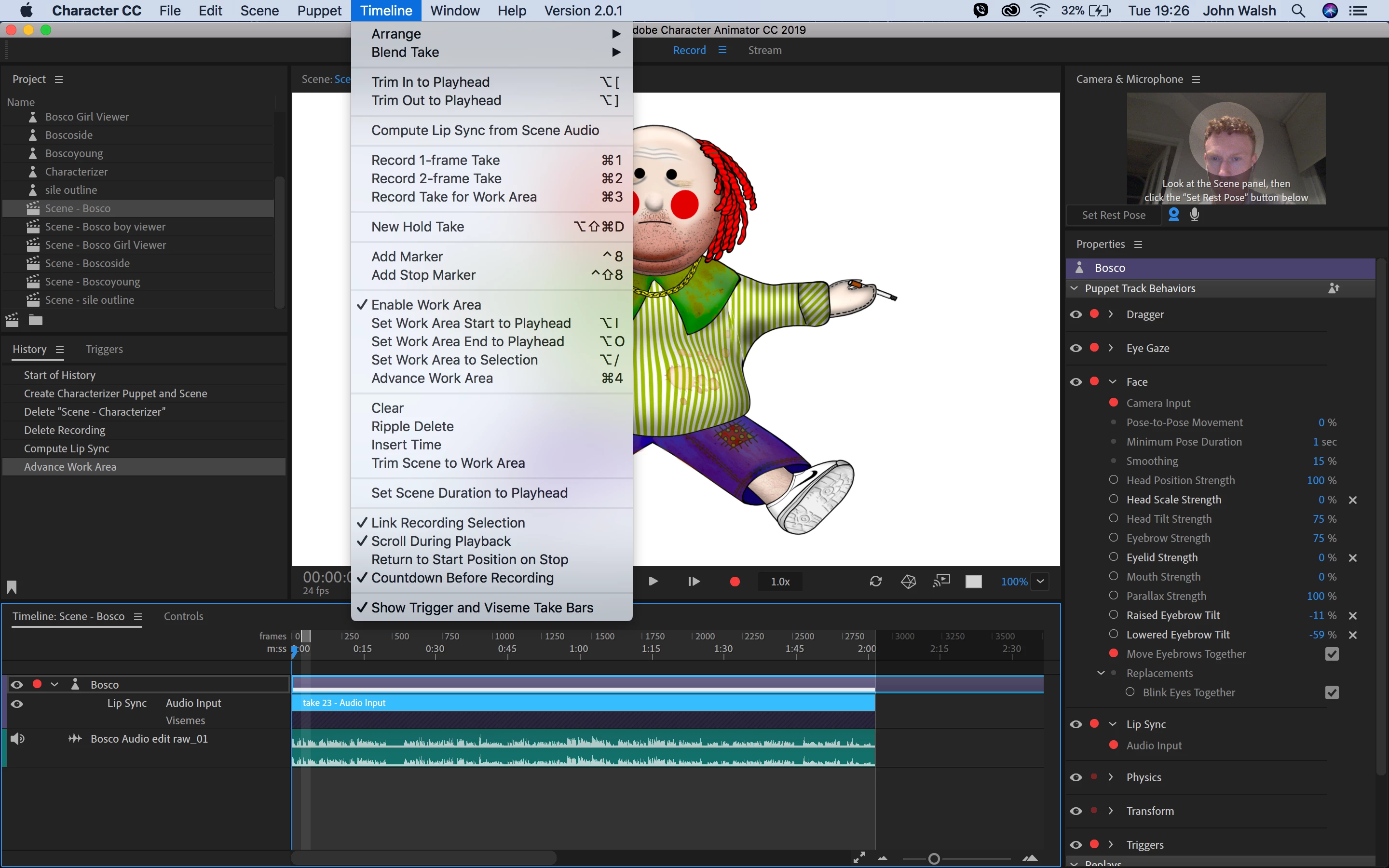
I used the "Compute Lip Sync from Scene Audio" option but I now can't adjust the visemes.  Other forums have said you select the audio input bar and select "split into visemes" from the Timeline bar but this option isn't there.  Not even greyed out, just not there.   Don't know what to do.  I've enclosed a screenshot
This topic has been closed for replies.
Correct answer alank99101739

Did you have the audio track selected when you did the compute from visemes? You have to select the audio track and the puppet (with lipsync enabled) for it to work.

Try zooming in - they can disappear if you are zoomed out too far (but I don’t think that is your problem). (Scroll bar at bottom right corner of timeline panel.)

If you right click in the black area immediately under the blue highlight bar, does it come up with viseme names? Can you add one by hand and stretch it out manually?

There was a post like a month back where someone had the same problem, but I cannot remember the problem. I don’t think it was enabling the mic...

1 reply

alank99101739
alank99101739Correct answer
Legend
January 8, 2019

Did you have the audio track selected when you did the compute from visemes? You have to select the audio track and the puppet (with lipsync enabled) for it to work.

Try zooming in - they can disappear if you are zoomed out too far (but I don’t think that is your problem). (Scroll bar at bottom right corner of timeline panel.)

If you right click in the black area immediately under the blue highlight bar, does it come up with viseme names? Can you add one by hand and stretch it out manually?

There was a post like a month back where someone had the same problem, but I cannot remember the problem. I don’t think it was enabling the mic...

Participant
January 8, 2019

I'm an idiot, I just needed to zoom in.  Thanks so much. 

alank99101739
Legend
January 8, 2019

You are not an idiot. I did not look closely enough myself. The diagonal bars are the indication that you need to zoom in And I did not notice that on the screenshot!