
Known Participant
July 26, 2019
Answered

Character Animator - timeline missing from record screen
  • July 26, 2019
  • 2 replies
  • 1415 views

Hi

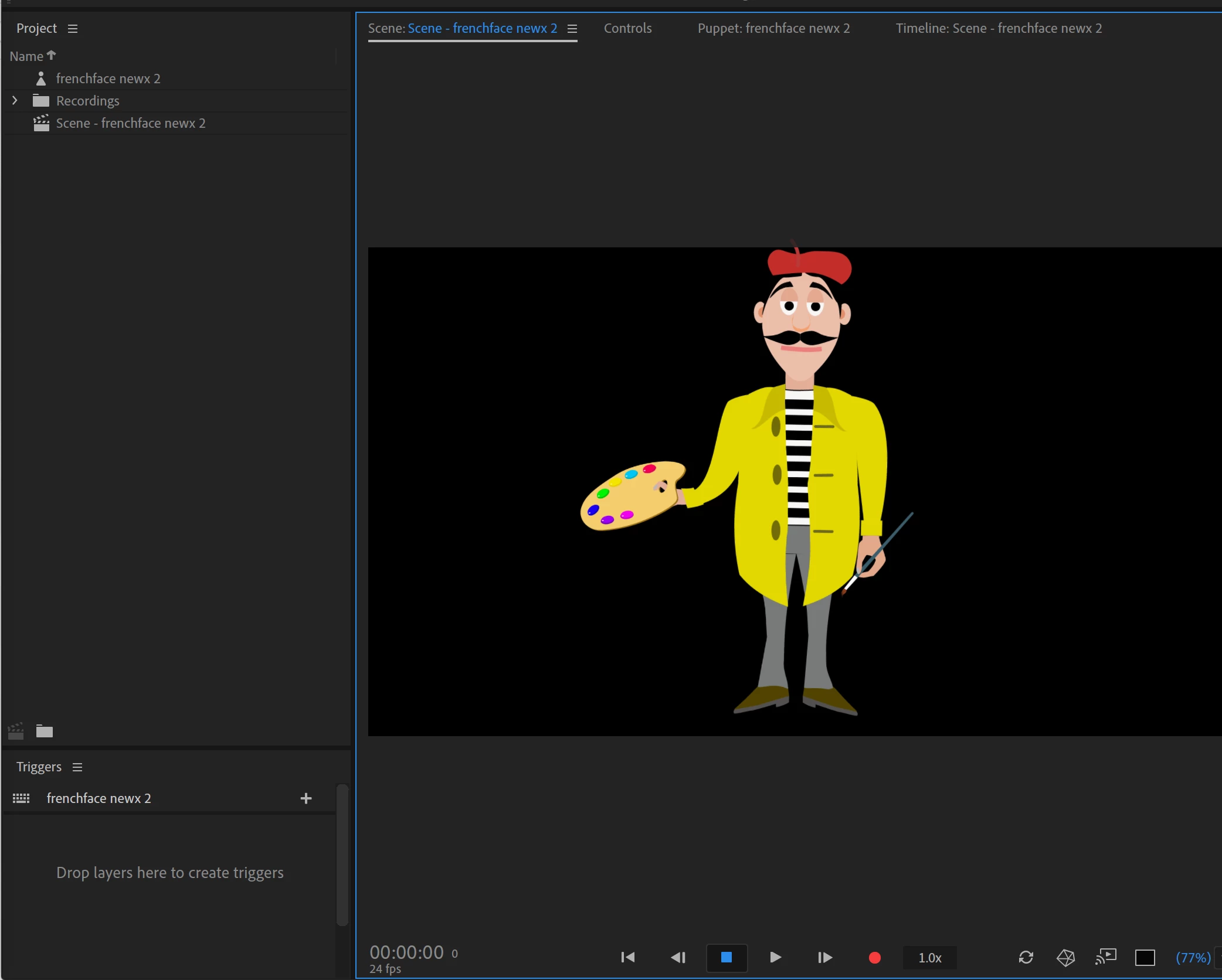
I don't know whether I have inadvertently clicked on some button but the timeline is not visible with the puppet on the record screen. The timeline can only be seen when I click either on Timeline Scene or on Window>Timeline and produces the puppetless screen shot 2. This means that without both things being on the screen simultaneously I cannot gauge how much time is elapsing or at which stage further recordings need to be added. If someone can shed light on this I would be very grateful.

    This topic has been closed for replies.
    Correct answer David Arbor

    Thanks for posting that screenshot. It looks like you accidentally dragged the Timeline panel on top of your Scene panel, which made it dock behind the Scene panel as a new tab. This is super easy to fix. Click and drag the Timeline tab (don't let go), now drag it below the Scene panel. While dragging you'll see several sections of the Scene panel light up. This lets you know where you'll be docking the panel.

    Alternatively, an easier way to do this is to reset your workspace by going to Window>Workspace>Reset to Saved Workspace.

    2 replies

    David ArborCorrect answer
    Inspiring
    July 29, 2019

    Thanks for posting that screenshot. It looks like you accidentally dragged the Timeline panel on top of your Scene panel, which made it dock behind the Scene panel as a new tab. This is super easy to fix. Click and drag the Timeline tab (don't let go), now drag it below the Scene panel. While dragging you'll see several sections of the Scene panel light up. This lets you know where you'll be docking the panel.

    Alternatively, an easier way to do this is to reset your workspace by going to Window>Workspace>Reset to Saved Workspace.

    Participant
    March 7, 2023

    My timeline is like completely gone, so are all the other pannels, please help.

    alank99101739
    Legend
    July 26, 2019

    Not sure how to explain how to do it easily, but this page from help might, err, help! Workspaces in Character Animator