

Embedding video in a tablet that's held by a character?
Hi [Ch] community,
I'm trying to figure out a better way to embed a video (screencast) into a device (tablet) that's being held by a character in one hand and pointed-to/touched with the other. Currently I'm using a green chroma for the device screen and then placing the screencast video in the layer behind and making the green chroma area transparent. It works, but the anti-aliasing on the puppet's hand is picking up a green glow.
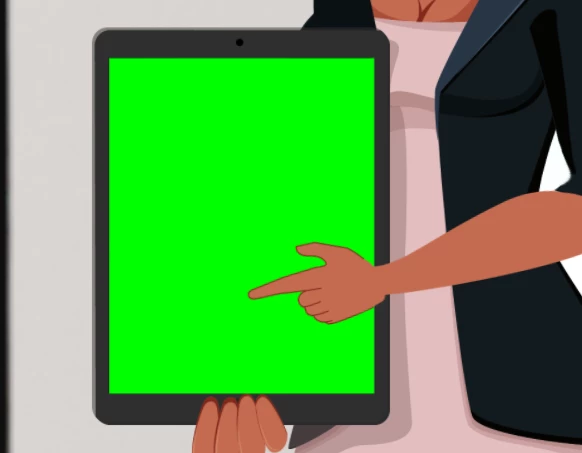
This is before rendering, with the green chroma key.
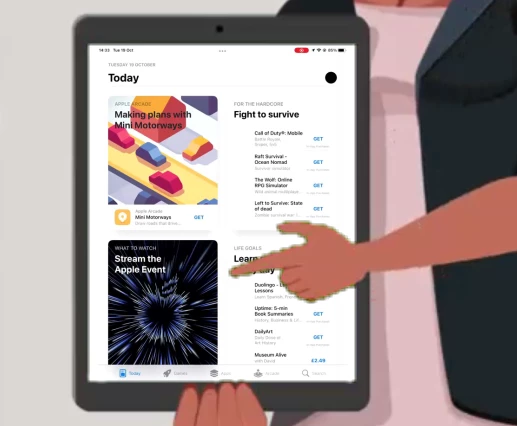
This is after rendering once the screencast has been inserted using the chroma key. It's not the end of the world, but I would like to find a better method.
Ideally I would like to render the video with the sequence in place. For some other variations of this theme it's easy because the puppet isn't holding the device, and I can put the video in a layer behind the puppet. But in this case the video is within the puppet layer.
Does anyone have any suggestions for putting the video between layers of a puppet?
Can anti-aliasing be turned off for the puppet's hand?
Is there a better key to use than green?
Thanks in advance,
Grant.
 AdChoices