
Known Participant
June 21, 2022
Answered

Eye gaze / Limb Ik

  • June 21, 2022
  • 4 replies
  • 754 views

The puppet; https://drive.google.com/file/d/1frKQbUweC-gx8Z4068IJhO1cZQZlKahA/view?usp=drivesdk


Hi everyone. My problem is my puppet's eye pupil is going far away from the eyeball. I set the eye pupil size and the range but it doesn't look like its working. And one more thing;  even if there is Limb Ik behavior, my puppet doesnt seem like it has a ground detection. And when it walks it looks like its arms are bending the wrong way, when i reverse the bend, it just looks the same. Nothing is changing. I know walking and limb ik behaviors may cause problems but i still wanted to give it a shot.. Thank you in advance. I can't even believe that you guys help us that much. So appreciated. 
This topic has been closed for replies.
Correct answer k_oshiro

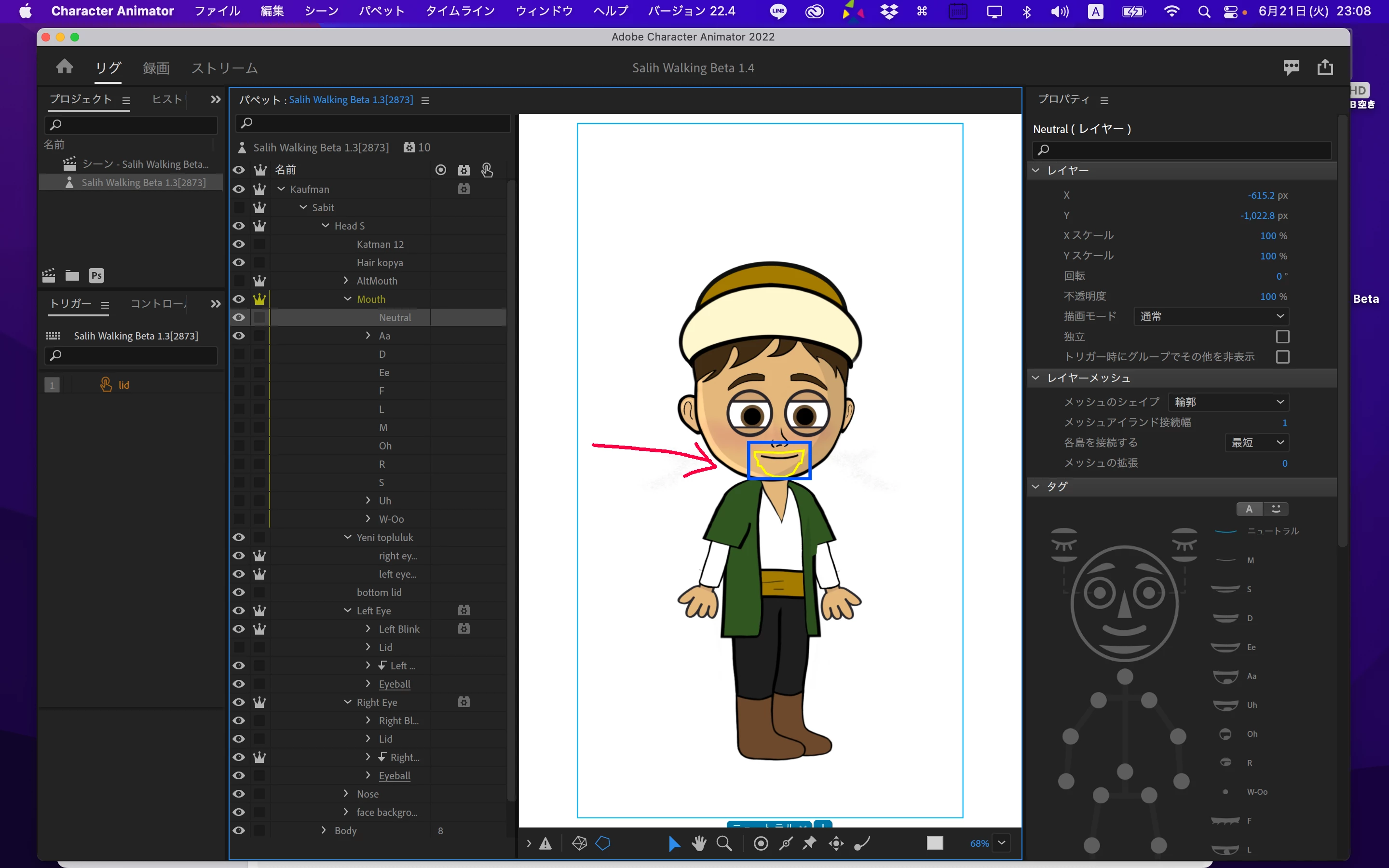
Normally the square blue frame encloses only objects. However, in your puppet, the blue frame surrounds the entire puppet.
Perhaps you used another application to draw the picture?
(Like Procreate?)

I think that is the reason why it is not working properly.

4 replies

k_oshiro
Community Expert
Community Expert
June 21, 2022

I don't know why, but if you have created a PSD in "Procreate", you need to make it a smart object in Adobe Photoshop or import and export the PSD in Adobe Illustrator. Then the blue borders will fit the object.

Try it with a simple puppet.


(in Japanese)

https://twitter.com/katsuya_oshiro/status/1527824204376469505?s=20&t=zzYrGSST7K29nWISV2D0Cg


https://twitter.com/katsuya_oshiro/status/1528787389426311173?s=20&t=bHlsuxHdMS4kqM3HbjBwJw


k_oshiro(AdobeCommunityExpert)
Known Participant
June 21, 2022

Thank you so much K_oshiro, this is the second time you helped me 🥹♥️♥️ 

k_oshiro
Community Expert
k_oshiroCommunity ExpertCorrect answer
Community Expert
June 21, 2022

Normally the square blue frame encloses only objects. However, in your puppet, the blue frame surrounds the entire puppet.
Perhaps you used another application to draw the picture?
(Like Procreate?)

I think that is the reason why it is not working properly.

k_oshiro(AdobeCommunityExpert)
Known Participant
June 21, 2022

Omg. I DIDN'T EVEN KNOW THIS COULD CAUSE A PROBLEM 😭😭 But, i mean both are psd files. Why? I am devistating right now lol

Known Participant
June 21, 2022

Devastated lol

Cherie2450573608fr
Inspiring
June 21, 2022

Hi there, I took a quick look and I see some of the pupils are not independant. Also on Sol view, you have mixed up left and right pupils (left pupil is in right eye group named and tagged as right pupil). 
There might be more but that is something I saw quickly!


Known Participant
June 21, 2022

Thank you for your answer. Turns out that you should convert your layers to smart objects when you draw from the procreate 😅

Known Participant
June 21, 2022

Up 🥺