

alank99101739
Legend
February 1, 2018
Question

Eyelid distortions during blinks

  • February 1, 2018
  • 1 reply
  • 1674 views

Is there a way to avoid the eyelid distortion shown below? See the dip in the middle of the eyes in the third picture below?

When open they look like (good)
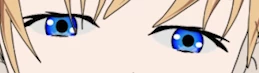
Closing you can see the little dip in the middle start to come in
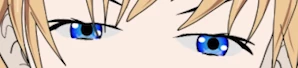
And finally

I wanted a straight line.

I don't think it happens if you turn off camera strength - with the autoblink behavior I think it uses the blink layer instead. But using the more expressive camera controls over eyelids creates this imperfection.

This topic has been closed for replies.

1 reply

oksamurai
Legend
February 1, 2018

Set eyelid strength to 0% (no blinks), or make the eye groups independent.

alank99101739
Legend
February 1, 2018

Thanks for the quick response!

I was after the eye control (gives more expression) so setting to 0% is what I am trying to avoid. I mean the dip in the middle is annoying, but the extra control is useful.

Currently I have the following things independent. Which ones are you suggesting I change?

For example, if I make "Left Eyelid Top" independent then when the eye lid goes down you can see the pupil above the eyelid (its not masked out any more). The eye opening is also visible above the eye lid.  (You can also see the bottom eyelid, the short horizontal black line, sneak up into the pupil.)

Thanks again!

oksamurai
Legend
February 1, 2018

Check out Dude from Okay Samurai Puppets  - his eye groups, top and bottom eyelids, and pupils are independent. The "blink" happens when the eyelids are basically at one extreme - however with him I think I set eyelid strength to 50% because I didn't want him to blink, only squint. I find the eyelids can be fluttery and was erring on the side of having my eyes close too much when turned all the way up.