Participating Frequently
November 20, 2018
Answered

Floating head not attached to body

  • November 20, 2018
  • 2 replies
  • 9310 views

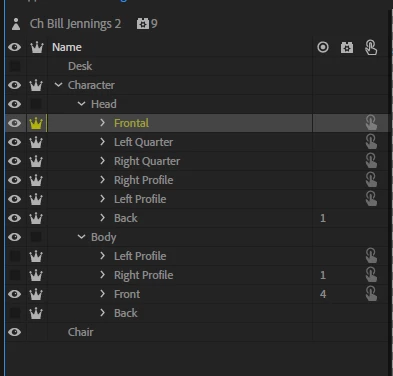
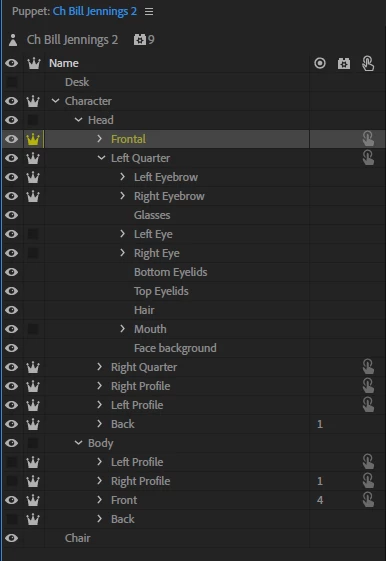
Head floats, not attached to body. The head and body groups have no crown turned on. Head has subgroup of 5 different head turns.
This topic has been closed for replies.
Correct answer alank99101739

Regarding the head, set the "Head Position Strength" property of the "Face" behavior to like 10% or even 0. That will stop the head moving away.

I note that you have a "Back" view also not hidden. CH does not understand that, so it is being displayed behind the front head. You might want to turn off visibility of the layer to stop it sneaking out behind the head.

I then added a "Head Turner" behavior to the "Head" layer which made the head start turning, or add it to the Character layer and then it turns the body and head at the same time.

Is that everything you were trying to do? Feel free to ask any more questions.

2 replies

namorAuthor
Participating Frequently
November 20, 2018

Ive also checked for an sticks in the body layer and nothing there either. PLEASE NEED HELP. Thanks in advance

alank99101739
Legend
November 20, 2018

Are you able to export the puppet and share it? Walk behaviors can be hard to debug just from screenshots. So many things can go wrong!  (And frankly I don't understand them well enough myself to understand why sometimes things get stuck and other handles do not - so its often trial an error still for myself.)

I notice you have profiles under the Head layer and under the Body layer. Is one head turns the other walk behavior?

alank99101739
alank99101739Correct answer
Legend
November 21, 2018

Regarding the head, set the "Head Position Strength" property of the "Face" behavior to like 10% or even 0. That will stop the head moving away.

I note that you have a "Back" view also not hidden. CH does not understand that, so it is being displayed behind the front head. You might want to turn off visibility of the layer to stop it sneaking out behind the head.

I then added a "Head Turner" behavior to the "Head" layer which made the head start turning, or add it to the Character layer and then it turns the body and head at the same time.

Is that everything you were trying to do? Feel free to ask any more questions.

namorAuthor
Participating Frequently
November 20, 2018

When I go to a scene the head will move side to side and follow my movements however the body is stuck in place. Also, any sudden head movement will cause the head to come off the body. I dont have neck layer" instead the head layer is resting on the body layer
