
Participant
July 7, 2021
Question

Hair not moving with head

  • July 7, 2021
  • 1 reply
  • 1029 views

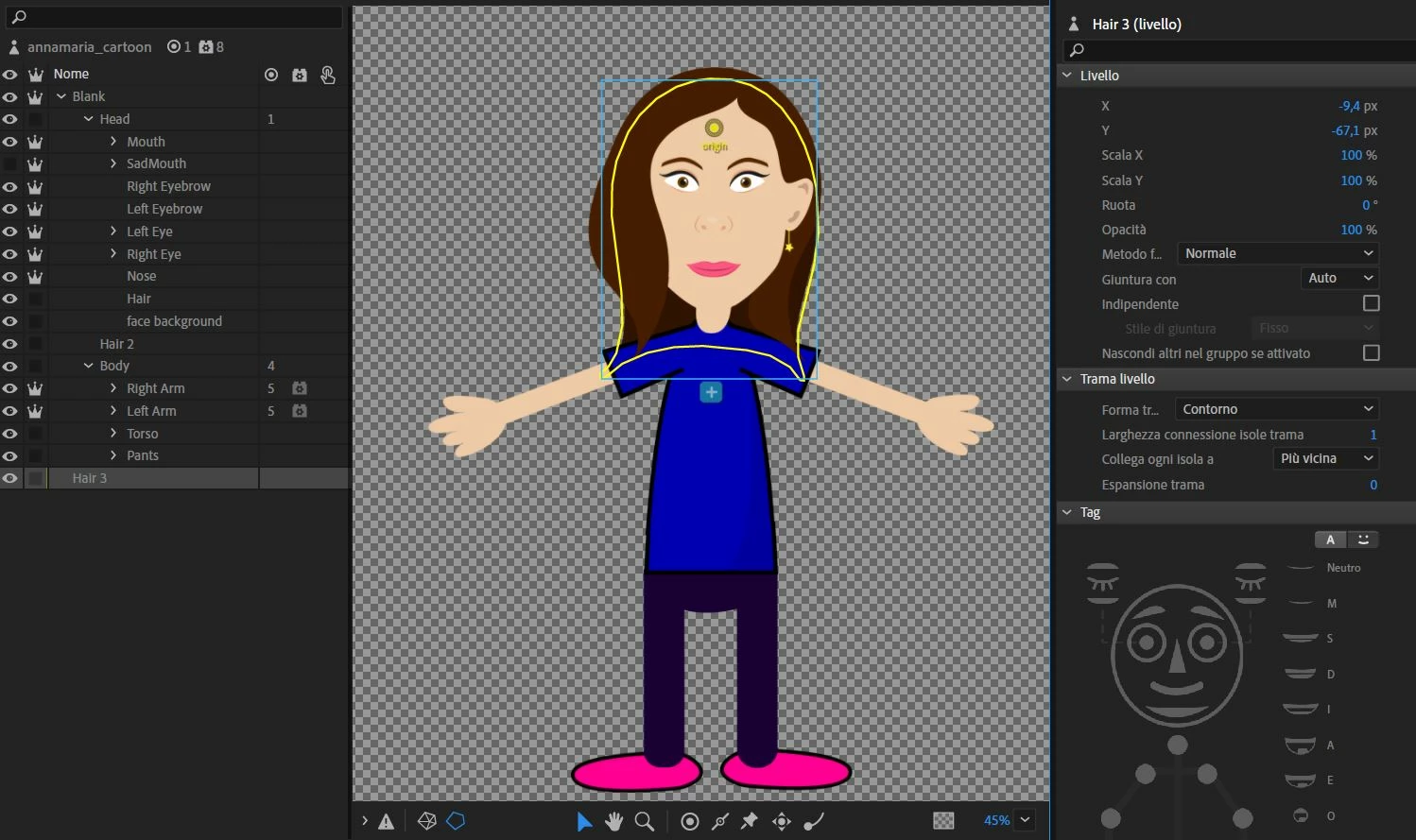
Hello. I created several layers for my puppet's hair, in order to visualize them both in front of the face, behind it, and behind the whole body. However, only two of the levels move together with the head, the one behind the body does not. I tried to move the origin point but the problem remains, what can I do? Thank you.


This topic has been closed for replies.

1 reply

alank99101739
Legend
July 7, 2021

The rear hair is at the wrong nesting level - you need to nest it under the character still. It needs to be nested one level deeper than it is (inside the character, siblilings of head and body)

marco988Author
Participant
July 8, 2021

Thank you. I had to put in Illustrator Hair 3 inside Torso to make it as a sibling of head and body. Is that correct? Because trying to put it under pants, he went back to where he was before.
It would seem to work anyway.

marco988Author
Participant
July 12, 2021

It is common to want to make hair bounce around separate to the face/body. Making parts of the hair independent is the normal approach so it can bounce. Bangs and fringe are often wanted in front of the face and body. Long rear hair behind face but over shoulders (in front of body) is pretty easy (still goes in the Head layer). The harder case is hair behind head and behind body as to be behind the body cannot be in the head layer any more (your case).


There are different approaches, but one common overall approach is to make the top of the head hair not independent, so it always moves with the head. Then make the lower parts of the hair a separate layer and independent with dangles to get movement. E.g. the bangs and fringe. You might want most of the hair to stick with the head, but the longer dangling part of the hair behind the head you might want to make bounce and sway - this might require you to split the rear hair into two layers for example (there are many ways to tackle the problem, with different results).


So what you have done works, but if you put dangles say in the corner of the rear hair to make it bounce a bit, it will also cause the torso (shoulders in particular) to move since they are in the same "mesh" as the hair - the yellow outline above shows the "mesh". Everything in a mesh moves together (I think of it like a thin sheet of rubber that you have drawn on - you stretch a part and everything on the same mesh/sheet of rubber stretches a bit with it).


Some theory: There are two hierarchies in Character Animator that are important to understand. There is the rigging / layer hierarchy. Things attach to their parents and move with them. The layers higher on the screen appear in front of things lower on the screen - so you had the rear hair below the body (looking top to bottom down the screen). So everyone gets that one without thinking.


There is a second hierarchy however which is a hierarchy of meshes. When you mark something independent (the little crown) then that tells CH to start a new mesh for all the children under that layer. If you don't want eyes to warp/bend with the rest of the head, then you make the eyes independent. The origin of the independent layer controls where the new mesh attaches to the parent mesh (the face in this case). They need to overlap. I think of it like sticking a pin through two layers of thin rubber for a "hinge" attachment, or using a dob of super-glue for a "weld" attachment. One rotates freely, the other does not.


Sorry for the long description, but back to the rear hair. The nesting depth only matters to know where it is in the hierarchy relatives to independent layers. Because Torso is not independent, the hair can be where it is or up a layer higher - it will not affect CH. Do whatever makes more sense to you. Since your head is not independent, it is in the same mesh as the body. That makes rear hair MUCH easier. You can make the rear hair independent, have it low on the screen (like you have) set the attachment point to the head. Attachment points care about the *mesh* hierarchy, not the partent/child nesting hierarchy. So you can have hair attach to the head, even though not a child of the Head layer, as long as your hair is under the same independence layer.


The yellow line by the way shows the mesh outline - it shows all the layers in the same "independent group".


Not sure how well I described that. There are a few posts on rear hair in the forums. If the head is independent there are real problems that kick in because the rear hair behind the body has nothing to attach to (the head if independent is in a separate mesh to the body, and the rear hair cannot attach to it).


Here is one approach using a highly detailed (cough cough) drawing. In this drawing, I would make the face and brown hair all in the Head layer. The brown hair is not independent so will stay in place (like strong hairspray).  What I have drawn in purple below I would also make as brown hair, but in a separate layers (there are 2 of them) that goes behind the Body (low on the screen). I would make them independent, then attach (the green spots) to the main hair using a weld attachment. Then add dangles. The dangling bits being low on the screen will be visible behind the body. So only those dangling parts would move, the rest of the hair is guaranteed not to move. (The purple below I drew in front of the brown hair - that was me being lazy - in the real project it would be behind the brown hair.


When can this go wrong? Well, if you draw a black line around the hair then you will see a problem where the purple attaches. This is why there is not a single solution. The above is just what I would do to get some parts bouncing and moving, while keeping most of the hair attached to the head.


Thanks for the detailed reply, you have been very kind. I must admit that I have not yet understood everything, I will still do some tests in the next few days and see how it goes. In case of problems I will rewrite here 🙂