Torin Inc
Inspiring
April 28, 2017
Answered

Handle Tags not showing up in properties (WALK)

  • April 28, 2017
  • 3 replies
  • 3123 views

I've been working and learning CA now since December, and I'm loving it. I created a regular full on puppet and it works great.

I just now started to play with the Walk Cycles, and I created a new side-view puppet for this purpose. I followed the video tutorial and my puppet would not walk. I got two of the heads (it has five heads) to bob up and down, disconnected from the body (*note below that those two heads' tags do show up in the WALK handles properties, and FYI I added fixed points on the head and did exactly as I did on my first original puppet, and only 2 of the 5 heads bounce while walk cycle is in effect).

I realized that the tags I was creating for the body, the limbs and heads were not showing up in the WALK handle properties. I have tagged them correctly, I've removed the tags and re-added them, yet they don't show up. I've tried closing the app and reloading, nothing.

I downloaded WALKBOT, and I removed tags and re-added them successfully. It's just not working on my puppet.

I have rigged all the points just as the video tutorial shows (head, heels, toes, ankles, knees, wrists, etc.), but they don't show up in the WALK handles properties...
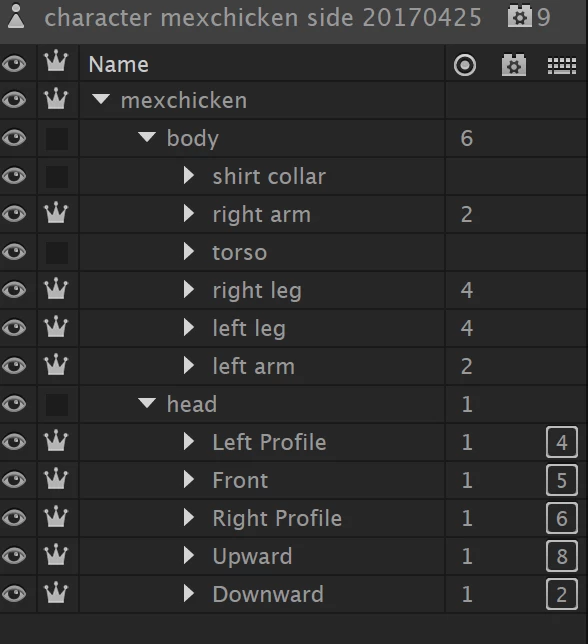
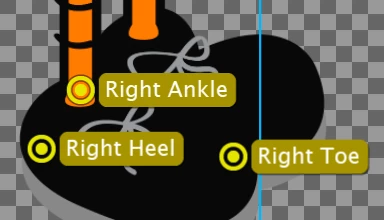
Here are screen captures of the Right Heel so you can see what I mean:
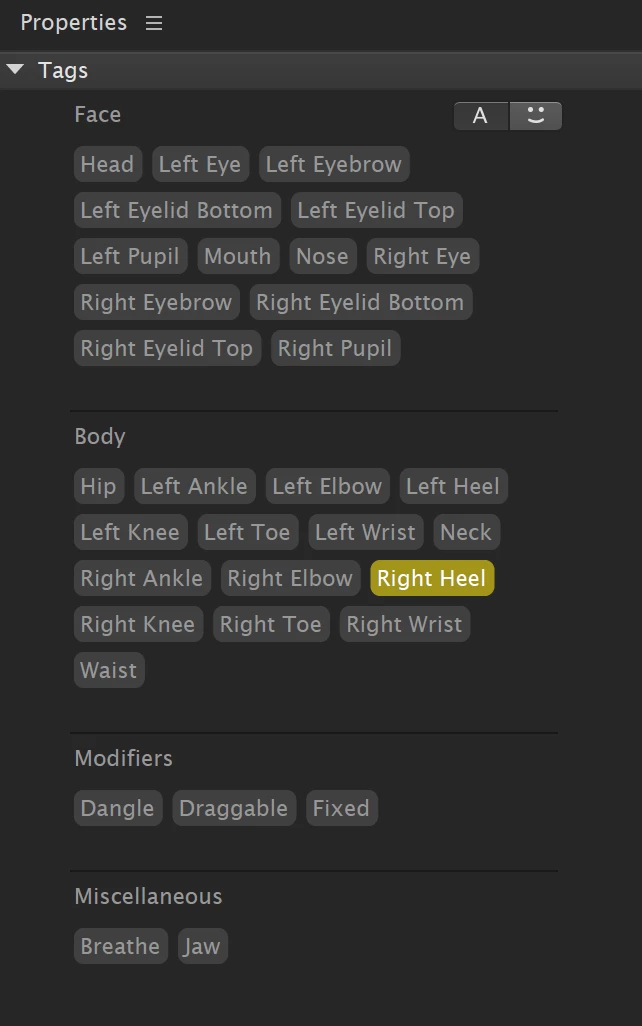
And here are the handles properties/tags for the WALK cycle behavior (notice that two heads are listed in the tags, the left and right profile, and those two do bounce up and down in the walk cycle, but detached from the main body). All the other tags that I created don't show up:
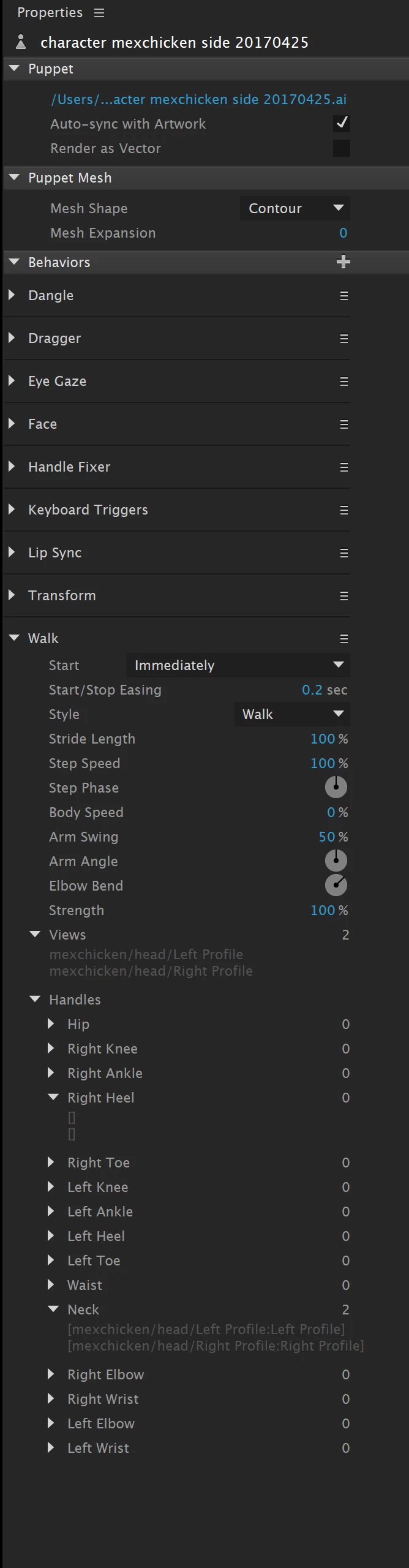
The only thing that I added/did differently from the video tutorial is I used a contour mesh (rather than auto) for the puppet (same as I did in the first original working puppet).

Any idea why this can be happening? Why the tags aren't applying in the Walk Cycle?

This topic has been closed for replies.
Correct answer oksamurai

Yes - if you make major renaming or structural changes to your file, CH can't reconcile everything and will think it's all new groups/layers. So ideally you want to do most of your artwork/structure pre-rigging.

But yes - this is a known issue and will improve in the future.

3 replies

Torin Inc
Torin IncAuthor
Inspiring
August 22, 2017

I've taken sharing puppets to another level by sharing the "right-walking" body of a puppet, adding it to the "left-walking" puppet, reversing the body, and that's it. Now I have a right-walking and left-walking body with half the work.

The issue I've seen is that if you change the original work file (illustrator file for me- name changes, etc.), it will cause an error in the puppet and lots of the rigging will be lost. I believe this has to do with the shared puppet parts being renamed or redone; I'm hoping it will get fixed in the upcoming updates. If it is fixed then you'll be able to create a counter left puppet.

oksamurai
Community Manager
oksamuraiCommunity ManagerCorrect answer
Community Manager
August 24, 2017

Yes - if you make major renaming or structural changes to your file, CH can't reconcile everything and will think it's all new groups/layers. So ideally you want to do most of your artwork/structure pre-rigging.

But yes - this is a known issue and will improve in the future.

Inspiring
January 1, 2022

I've found this thread due to Walk mis-identifying my own head turner views. And it looks like my necessary restructuring will trigger the other ongoing issue mentioned, which is that changes to the PS file will probably heavily disrupt my rigging.


While I'm grateful to have found a solution, I think it's fair to note that, despite earnest reassurances that these issues are being worked on, customers are still troubleshooting them 4 years and 4 months later.

Torin Inc
Torin IncAuthor
Inspiring
May 3, 2017

Thank you for the response, and after extensive testing I have found that your suggestion helped.

When the first versions of CA were in use, the head turner behavior was included. So, as per the many tutorials available for CA, most people built their puppets with two main upper-level layers- the body and head.

The head was setup with the following layers: "FRONTAL" or "FRONT", "RIGHT PROFILE", "RIGHT QUARTER", "LEFT PROFILE", LEFT QUARTER". This allows the head turner behavior to read, and tag, each head separately:

PUPPET NAME

-BODY

     -LEFT ARM

     -RIGHT ARM

     -TORSO

     -LEFT LEG

     -RIGHT LEG

-HEAD

     -FRONT

     -RIGHT PROFILE

     -RIGHT QUARTER

     -LEFT PROFILE

     -LEFT QUARTER

The problem is this- the new version of CA (version 6) looks for the same labels ("FRONTAL" or "FRONT", "RIGHT PROFILE", and "LEFT PROFILE"), and it does not differentiate whether they are for a HEAD label or for a FULL BODY label.

Solution- we now need to create a new puppet with three FULL BODY profiles ("FRONTAL" or "FRONT", "RIGHT PROFILE", and "LEFT PROFILE", and within these profiles we need to further create layer for the body and for the head, and inside the head we need to add the head turner layers ("FRONTAL" or "FRONT", "RIGHT PROFILE", "RIGHT QUARTER", "LEFT PROFILE", LEFT QUARTER"):

PUPPET NAME

-FRONTAL

    -BODY

     -LEFT ARM

     -RIGHT ARM

     -TORSO

     -LEFT LEG

     -RIGHT LEG

    -HEAD

     -FRONT

     -RIGHT PROFILE

     -RIGHT QUARTER

     -LEFT PROFILE

     -LEFT QUARTER

-RIGHT PROFILE

   -BODY

     -LEFT ARM

     -RIGHT ARM

     -TORSO

     -LEFT LEG

     -RIGHT LEG

    -HEAD

     -FRONT

     -RIGHT PROFILE

     -RIGHT QUARTER

     -LEFT PROFILE

     -LEFT QUARTER

LEFT PROFILE

    -BODY

     -LEFT ARM

     -RIGHT ARM

     -TORSO

     -LEFT LEG

     -RIGHT LEG

    -HEAD

     -FRONT

     -RIGHT PROFILE

     -RIGHT QUARTER

     -LEFT PROFILE

     -LEFT QUARTER

Of course, this gives us three times the work, but the results are 100% worth it. The ability to walk, left and right, or to face forward, is incredible. Add the head turner ability to each of those walking parameters and it becomes even more amazing.

I suggest that you (ADOBE) differentiate the naming structure, for example LEFT PROFILE HEAD and LEFT PROFILE FULL BODY so that when we label and create our puppets CA will know how to separate and differentiate between the layers and structures. This might be a good idea to bring up in your upcoming tutorials and tips & tricks.

Thank you so much, and as I continue to learn to use the app, I become a bigger and bigger fan of CA!

oksamurai
Community Manager
Community Manager
May 3, 2017

Glad you figured it out. And I agree, we could be clearer with those views - definitely something to consider for the future, thanks!

Torin Inc
Torin IncAuthor
Inspiring
April 28, 2017

One other thing that may be causing this error is that puppet's name is the same as my previous puppet. The files are named differently, but the actual puppets used to rig have the same names. Therefore, I have two puppets available in CA- the original one that works fine and this new walking one (both have the same name for the actual puppet, but different file names). Could that be the problem?

oksamurai
Community Manager
Community Manager
April 28, 2017

Yeah. If the handles are showing up in the puppet panel but not in the walk behavior pulldown, then the Walk behavior can't find them for some reason.

The issue seems to be that the Walk behavior is finding the "Left Profile" and "Right Profile" for your head and latching onto that instead of the body. See under "Views" in the Walk dropdown - that's what it's showing.

My advice would be to check out how Maddie is set up here and emulate her: http://adobe.com/go/chexamples. She has head turns + a three view walk. I think the issue is that you only have one head group, where in Maddie she has each of the views at the top level - Frontal, Left Profile, and Right Profile - each with its own head and body. That's the route I would take too, so Walk picks up on those top level views instead.