Also, on which layer ("mouth" or "happy"/"sad"/etc) do you suggest applying the LipnSync behavior?
It looks like the extra behavior is not needed. What it needs to find is every mouth group under the "Mouth" in LipSync (at top of your latest screenshot, with 4 of them). It then looks under there for visemes.
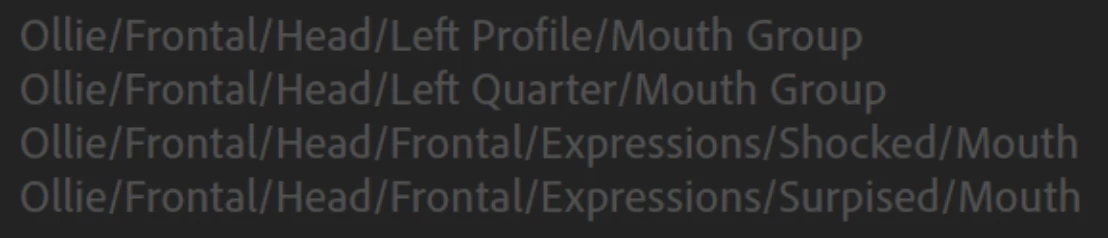
Now there are two tags in CH, "Mouth" and "Mouth Group" and I always forget what the two mean (blush). Its confusing because the LipSync behavior documention talks about "mouth groups" but only bolds "mouth". Also, if you have a layer called "mouth" (at least without a Mouth Group layer in use) it will tag it with BOTH tags. So it always confuses me. I just normally never have a layer called Mouth Group (only Mouth), and that has just always worked so I never looked into it further.
Backing up on tags - normally what happens is if a layer matches a tag name, the tag gets added automatically. This is true for subsets of words. For example "Sad Mouth" will match "Mouth" as well and get tagged.
But over time, tags and behaviors changed here and there, so it might be that a layer containing "Mouth" anywhere in the name always gets tagged as "Mouth" AND "Mouth Group" for historical reasons.
See how you have ..../Frontal/Expressions/Shocked/Mouth as one of the 4 "Mouth" paths? It will then look for visemes nested inside this layer. You did not expand that part of the rigging, but I am guessing there is no Ah etc inside. So the Lipsync behavior said "well, I'm told its a mouth with visemes, but it cannot do the Ah sound". If "Shocked" is just a single mouth drawing (not a series of visemes) then you don't want to have a Mouth layer for that expression. The expression swapset hides any other Mouth tree of visemes when you trigger the shocked expression with the keyboard. Shocked in this case is not a viseme understood by ch (only Smile and Surprised and Ah/E/F/... sounds are visemes) - so it should not appear under Mouth. If you want a set of Ah/E/F/... for happy talking, then you would have a .../Head/Expressions/Happy/Mouth/<visemes> hierarcy.
Not sure if that helped. Let me try another way.
* First decide which sets of mouths are going to have multiple visemes. In your case, you are going to at least have visemes for the profiles and frontal. You *can* also have multiple mouths for different emotions (a set of normal mouth visemes, a set of happy mouth visemes). Decide if going to do this or not.
* Then decide what other expressions you want (as a single drawing - e.g. shocked might be such a single drawing).
* Then, for each profile, have an Expressions layer with children of the different expressions (default, shocked, angry) - but not Smile and Surprised (because they are considered visemes!)
* For each expression with multiple mouth visemes, create a Mouth layer and put the visemes under Mouth.
* Create a swapset on Expression layer with the default expression as the swapset default, so you can trigger Shocked or Angry and it will hide the default mouth.
* For single layer Shocked or Angry etc expressions (that is, no visemes!), DO NOT have a layer called Mouth.
I hope that helps - you are really close, its just a little funky and I could not see what you were doing inside the Shocked layer from the screenshot. I should have probably just asked for that Lol!

 AdChoices