
johnk67259553
Participating Frequently
January 21, 2021
Question

HELP NEEDED!! Layer/File arrangement transfer issue from Illustrator to Character Animator

  • January 21, 2021
  • 3 replies
  • 593 views

Hello!  

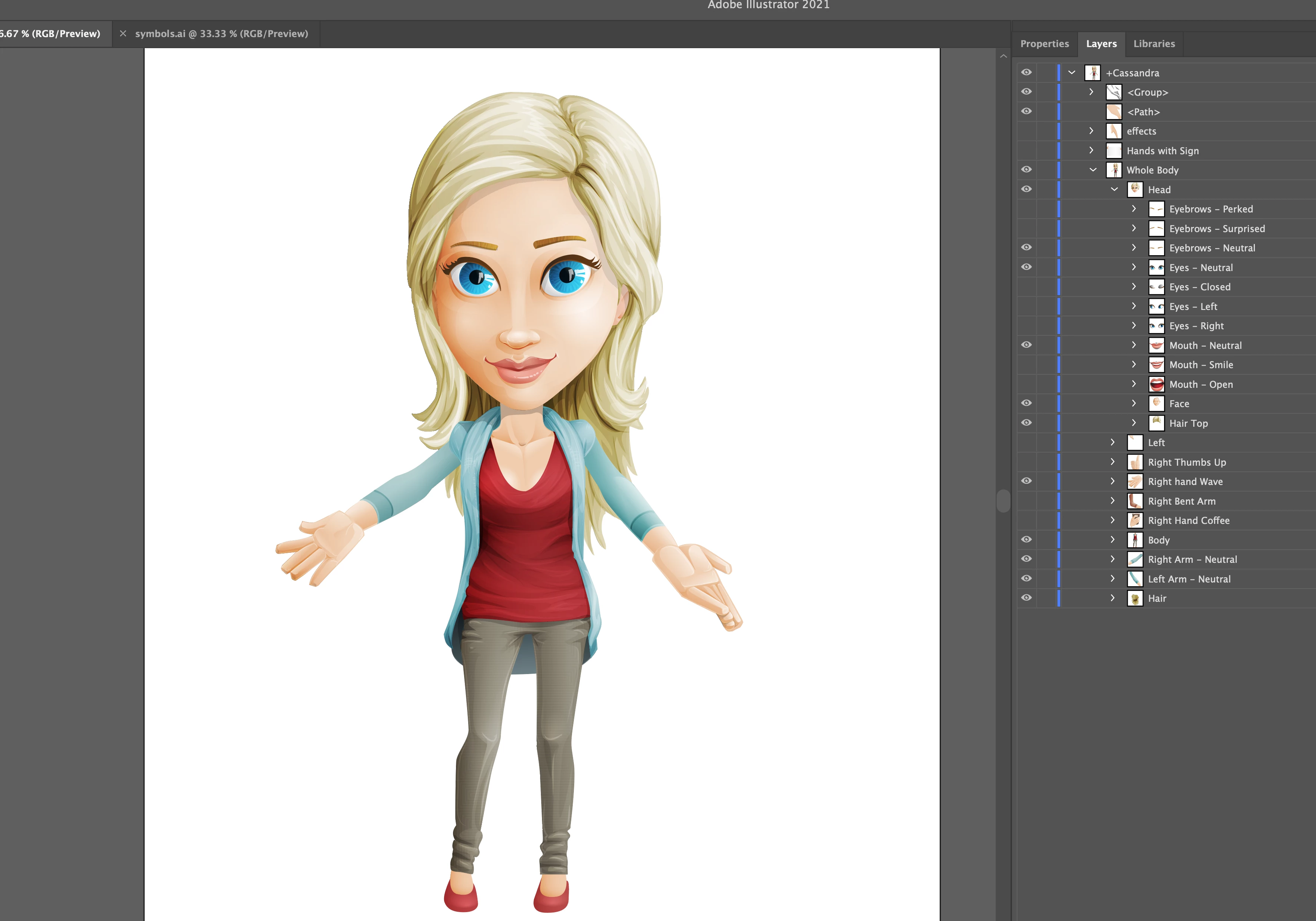
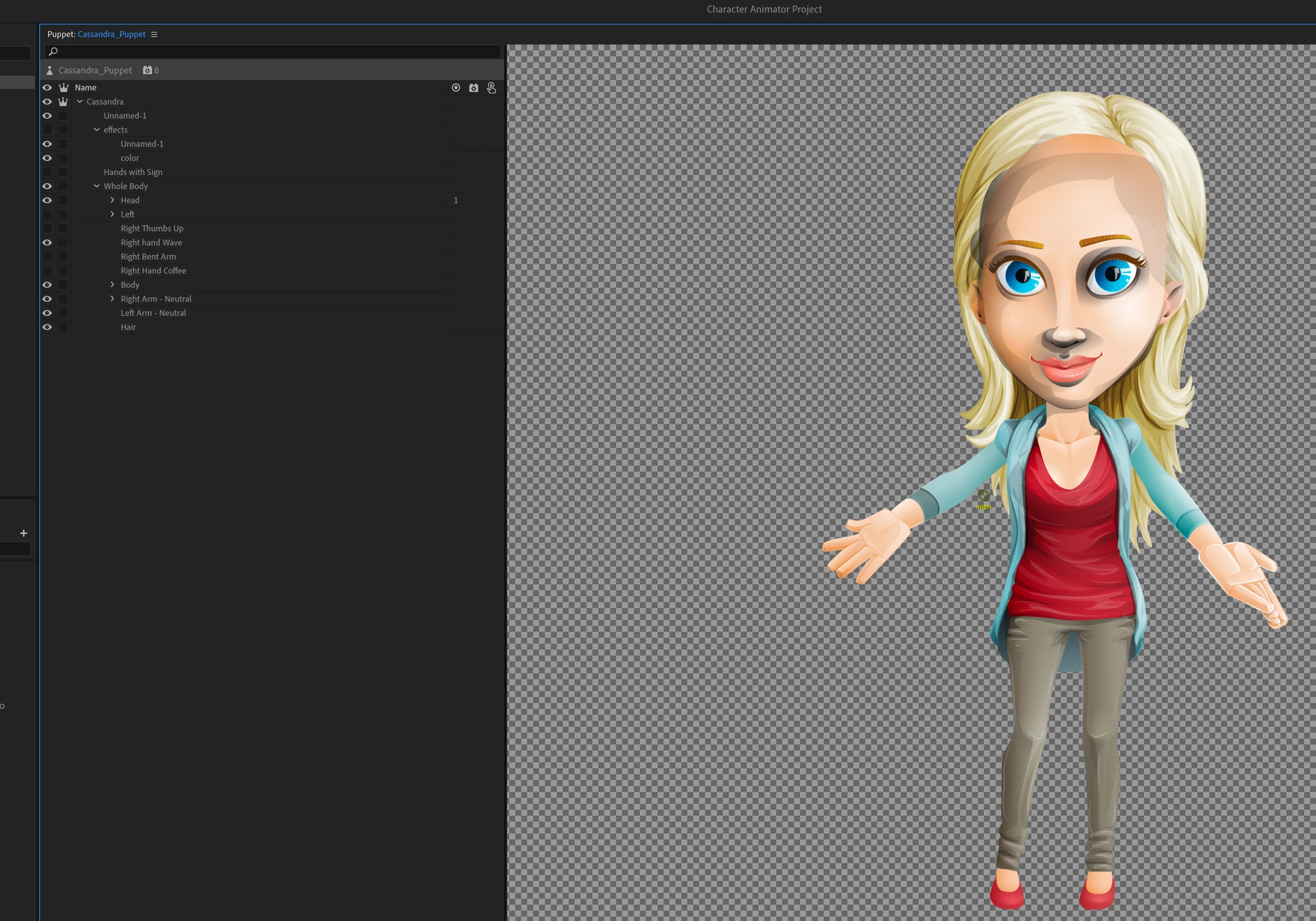
So I'm relitively new to Character Animator. Being a Graphic Designer, I am trying to utilize this software more often now in my work and I am currently working on project and am trying to animate a puppet in Character Animator (a puppet figure I purchased from graphicmama.com) - anyway, with this specific puppet character, I cannot seem to get the different layers (specifically around the head) to transfer or match properly, as you can see in the attached images here.  So my primary question is, what am I doing wrong??

I go through the normal process as before, and am even following a youtube tutorial step by step; transfering the inital Illustrator project into Character Animator but for whatever reason I cannot figure out why the layers for the hairline and highlights of the face are coming in so dark like this...
Any help will be greatly appreciated!!  I hope I've explained this decently.

Thanks!

John

This topic has been closed for replies.

3 replies

alank99101739
Legend
January 22, 2021

oh, another thing it might be - the depth of layers matters! In restructuring the puppet you might have brought say the face layer in front of the hair layer, causing the front locks of hair to not be visible due to the skin of the face.

alank99101739
Legend
January 22, 2021

Hmmm. Was looking a bit closer. The original file had face above hair in the layer hierarchy, but the hair appears in front! Maybe the illustrator file is using masks or something in the face layer that ch does not understand. You may need to duplicate the hair, then erase the 'behind' hair in the copy so you have a "in front of face" hair layer and a 'behind face' hair layer.


There is some masking support in CH as well, but i don't think it is powerful enough to solve this. I think you need to split the hair artwork to make it work

johnk67259553
Participating Frequently
January 22, 2021

Thanks for your responses!  So I first considered disabling layers in Illustrator and did so, once I save that project is automatically updates that file in Character Animator, however even if I disable and/or swap or duplicate layers in Illustrator, it either doesn't change anything in Character Animator or makes it look worse.  I've been looking over the layout and structure of the files in Chracter Animator over and over again and cannot figure this issue out. It's weird cause graphicmama makes these characters specifically to be used in Character Animator so I'm not sure why some layers or files wouldnt be supported in there.  And on top of that, the shading and gradients on the other parts of the character appear to be the same and they transfer into Character Animator with no problem.  I just feel completely stumped on this one. Hmmmmmm

alank99101739
Legend
January 22, 2021

I have only purchased puppets from graphicmama - i did not realize they sold AI files directly too.


The grey shading looks like the illustrator file uses a feature ch does not support - there are a few to do with gradients or similar. My guess is they have a gradient on a shadow along the edge of the face. I think you need to convert to a format that ch understands.... somehow. Maybe can you render it?? Sorry, i am not an illustrator expert to that level. Either that or disable the shadow layer in the original artwork file.

Erica Schisler
Inspiring
January 21, 2021

Hi John! so sorry you're having issues. You mentioned that you're doing something to transfer the file from AI to Ch? Could you explain more what you mean by "transfer"? From graphicsmama did you get an AI file? or a .puppet file? and in Ch are you able to File>Import the file? or are you doing something else? 

johnk67259553
Participating Frequently
January 21, 2021

Hi Erica, no worries I'm just trying to get this solved so I can finish my project haha. So I purchased and downloaded the project file (AI file) off of that website and working on building the character in Illustrator went smoothly enough (as seen in the picture of it) had a couple hickups with the structuring of the layers for it, I'm still getting used to building these.

But once I open Character Animatore and go to 'File>Import' and bring it in and open the project it automatically appears as seen in the other picture.  So I guess I'm just trying to figure out if it's something I'm doing wrong or some step that I'm missing?

johnk67259553
Participating Frequently
January 22, 2021

Hello again!  I just wanted to see if anyone could assist me in some way with this issue?  Perhaps walk me through a possible solution?   I would really appreciate it!


Thanks again