
How Do I Get the NDI Plug-in to Work with Character Animator or any Adobe Program on Windows 10
Hello all,
I'm using a Windows 10 machine and am trying to livestream with Character Animator but I can't get any of my Adobe programs to recognize the NDI Tools I have installed. I could have popsted this on the Creative Cloud forums, but since my end goal is to use the NDI tools for livestreaming from Character Animator, I thought this seeme diked the right place.
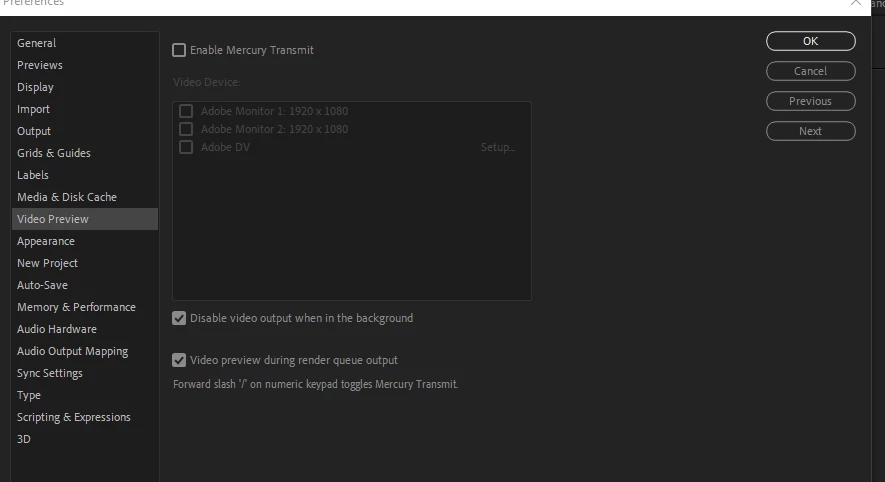
I found people with a similar issue on this forum thread. It suggested uninstalling NDI and then downloading and installing After Effects or Premiere Pro. Then, it suggested redownloading NDI and running the NDI tool for Premiere or AE, which should then make NDI appear in other apps as well. I followed these instructions for AE. When I open the NDI tool for AE, it opens AE, but when I go to Edit>Preferences>Video Preview, I don't see NDI as one of the options (see image below).
The other forum also had someone suggest testing if NDI was working using Test Patterns. I opened Test Patterns and it seemed to work, though I'm not sure if I needed to do anything more than open it.
I'm sure this is probably user error, but I'm just not sure how to problem slove this any further. I poked around on the NDI site to see if there's any way to email them, but I had no luck finding contact info.
If anyone has any suggestions or could just point me in the right direction, I'd be super appreciative. Have a great day!
 AdChoices