Emily LKJ
Known Participant
March 13, 2019
Question

How do I make the body structure when I have all the parts as layers

  • March 13, 2019
  • 14 replies
  • 4911 views

Hi! I just started using Adobe Character Animator today. I have used photoshop for half a year now and I have experimented with animation usually in photoshop but I wanted to try character animator to get a touch at the face and how that program works so I could later on use it on animate or after affects when I want to learn that. I have used a lot of time in photoshop so am well known to the program, but am new to how it works with character animator.

So first off, I manage to get the whole face to work out really fine, both the eyes, brows and mouths all working perfectly.

...

I didn't get the hair to move, I tried but it didn't work out. I used the pen -> had it on form and marked first the "origin" and then the "dangle", but it didn't seem to work sadly. But thats a problem I will look into after I get the body right.

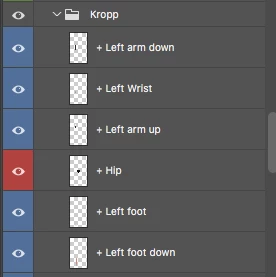
SO this is how my layers are in photoshop:
(kropp means body in Norwegian)

So the foot is a layer, the legg is a layer and so it goes on.

I want to make this fit together and work smooth when I want to animate, but I only find answers for how to do it when you have the arm in one layer instead of 3 like me. (upper arm, down arm and wrist/hand).

So my big question is how can I make the body structure when I have more layers than one?

How can I add movement to each body part so when I moved the arm from I to / every layer will be moved in a smooth way, but I can also manage to make a position out of it?

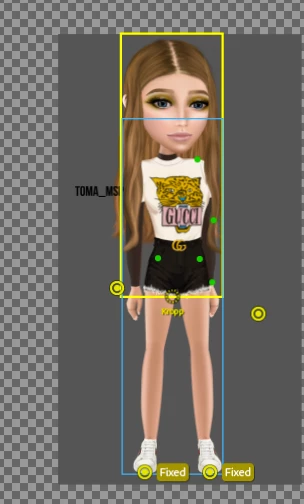
So from this
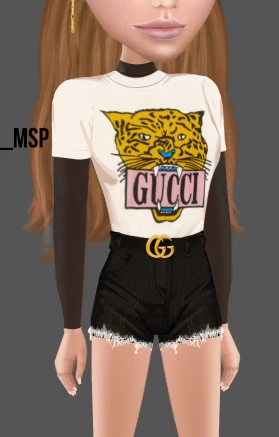
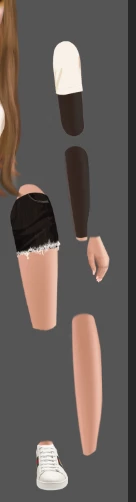
to this but with animation and a structure of how I can do it

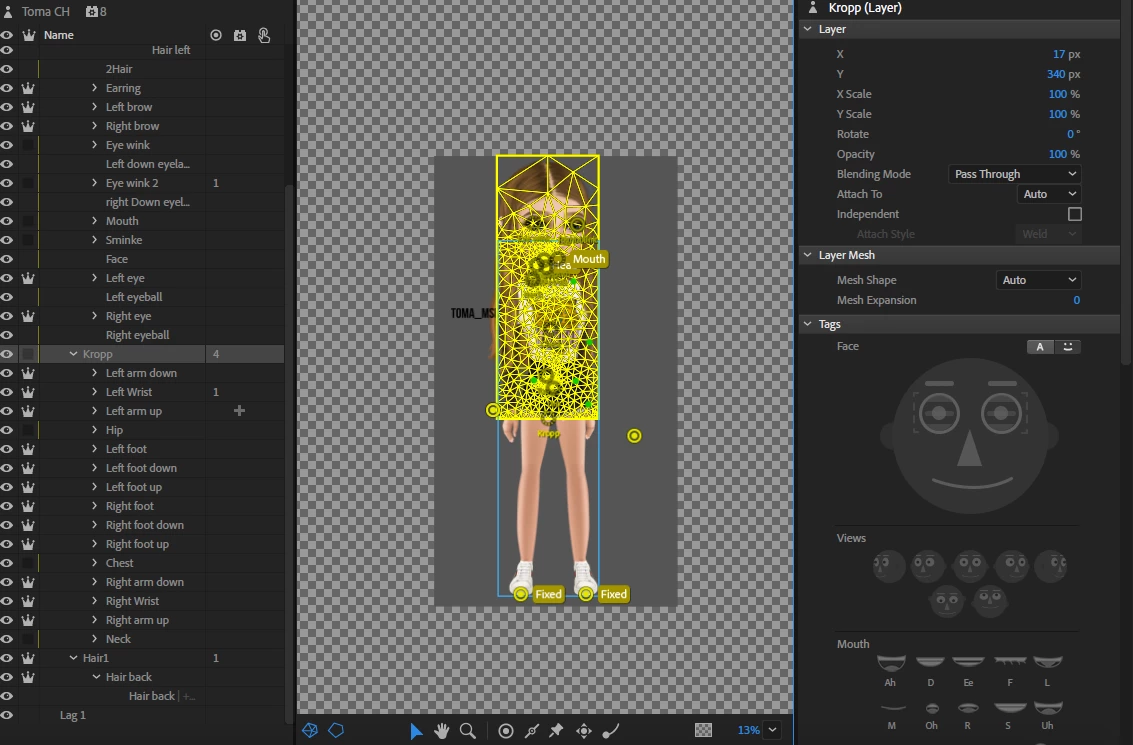
This is how my character animator file looks like:
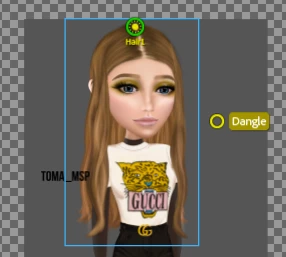
If you don't understand my question please tell me, also thank you very much for helping me I really do appreciate it. I hope you all get a nice day.

- Emily

This topic has been closed for replies.

14 replies

alank99101739
Legend
April 2, 2019

Sorry, the video is behind a login page on Instagram. I don’t have a Facebook account and given their privacy history I am not planning to create one!

AE cannot edit the character. You do all the animation in CH. AE takes the video stream out of CH and can layer it and do other things to it. But not all CH functionality is in AE. For example, you can scale the video, move it around etc in AE. But you cannot move the head in AE and have the hair dangle nicely (I think).

Regarding “draggable sticks” - there are draggers which are a single point that you can move with your mouse and sticks which are lines (not draggable) equivalent to bones in arms and legs to control where bending can occur.

Changing clothes can be done in different ways. One is using swap sets in the one puppet. Personally I create a separate puppet to keep puppet complexity down. Sally With Green Dress, Sally With Polka Dots, Sally with ...  There is a “shared puppet” feature that may be worth reading up on - I have never used it myself.

Emily LKJ
Emily LKJAuthor
Known Participant
April 7, 2019

I can rather take a video from youtube

As you sew her hair moved, and like everything moved really good. So I think am kinda asking you how far can I use character animator? Is there any limits? Can I use a puppet like that and make "movies" out of it? Like making a music video, and making it with the leggs and arms working like that?

Or do i have to sync it with a mother program? Because I would really like to use the head functions but in ae, so If I do m one the head the rest will follow, and then I can control the body by my self, and the movement.

alank99101739
Legend
March 26, 2019

Prem Pro etc cannot edit a puppet. But you can use “dynamic linking” to drag a scene from the Character Animator window over into Premier Pro. As soon as you edit the puppet in CH, it will be visible in PP. But it can be sluggish, depending on your computer and puppet etc. (I don’t do it often personally - I export video clips from CH and import the video file into PP.)

For Sad, you cannot add new emotions to the Face behavior. You have to use a keyboard (or MIDI) trigger. There are two approaches

#1. If you want a single sad face position, add a new swapset above the mouth section of the existing puppet so you can replace the whole mouth group with the sad mouth.

> Head

> >  Gob Swapset

> > > Sad (triggered)

> > > Quizical (triggered)

> > > Mouth (default for swap set)

> > > > Neutral

> > > > Ah

> > > > Smile (built in expression)

So triggering “sad” or other emotions hides the default mouth group (which you make the default for the swapset). Swapsets hide the other triggers in the group - only one visible at a time. Works best if they are siblings.

#2. If you want a sad face while talking, you can redraw all the mouth positions in a sad form. Swapset picks between default Mouth set and Sad Mouth set.

> Head

> > Gob Swapset

> > > Sad Mouth

> > > > Neutral

> > > > Ah

> > > > Smile (a sad smile???)

> > > Default Mouth (default for swapset)

> > > > Neutral

> > > > Ah

> > > > Smile

You might need to add a Face behavior to “Sad Mouth” and “Default Mouth” - I cannot remember. I don’t remember if the Face behavior will control all mouths or just the first one it finds.

Oh, I don’t call it “Mouth Swapset” because it will tag the swapset layer as a Mouth (and its not). So I use “Gob” or other slang, or “Mth Swapset” or similar. Auto tagging looks for the word “Mouth” and will tag that.

Emily LKJ
Emily LKJAuthor
Known Participant
April 2, 2019

Hiiii! I just wanted to say that am still alive, just sick and a lot of school. I will try to use character animator this weekend, because then i have time. And i thought about using the chatacter i have made into after effects. But i dont know how to like... make it move right? Let me rather show you:

So this girl got the face and gravuty to work just as with character animator:

    Mishka     on Instagram: “Her skills  @kadse_buffalo HER YT CHANNEL: Kadse Her Msp name: Lìnn (German msp) NOT MINE!…

so am just wondering what should i do with the body. Should i add dragable sticks, or rather just use the animation system it self in ae? So use the head as normal? so am guessing if i tilt the head the hair would do so in ae (havent tried yet). But if not, i dont know how to use ae animate yet. But if so i will look i to it. But main question if the head tilts with the gravity, what will the body do and how will it move? Should i use character animators build up? Or ae?

I want to have the possibility to change clothing, and then use the gravity and face made in character animator into ae. a lot of programs her hahah.

Also i will answer your message on friday/saturday, when i have time because am not using character animator atm, am using photoshop. So i started to work on a new design (harder puppet, with clothing as layers and not merged to the body) Also im soon finished with it so i will put it into character animator with the same setup as the “easier puppet” with that i hope to be in contact with you, if you wanted to use the puppet i have or not. When thats said, how did the project go?

Emily LKJ
Emily LKJAuthor
Known Participant
March 26, 2019

So i cant edit that message on my phone, and i acsid pressed post, so sorry for the typos lol. Anyway ive working on a new design so i can change clothing without changing the body parts, so i can change the clothing on the puppet easy and nice, i will do that for the eyes and the brows and so on. But also, if i want to make a new mouth lets say sad, because it isnt a “Sad” in the mouth section, will the program see me sad or do i need to customate it. Like to work when i press a button or somehow like that. Also when thats said, i also was wondering if i could put the body in to for instant premier pro or after effects and make animations in there with it, where the puppet will keep the same settings for the hair and movements and so on.

Emily LKJ
Emily LKJAuthor
Known Participant
March 26, 2019

t

Hii!! I just wanted so tell you that am still here, and tjat ive just been a littlebit inactive because ive been sick!! But an better now, and i am also working on a mew design to put into character animatior. Like a body and with cthe clothing as layers instead of merged onto

alank99101739
Legend
March 20, 2019

Quick questions are fine. They are quick to answer.

Yes, adjust the layers in photoshop without changing nesting depth of anything. Just change the order of siblings.

alank99101739
Legend
March 20, 2019

Clearly you should have got mad with the computer earlier!

I have a deadline for my work this week, but after that if of interest to you happy to grab a copy of your puppet and say record a tutorial I can share on YouTube showing what I do to try and get it going (hopefully useful to others as well). You can then follow along at home. The more advanced you get, the harder it is to diagnose problems via screenshots.

Emily LKJ
Emily LKJAuthor
Known Participant
March 20, 2019

I would love to do that, really, I really would love that. Again, thank you for helping me a lot, you have really made me learn this program in a very short amount of time, and fixed all my "newcomer" problems. I really appreciate what you are doing and all the help you are giving me. I love character animator, and photoshop, and I cant wait to go further with all my new knowledge.

I will start saving up my questions until then

alank99101739
Legend
March 18, 2019

On the rear hair group you probably have a single attach point at the origin, so it does not look natural. I suggest trying two pins on rear hair layer on left and right side half way down head. Try . If no good, undo and try a horizontal stick across head half way down head (in hair layer) - maybe move rear hair origin down a bit so the stick goes thru it. I think the pins should work though.

basically you want the rear hair to swing below the head, not from top of head.

Extra groups do not matter - only when you add independence does it matter. So up to you. I normally keep it flat

Moving the body in a recording from left to right the body will follow the head a bit. Beyond that I would look through tutorials on movement. i can answer specific questions but not going to try and repeat the tutorials all here! ;-)

I notice you have a nose tag near the waste. I would remove excess tags.

Next step is is putting a dragger on the wrists and trying to move the hands do record it. That may be trail and error - see what works that you like.

For the lower arms, you can change the order of siblings to change what appears in front of what. If that is not enough can discuss more.

Emily LKJ
Emily LKJAuthor
Known Participant
March 20, 2019

Hiii! I have tried to get the hair to work for days now.

I made the rear / back hair into 14 layers, but if it is inside the folder or not they will follow the head, and they are on the "frontier" group. So I don't know what to do, and its so annoying because they are flying up

Emily LKJ
Emily LKJAuthor
Known Participant
March 20, 2019

so I got mad, and then it started to work

alank99101739
Legend
March 17, 2019

But yes, the reason the body is moving with the head is you made it a child. Parents tend to control children. (And its the mesh hierarchy that matters here, not the layer hierarchy - CH does not show you the mesh hierarchy - you have to work it out in your head by looking at the independence crowns.)

There are a few other gotchas. But get the body structure right first. The Head is somewhat complex. If you do the wrong thing, the head will get pinned to the background by mistake and not move. But get the body structure and rear hair right first, then move on to the next problem.

From my perspective the puppet is getting closer - meshes are looking better, nesting almost right, etc.

Emily LKJ
Emily LKJAuthor
Known Participant
March 18, 2019

So I've done a lot today, after I updated the layers I had to connect all the parts all over, even the faces eye, lips, brows and so on. But I manage to do so.

First question, what should I do with the body layers, hip and waist?

Should I keep it inside the TomaBody group, or should I take it out?

The front hair is moving perfectly. The back rear hair is moving and its has gravity and hangs down. but the second it hangs down It starts to fly up ( I will show you in a video) And the funny thing is that the settings doesn't matter, if its standar the same things happened, if the gravity or strength is on 600 it happened, also when added the handles, it didn't matter where it would still happen, many at the end still happened, few, still, no one, still, just the hanger that the hair hangs on, still happened.

Questions

1. Should I keep it inside the TomaBody group, or should I take it out?

2. What can I do to fix the back hair?

3. Is it possible to get the body to move after my self in the camera?

4. How would you recumbent going forward with "animation" (movement) in the arms and in the leggs to make it look good?
5. If I want the downer arm to be in from of the top arm, but I don't want to ruined my layers who is actually I think good, is it possible to tell CH that "hi I want the picture to be over the arm, but not the mesh/structure/layer"?6. How does my layer and independent section look now?

alank99101739
Legend
March 17, 2019

Once you get the structure right, can move on to the rear hair to make it dangle nicer.

Because it is so wide, it probably has more resistance to bending. You may need to put more dangle handles along the bottom of the rear hair group. You might also need to adjust the stiffness setting by adding a new behavior to the rear hair group to change the default physics settings (you probably need different stiffness for the front and rear hair because of the artwork - you can add behaviors to any layer in the tree so those settings only affect that layer and its children.)

You can play with the physics settings already on the root of the puppet just to see what they do. There is gravity strength, stiffness, stretch etc.

I think it is the stiffness setting making the hair stand out, or lack of dangle handles in the right spot. That takes a bit of trial and error Just playing until it “looks good”.

alank99101739
Legend
March 17, 2019

The top level body structure would be:

* +Toma

* * Head (No +)

* * Body (No +)

* * * Neck

* * Read Hair Group (No +)

So Neck is part of the body artwork, but appears behind the head.

The Head and Body and Rear Hair Group are all part of the root puppet mesh.

With the Frontal layer added,

* +Toma

* * Frontal.  (Ummm - I actually don’t remember whether to make this independent!)

* * * Head (No +)

* * * Body (No +)

* * * * Neck

* * * Read Hair Group (No +)

CH supports walking only for left and right profiles, not frontal. So if you don’t have plans to draw them, don’t bother about the walk behavior.

Emily LKJ
Emily LKJAuthor
Known Participant
March 17, 2019

So I made this

SO in frontal will I have the from hair

In head will I have the face

In body the bodyparts

and in neck the neck

and again rare hair with the hair

How should I do it with the attach to?

Emily LKJ
Emily LKJAuthor
Known Participant
March 17, 2019

So I started to place the things within the folder, where should I place the chest and the hipps?

or

In folders like this

- Body (group)

- - Arm group

- - Chest?

- - Hip?

- - Feet group

- - Feet group

- - Arm group

Well when they layers where like that the face got really messy. It moves like a lot