abdula39029471
Participating Frequently
November 28, 2018
Question

How to add Head Turner behavior to the Head group?

  • November 28, 2018
  • 3 replies
  • 2315 views

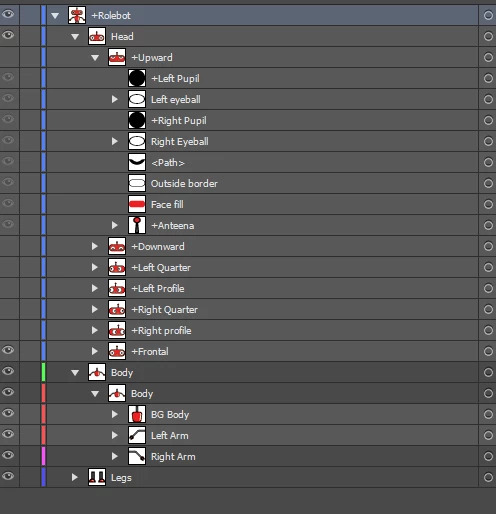
I have added all the 7 sides of face but the head turner behavior is not showing neither it's following my webcam. What should i do?

This topic has been closed for replies.

3 replies

alank99101739
Legend
November 29, 2018

Sorry I was not clear. I did not mean to rename layer in the artwork. I meant to add the “Head Turner” behavior in the rigging panel. It looked like you added “Head Turner” to each of the profiles from the screen shot you provided. I meant remove those behaviors (the lego block icons for Frontal, Upward, Downward etc in Character Animator rigging), and add a single Head Turner behavior to the parent layer of the profiles (which is now called “Head Turner”).

That is, behaviors are not added automatically based on layer name. (Tags are, behaviors are not.) In Character Animator rig mode, you have to click the “+” symbol under the lego icon column next to the “Header Turner” layer you renamed. So I would suggest adding (in CH) a “Header Turner” behavior

abdula39029471
Participating Frequently
November 29, 2018

Thankyou so much. It's working now

abdula39029471
Participating Frequently
November 29, 2018

I have added Head turner to each view but even then its not working. The properties view show as this

alank99101739
Legend
November 29, 2018

Close! Add one head turner one level up, in the Head layer. It picks which child to display.

abdula39029471
Participating Frequently
November 29, 2018

Changed it, but the problem is still there. Head turner tab won't show in the properties tab.

alank99101739
Legend
November 28, 2018

If you look at the Head Turner behavior, what do you see? Here is a sample from another puppet. Do you see "1" next to the profiles? If you expand them, does the path shown make sense?

What could be helpful is a screen shot of the rigging hierarchy in CH, showing where the Head Turner behavior was added. You might also check all the tags are on the layers - the Tags are what CH uses, not the layer names. If the tags are not right that could cause problems.

(Note: Everything you have shown seems sane - just trying to help track down the cause of the problem.)

abdula39029471
Participating Frequently
November 29, 2018

The heaing "Head Turner Behaviour" is not showing in the properties panel. How can i make it appear?