

How to key trigger a different mouth (i.e. smile, laugh, frown)
Searching for the answers in the forums really isn't efficient because people tend to phrase their questions in vague terms, so even if the answer is out there, it's extremely hard to find and more often than not, it's hard to understand. So when I figure out a way to do a task or fix a problem, I'm going to post a "how to". I learn best with visuals, so the more screenshots, the better. Help out the community and add one or two of your own!
This one was driving me crazy and I couldn't find a clear answer that worked. When recording the "Face", the smile would flash when I didn't want it to and wouldn't show up when I did want it to. So put a trigger on it, right? Not that simple. There's a whole hierarchy of layers and naming items properly (another "How To" for another time) that's hard to understand for dummies like me. What I finally figured out, thanks to trying some things that alank99101739 described, is that you have to put the Mouth viseme group inside of another group (or layer) in your PSD or AI file and name it something other than "mouth". I named mine "Laugh group".
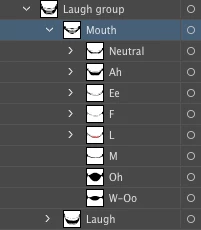
I put the Mouth layer on top of the Laugh so that I could make a swap set out of the Laugh Group wherein "Mouth" would be the default layer and I could trigger the Laugh with a key (L). Notice I got rid of the Smile viseme--I never want it activated by my face when recording from the webcam--but I imagine you could do both?
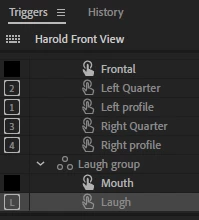
I also wanted the Laugh to trigger when he turns his head. Haven't been able to find a way to do it another way, so I just made four more swap sets (after creating four more Laugh groups in each head turn in AI). Seems like you ought to be able to just have one swap set that works for the Laugh triggers in all the views--anyone know if is this possible?
Next I checked to make sure it would work after recording the audio with visemes. Woo hoo! It works!
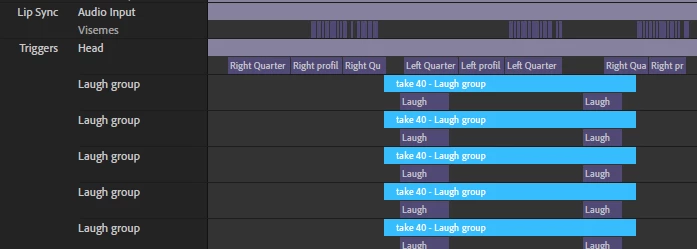
Screen shot of all the tracks that got recorded from having multiple swap sets. Seems excessive.
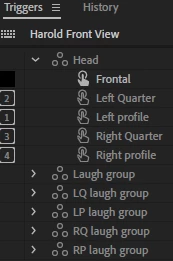
Having all the Laugh groups named the same was confusing, so I went back into AI and renamed each head profile's Laugh group:
Bonus tip: just record a couple seconds of the triggered action, then use the Split function to make multiple instances on the same track.
I didn't try it, but I imagine adding other mouth shapes like a frown or grimace would simply go inside the same group.
If anybody out there has an easier way to do this or if has a better idea for how to index answers to basic questions, make it happen! In the meantime, hopefully this helps!
 AdChoices