
Question
Layers in CH moved from position in Illustrator
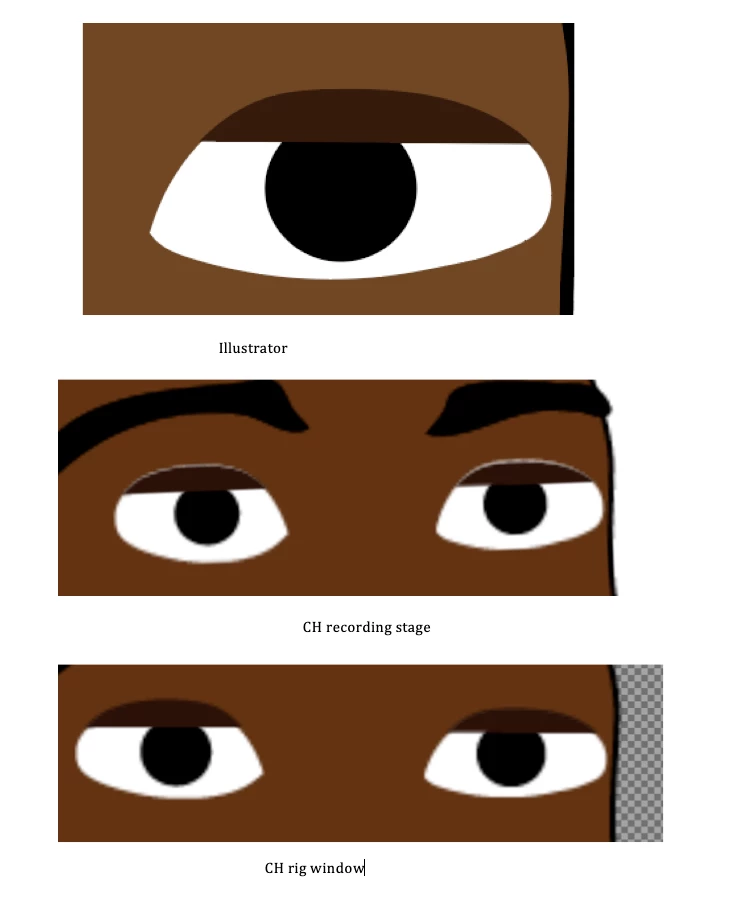
This issues has happened before. A layer appears differently (moved) on the CH stage, but appears to be in the correct position in AI and in CH rig window. Changing the position in CH rig window does not move where the layer is rendered in CH stage.
You'll see the gap between the eyelid and rest of eye in the CH recording stage image. This persists with vector rendering on or off and at all resolutions. Also tried moving the lid layer in AI to a newly created layer as this has helped before. No luck.
Image shows it best:
 AdChoices