

ameliarrw
Participant
February 13, 2021
Answered

Need head and body to move with legs

  • February 13, 2021
  • 3 replies
  • 649 views

I have a puppet that I want to do a "squat" action. I'm not sure if I've rigged it incorrectly, but currently I've only managed to animate the legs "squatting" with the head and body staying static. How can I make the head/body move with the legs without keyframing the actual position of the character?

For a bit more context, the character isn't human and so the anatomy is a bit complicated, which is easily where I could have gone wrong.
This topic has been closed for replies.
Correct answer k_oshiro

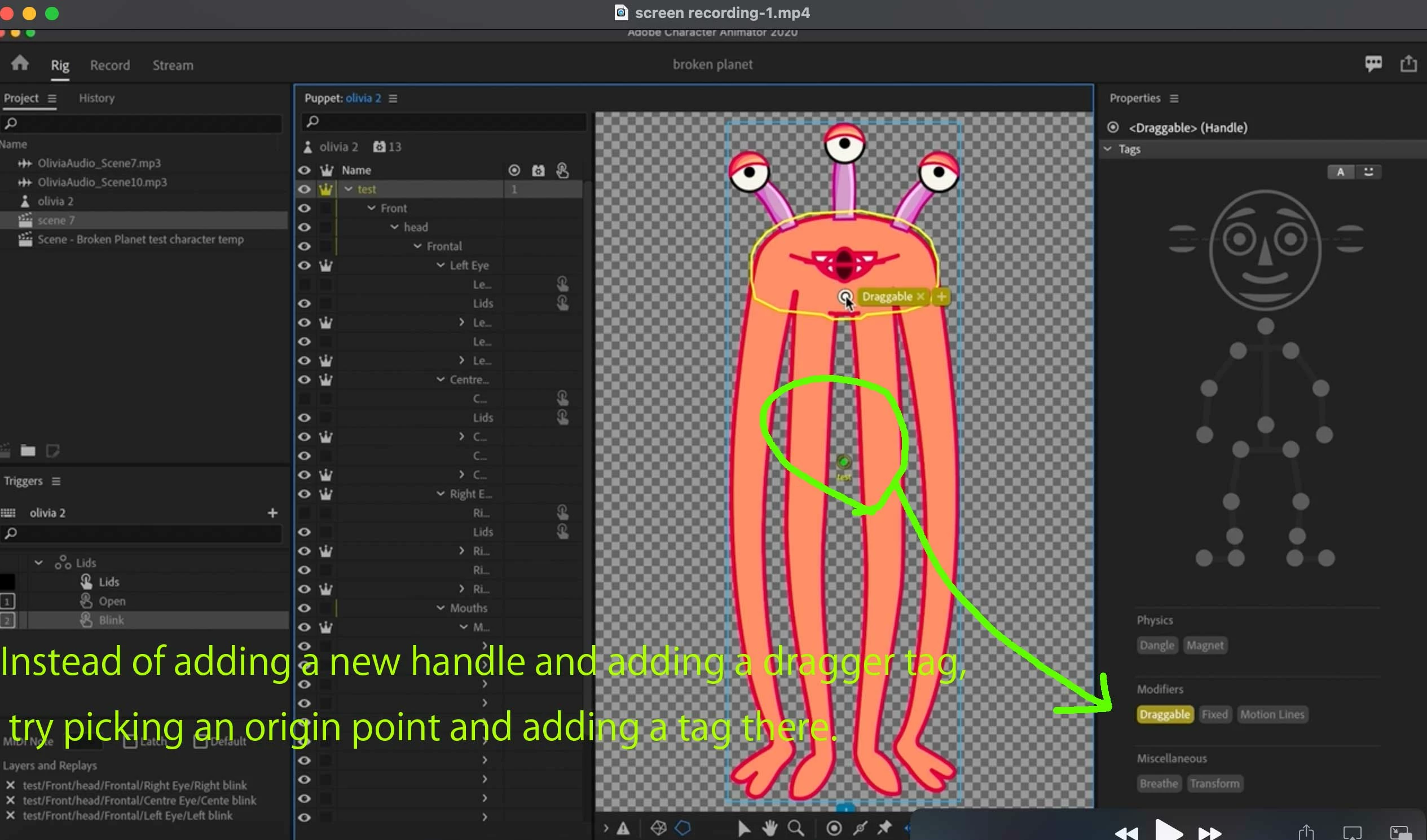
Instead of adding a new handle and adding a drag tag, try selecting the origin and adding a tag there.
If that doesn't work, export your puppet and share it on Dropbox or Google Drive.
If you take a closer look, you may find the cause.
Thank you .

3 replies

ameliarrw
ameliarrwAuthor
Participant
February 15, 2021

That did it! Thank you so much for the help 🙂

k_oshiro
Community Expert
k_oshiroCommunity ExpertCorrect answer
Community Expert
February 15, 2021

Instead of adding a new handle and adding a drag tag, try selecting the origin and adding a tag there.
If that doesn't work, export your puppet and share it on Dropbox or Google Drive.
If you take a closer look, you may find the cause.
Thank you .

k_oshiro(AdobeCommunityExpert)
k_oshiro
Community Expert
Community Expert
February 15, 2021

I'm not very good at English so I'm afraid I'm not understanding your question correctly.

Add a dragger behavior around the waist of the main layer.
Drag the waist of the puppet in record mode or stream mode.
You can make the puppet squat without hitting keyframes.


However, if your puppet is not a human puppet, it may not work the same way.

I've uploaded a sample puppet to Dropbox.
https://www.dropbox.com/s/4pep7vw75hppvqa/dragger_sample.puppet?dl=0

I've uploaded an instructional video to YouTube, in Japanese.

https://youtu.be/U72g4W4MYl8

Thank you.

k_oshiro(AdobeCommunityExpert)
ameliarrw
ameliarrwAuthor
Participant
February 15, 2021

Hi,

No worries, your English is great! This definitely makes sense, but I think I have something set up incorrectly in my puppet. I've attached a screen recording of the issue if you're able to help in any way? I didn't set up the original rig, so I don't fully understand everything on the puppet, I'm afraid - it might be something really obvious!