
Inspiring
February 20, 2021
Answered

Puppet mouth disappearing during frames and long syllables

  • February 20, 2021
  • 1 reply
  • 746 views

Hi,

It's strange, prior to 3.5 version of CA I didn't have this problem I think. So you know when you stretch the word you're using for emphasis or something ("John, nooooooo!")? During these syllables the mouth of the puppets disappear after one frame or so and the audio keeps playing. After the long syllable ends, the mouth is back to normal. Is there any way to fix this? I tried messing around with the cycle layers behavior and whatnot but to no avail. I even tried to mess with the lip movements on the timeline but it's still the same...
This topic has been closed for replies.
Correct answer CoSA_DaveS

Do you have Cycle Layers on that mouth shape? If so, is Hold on Last Layer enabled?


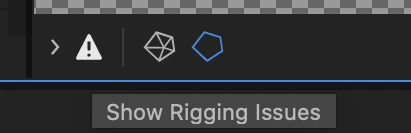
BTW, the Rigging Issues section (enabled by the triangular button in the lower left corner) of the Puppet panel will warn you about problems like these:


1 reply

k_oshiro
Community Expert
Community Expert
February 21, 2021

I'm not very good at English, so I may not understand your question exactly.


If you want to adjust the shape of your puppet's mouth to match the sound.
Drag the mouth shape element on the timeline to match the waveform of the sound.

https://youtu.be/kz5hSrHBYQ4

ThankYou.

k_oshiro(AdobeCommunityExpert)
Inspiring
February 22, 2021

It's not quite that... What I want is, for example, someone screaming and have the mouth there the whole time, until the audio stops. What I'm getting is the scream starts and the mouth shape is there for one frame but then turns invisible. I have tried to do what the video showed me and it doesn't work. It should, but it doesn't. Also, even if it worked, I have so many audio files and about 12 puppets, so doing that for each and everyone of them is impossible for me.

CoSA_DaveS
Adobe Employee
CoSA_DaveSCorrect answer
Adobe Employee
February 23, 2021

Do you have Cycle Layers on that mouth shape? If so, is Hold on Last Layer enabled?


BTW, the Rigging Issues section (enabled by the triangular button in the lower left corner) of the Puppet panel will warn you about problems like these: