Hi shooterstache, I had a chance to look at your puppet and I believe that I know what's up with the issues you are facing. Your mouth swap sets are not responding because they are in the same group as the lip synch mouths. Because there is no viseme for "mad" or "sad" CH doesn't know when to display those mouth shapes automatically. Good news is, simply move those "triggered" mouth shapes to their own separate group above the mouth group in your puppet file, and they should work the way you have them set in your swap set. Remember, swap sets can take advantage of triggers from multiple groups at once.
Next your eyebrows - they are not responding because of the way they are tagged. You have alternate eyebrow shapes in the groups "r eye brow" and "l eye brow" which seems to be set up for a swap set. Unfortunately CH seems to have auto tagged these groups with the "l" and "r" viseme tags instead of eyebrow tags...
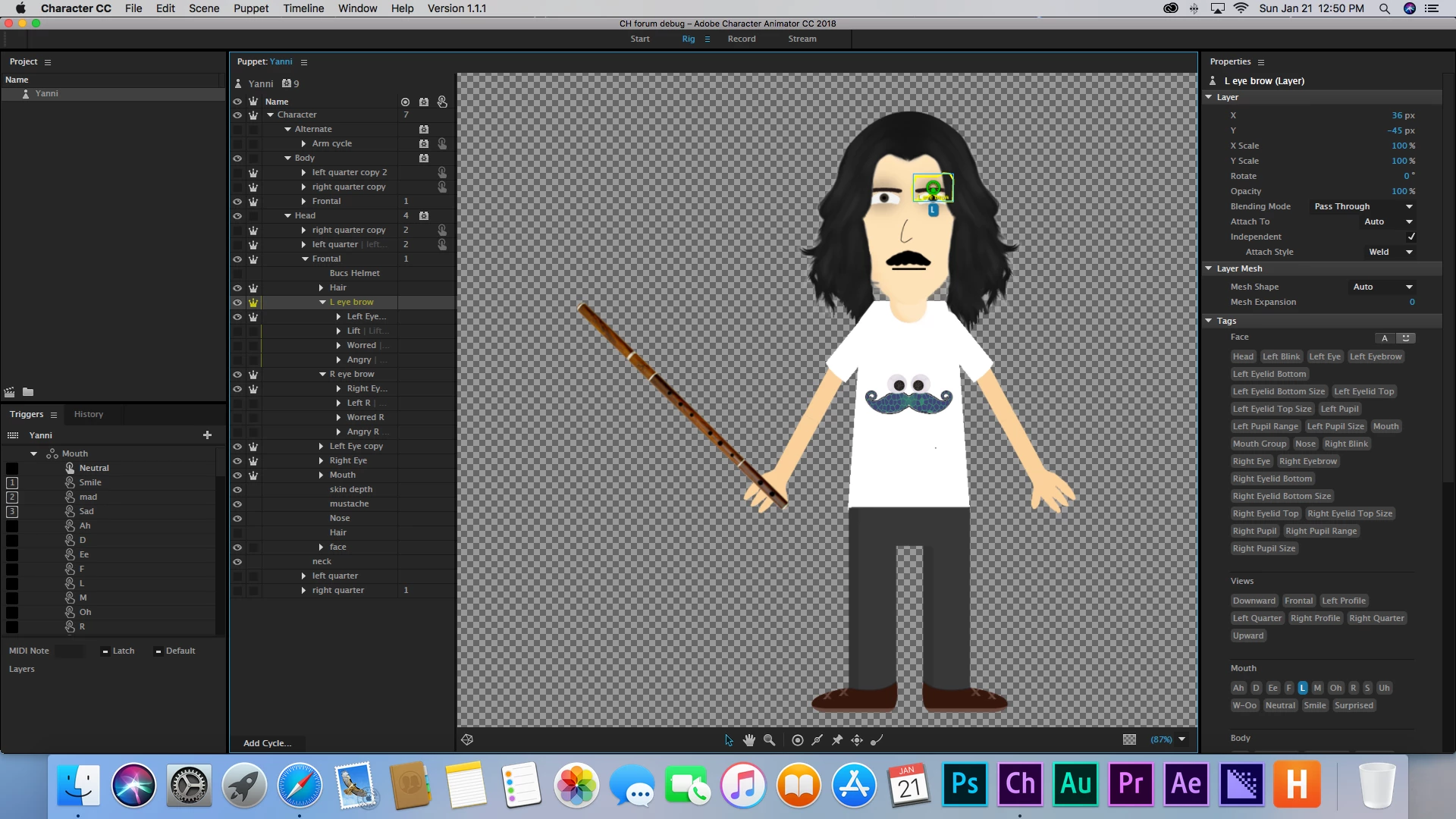
Go back and remove the "r" and "l" tags on your eyebrow groups, and also you might want to add the eyebrow tags to your alternate eyebrow shapes, if you want them to also respond to the face behavior when they are triggered. You can adjust the sensitivity of the eyebrow movement in the Face Behavior parameters.
That should solve the issues you are having, but I'd like to also make a couple quick observations of your puppet's rigging. You have it set up with a swap set that blinks the eye for each eye for each angle of the head turn. That's a lot of extra work. The beauty of the Swap Set function is that it will do that work within one rig. So you can create a swap set that says "eyes" and has two sets within, a neutral "open" artwork, and a triggered "blink" artwork. Then take the corresponding layers from your puppet artwork (each head, frontal and both sides) and drag and drop them into those sets. Because its a simple behavior - like blinking, this will ensure that everything operates identically from view to view. If however you want a different type of blink for each head or something like that, then the way you have it rigged right now allows you a much more intricate level of control. In my experience however, it's just something else that has the ability to confuse the computer about what you intend when you're animating. It's best to consolidate you're triggers and swap-sets and eliminate some of the potential for things to get complicated.
Like when I added those "sad" and "mad" mouths back into the swap set once they were in their own group in the puppet file, it still didn't work at first because I had them in the wrong "mouth" swap set. Just having one mouth swap set will simplify things.
Also, is he supposed to wink his right eye when the flute trigger "f" is pressed? or is that an error? There were a few things (layer independence and fixing his feet to the floor) that I changed when I opened the puppet that I wasn't sure if it was intentional or not. I love this puppet. I got so excited when I first opened him because his shirt is so funny. Once you work out these bugs, I'd love to see you add some functionality to his shirt, like maybe a nutcracker behavior and separate eye gaze behavior, then he could have conversations with his shirt!
Hope all this helps, happy animating!
-AP


 AdChoices