

christineavatar
Legend
April 26, 2019
Question

The eyes cannot stay looking at me.

  • April 26, 2019
  • 9 replies
  • 1325 views

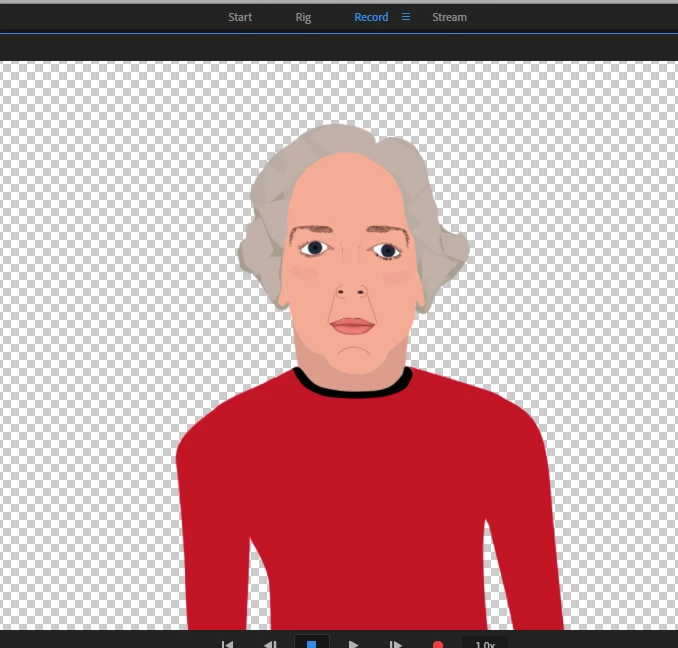
My puppet keeps looking away from the camera for no apparent reason. I have set the eyes up to look around but the right eye has insisted on going WAY off. I have worked most of the afternoon trying to get the eyes to behave. I have had some luck with the left eye but no luck at all with the right. The left eye moves off a little at the same time as the right but it is less extreme.
Can anyone tell me how to fix this?

    This topic has been closed for replies.

    9 replies

    alank99101739
    Legend
    April 30, 2019

    Bizarre! Glad you are making progress though.

    christineavatar
    Legend
    April 29, 2019

    Just for general information:

    I made one last attempt to clear out the eye problem. First, I threw away the entire program but kept 'saved settings' (an option given on the 'throw away' a program) and I kept the settings. That did not work. Then I threw away the program and the settings. Now her eyes no longer look off into the distance while I stare at her. She just stares back.

    So, it seems to have been a glitch in my program's makeup.

    christineavatar
    Legend
    April 28, 2019

    Thanks so much!

    alank99101739
    Legend
    April 28, 2019

    The embedded video was an animated GIF at around 480 wide resolution (not full sized). If short (few seconds), you can export Video, but when Media encoder opens up, change the output format to Animated GIF in Adobe Media Encoding (and reduce the dimensions). Then you have a GIF you can upload to the forums!

    christineavatar
    Legend
    April 28, 2019

    Thank you so much for your help, Alan. I will be able to record something now by having her eyeballs sit still for a minute or two. I still can't figure out why they do that (even with my glasses off). Also, I am curious, how did you put that little bit of 'action' in the prior communique? Life would be easier if I could have done that myself.

    alank99101739
    Legend
    April 28, 2019

    Oh, the pupils were sneaking out around the eye lids too. I was not sure if you wanted to increase eyelid size or wanted to turn clipping on for the pupil. Setting the mouse strength back to 100%...

    I used menu item "Puppet / Create Clipping Mask" on the pupil layer as follows (see the little down arrow)

    And then it behaves better. (I only did one eye here - you would do both of course.)

    alank99101739
    Legend
    April 28, 2019

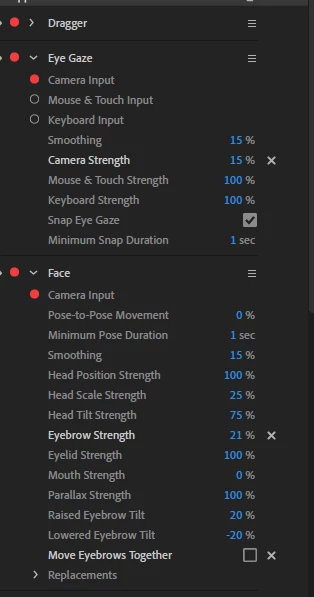
    Suggestion. Turn off the "Camera input" in the "Eye gaze" behavior, turn off draggers etc (just gets in way), then turn on the "Mouse & Touch Input" in eye gaze. Then drag your mouse (with button click down) around in a scene. This should control your eyes. Try turning Snap on/off as well while you drag. I found the eyes went too far for my liking, so I reduced the Camera & Touch strength to 50% (a crude way to reduce the eye range). Using the mouse alone, do things behave well?

    If so, it may simply be you need better lighting (or making sure you are not wearing glasses etc) - the problem may be the webcam is not tracking your eyes reliably. Personally when doing recordings, I use the mouse now because it gives me better control. Snap helps a lot - but I like finer control, and the webcam for me tended to jitter a bit too much even looking straight ahead.

    christineavatar
    Legend
    April 27, 2019

    Well, try though I might, I can't seem to find the problem. Right now, after I worked with the Range, I have gotten both eyes to the same thing at the same time. The only remaining issue has to do with the 'involuntary' movement of the eyes. I have put all kinds of variables into the mix, like eliminating Right/Left Eyeball and resizing and relocating Pupil Range. She improved which gave me hope I was on the right track but I've finally thrown in the towel because I can't think of what else to do to make it change. I have the puppet in DropBox Dropbox - cmachado1.puppet - Simplify your life

    alank99101739
    Legend
    April 26, 2019

    Eyes are tricky. Do the eyes stay in sync? Or do the two eyes normally look together and sometimes apart?

    Two common causes:

    * The lighting is not good on your face in the room you are in And the web cam is failing to track your face correctly. That makes sense if the eyes are staying together always.

    * There is a pupil range concept. If the artwork is not quite right, the pupil range can be too small or has stray pixels which confuses the eye movement software. It can result in an effect I call “crazy eyes”.

    This blog might help. https://extra-ordinary.tv/2018/04/21/debugging-character-animator-eyess/  At the end is some content on crazy eyes, which is my guess is your problem.