Known Participant
May 14, 2017
Question

This is my first puppet and the arms won't move

  • May 14, 2017
  • 1 reply
  • 3449 views

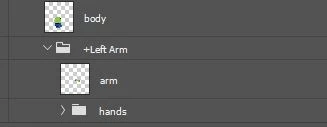
I've run out of ideas to fix my puppets arms. The arms won't move. I put sticks in. I put a draggable handle and the arms just pull the body and distort it.

I used a template puppet to build this puppet.

Thanks. I appreciate the help.

    This topic has been closed for replies.

    1 reply

    KJerryK
    Legend
    May 14, 2017

    Which template did you use?

    Known Participant
    May 14, 2017

    I used Rameriz. I tried him before and his arms worked but this template they do not work.  I have a touch screen laptop and it and the mouse don't work.

    I'm not sure what I should do.

    Thanks.

    oksamurai
    Community Manager
    Community Manager
    May 15, 2017

    Yes, it distorts like the photo you put up.

    I can see the tags are not probably placed so I'm trying to move the tags but they won't move.

    I saw Dave's snowman on his tip video and I can see I need to get the tags right.

    So I'm trying to figure out the tags right now.

    Thanks for checking into this.  I did, get my tie dangling so that was a good.


    For draggable arms, the only tag you really need is "draggable."

    Make sure everything is inside a "Body" group that is inside your "+Character" master folder.

    Make sure you've added a draggable handle on the arm group itself near the hand.

    Make sure the arm is independent and stapled to the body.

    Try setting the attach style to hinge.

    If you do all of these, the body should not get pulled at all - independence means things work/move on their own. I'd also check Chloe from the Start workspace as a good example of this - her arms are pretty simple.