
Participating Frequently
June 15, 2017
Answered

Why is everything transparent?

  • June 15, 2017
  • 2 replies
  • 1131 views

I'm just starting out. I try to do an adobe tutorial. I make my puppet. I import my puppet. ALL the artwork including the background is transparent. Before I've even sent up my arms, legs, etc on my puppet. I know it's going to be a quick, dumb fix but I am super frustrated trying to figure this out on my own. I'm following the tutorial exactly but the presenter doesn't encounter this problem.

Once again, just starting out. No clue what I'm doing. I know my photoshop, illustrator, and a little bit of flash from years ago but literally zero experience with Character Animator.
This topic has been closed for replies.
Correct answer Jeff Almasol
-If you reset the origin on the ruler to be above the upper-left corner of the artwork, does it import within the scene properly?

--- Sorry, I have no clue what this means

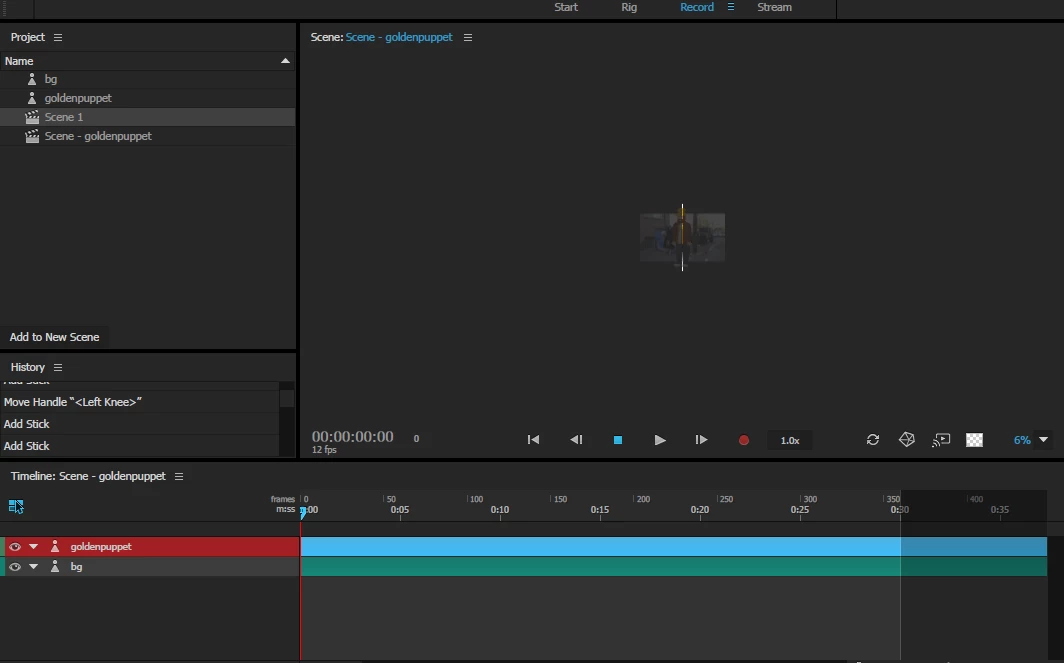
Here's what happens when I zoomed out.


It looks like your scene dimensions might be too narrow? Select the "Scene - goldenpuppet" in the Project panel, then check the Width and Height values in the Properties panel. Is Width too narrow for your content?

2 replies

Participating Frequently
June 16, 2017

Participating Frequently
June 15, 2017

Not that it matters but It is the walking tutorial. And I've made my puppet from scratch.

Jeff Almasol
Adobe Employee
Adobe Employee
June 15, 2017

Just to confirm, it's transparent in both the Puppet panel and Scene panel, or only in the Scene panel?

In the Puppet panel, you see the layer structure on the left side, but no content appears on the right, even if you zoom out?

Can you post some screenshots? Thanks.

Jeff Almasol
Adobe Employee
Adobe Employee
June 15, 2017

Thanks for the reply.

It's just the Scene Panel I believe. The art has somelike like 50% opacity on a gray backing. I must be missing a step somewhere. I'll send screens when I get home from work.


Is this with Illustrator or Photoshop artwork?

If we can get the artwork you're trying to import, that might be faster to diagnose as well. Feel free to send a shared link (via Dropbox, Google Drive, etc.) either here or via direct message.

Thanks.