
Participating Frequently
February 23, 2022
Answered

Zhongli eyes keep squeezing when I use the facial tracking

  • February 23, 2022
  • 1 reply
  • 4420 views

Hi all! I'm having a little trouble getting my Zhongli character profile's eyes to track. When I look to the side, the entire eye appears to squish up or move the head, depending on what I tag as independent. I can DM the files to anyone who can help! 🙂
This topic has been closed for replies.
Correct answer alank99101739

Hmmm - I wonder why there are 2 views. Is there a frontal or something tag on the root layer of your character? Try removing that. If that does not work, can you "export puppet" and share a link to the puppet via Google Drive or similar? (DM if you want to keep it private). Running out of ideas...


Thanks for sharing the puppet. A couple of changes and it should work.

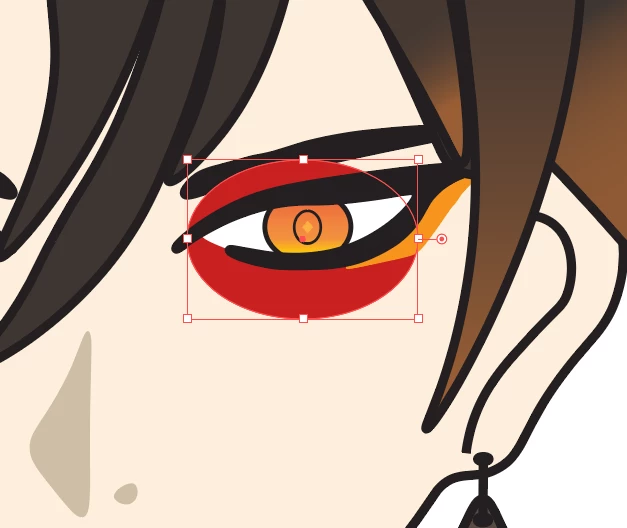
  • Remove the Left Pupil Range tag from the Left Eyeball layer
  • Add the Left Pupil Range tag to the Left Pupil Range layer
  • Replace the Left Pupil Range with a larger object (its too small for the pupil to move) - e.g. I used an oval filled with red and things moved better then (you can hide the layer so its not visible once working to your satisfaction - it will still kick in even when hidden). Should be at least twice the height of the pupil generally.

Worked fine after that. 


1 reply

alank99101739
Legend
February 23, 2022

Can you share a screenshot of the rigging hierarchy with the eyes section expanded? Sounds like you need the eyes and/or pupils to be independent. E.g. the pupils moving if not independent will warp the face.

FluffsAuthor
Participating Frequently
February 23, 2022

Thanks so much for the prompt reply! Here are is the requested screenshot + the appearance of the problem! Thanks so much!

alank99101739
Legend
February 23, 2022

Getting independence right is important for correct behavior. Some suggestions:

  • Make the root of the puppet independent (always) The root layer with the character name.
  • If you have an independent layer with all children independent, its almost certainly wrong. If I see correctly, your Head layer does not have any non-independent children. Normally the face skin would NOT be independent. All the other facial features can then attach to it.
  • Avoid repeating layer names where you can, for specially tagged ones. E.g. Head (independent) has a child called Head (also independent). If CH decides the nested Head is the real head, all sorts of things go wrong. (However, sometimes PSD files include a nested layer with the same name and you have no control. So avoid it where you can.) 
  • I suspect you don't need the eye makeup layers independent. They don't need to move separate to the skin. I don't think it will fix the problem, but may as well clean it up.

I would do a pass over the independent layers and see how much that helps, then share a new rigging hierarchy. Basically if you click on a layer like Head, you should get a yellow outline around the head. If independent, that layer needs to overlap with the parent mesh (for the head, it needs to overlap the body artwork to attach to it). 


The other thing that can help is to turn on the yellow mesh of triangles over the artwork (bottom left corner button in scene window) then move the eyes around. Select the Head layer and see if moving the eyes is distorting the head mesh. It might help identify the source of the problem. E.g. if the pupil is independent, it should be able to move around without distorting the head.


The other thing is to understand the relative layers of face skin to eyes etc, especially with eye lids and blinks. E.g. if the eye pupils are above the skin, then the skin won't crop the pupils. 


Also the eye whites will be defining the pupils range (how far the pupils can move). Not sure how big yours eye. You may need to adjust if pupils are moving too far (or adjust the eye gaze strength settings).


But have a go, then come back again. The above is a first pass, then can dig a bit deeper.